
Screen Recorder - AZ Recorder APK
AZ Screen RecorderVaries with device · Free · Safe · Verified
Share This App
Scan to Download
Scan with Android camera
Screenshots


About Screen Recorder - AZ Recorder
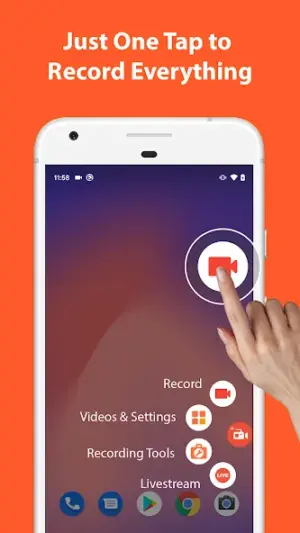
In an era where creating content directly from our devices has become essential, AZ Recorder stands out as a robust screen recording solution. This app combines user-friendliness with versatile functionality, making it an excellent choice for anyone looking to capture their on-screen activity effortlessly.
| App Name | Screen Recorder – AZ Recorder |
|---|---|
| Version | Latest |
| Developer | AZ Screen Recorder |
| Package Name | com.hecorat.screenrecorder.free |
| Category | Video Players |
| Size | Varies with device |
| Downloads | N/A |
| Rating | 4.7 |
| Android Version | Varies |
| Updated | Jul 14, 2026 |
Overview
AZ Recorder, developed by AZ Screen Recorder, is a celebrated application that specializes in seamless screen recording and video capturing. It is hailed for its intuitive design that caters to both novice users and seasoned content creators. With the ability to record high-quality video with audio, it's perfect for tutorials, gameplay, or simply sharing moments captured on your screen.
One of the standout aspects of AZ Recorder is its universal architecture, ensuring compatibility across a wide range of Android devices. This makes it accessible to many users who wish to utilize its features without worrying about device limitations. The app’s lightweight nature means that it doesn’t hog resources or slow down your device while recording.
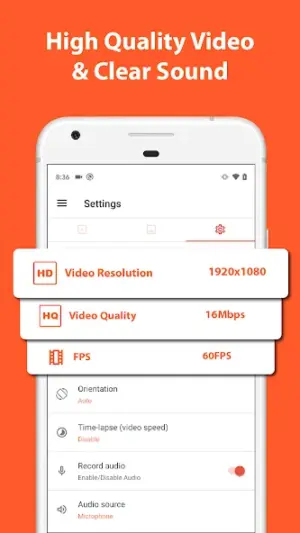
With a user rating of 4.7, AZ Recorder has garnered positive feedback for its simplicity and performance. The interface is clean and straightforward, enabling users to start recording with minimal setup. Features such as customizable resolutions and bit rates further enhance your ability to tailor recordings to fit specific needs.
AZ Recorder also offers some advanced options like overlay features which allow you to add a front camera view while recording the screen; this can be particularly useful for live streaming interactions or walkthroughs. Overall, this app brings together all aspects of screen recording into one comprehensive package designed for everyday use.
Who Is Screen Recorder – AZ Recorder For?
AZ Recorder caters to a broad audience including gamers wanting to record gameplay, educators creating tutorial videos, and individuals wishing to share quick visual instructions or experiences. Its versatility makes it appealing not just to content creators but also to anyone who needs a reliable method of capturing their screens.
Real-World Use Cases
- A gamer documenting their gameplay strategy for YouTube channel content creation.
- A teacher creating instructional videos explaining complex concepts through visual aids.
- A software developer showcasing an app’s functionality through captures during testing phases.
- A social media influencer sharing behind-the-scenes content or product reviews effortlessly.
Features
- High-quality screen recording with audio support
- Easy-to-use interface suitable for all skill levels
- Universal compatibility across multiple Android devices
- Customizable resolution and frame rates
- Overlay feature enabling front camera integration
- No time limits on recordings
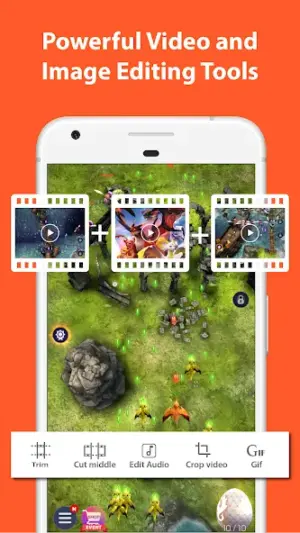
- Options for editing videos post-capture
- Convenient sharing options directly from the app
Performance & Battery
AZ Recorder generally performs well under most conditions thanks to its efficient coding practices that minimize resource consumption during recordings. Users report smooth operation even while multitasking with other apps.
Privacy & Permissions
Privacy-conscious users should note that AZ Recorder does not publicly disclose specific permissions requested upon installation. However, typical permissions likely include storage access for saving recorded files. Employ safe APK habits—downloading from reputable sources—and performing scans ensure your privacy remains intact.
What’s New
Although specific release notes haven't been provided in the latest update from July 14, 2026, users can usually expect regular improvements in stability and performance enhancements in each version. It's advisable to keep your app updated regularly to benefit from these optimizations.
How to Install
- Enable installation from unknown sources: Go to Settings > Security > Unknown Sources and toggle on.
- Download the APK file from a trusted source.
- Before installing, verify the package using checksum tools if available.
- Scan the APK with an antivirus tool as an additional safety measure.
- Install the APK by opening it through your file manager.
- Once installed, revoke unknown apps access if you wish to maintain security after setup.
Pros
- User-friendly interface minimizes learning curves.
- High-quality recordings are ideal for various applications.
- Versatile features cater well beyond standard screen capture needs.
- Regular updates help maintain performance standards.
- Accessibility across various Android devices enhances usability.
Cons
- Lack of detailed permission information raises concerns about privacy.
- No built-in editing tools may limit post-recording modifications.
- Some users might prefer additional advanced features like real-time editing.
Download Screen Recorder – AZ Recorder APK
Download Screen Recorder – AZ Recorder vLatest APK
Free · Safe · Opens Google Play / APK source
Frequently Asked Questions
Is AZ Recorder free?
Yes, AZ Recorder is free to download and use.
Does it require internet access?
No, internet access is not required for basic functionality.
Can I record internal audio?
Yes, AZ Recorder supports internal audio recording depending on device compatibility.
Are recorded videos stored locally?
Yes, recorded videos are saved directly onto your device's internal storage.
What formats does AZ Recorder save video in?
Typically MP4 format is used for saved videos.
[Does it support different resolutions?](https://example.com)
[Yes, users can customize resolution settings according to their preferences.]
Final Thoughts
"When considering downloading apps like AZ Recorder via sideloading methods, it's essential you proceed with caution while following best practices outlined in our installation guide. While this tool provides fantastic opportunities for capturing screen content effectively; personal vigilance regarding digital safety cannot be understated."
Related Apps
More apps coming soon.
Disclaimer
"This review operates independently of any affiliations with developers or related organizations concerning APK Hygiene & Safe Install practices."
All Versions of Screen Recorder - AZ Recorder
Frequently Asked Questions
Yes. Screen Recorder - AZ Recorder is scanned before publishing. Our pipeline verifies each file.
Download the APK, enable 'Install from Unknown Sources' in Settings > Security, then tap the file.
Latest version is Latest.
Requires Android 5.0+.
Yes, completely free.
APKs let you install apps not in your region, use specific versions, or install without Google Play.
Related News Articles

Screen Recorder - AZ Recorder Alternative
Apps similar to Screen Recorder - AZ Recorder that you may also like.


User Reviews
Compatibility Checker
Screen Recorder - AZ Recorder requires Android 5.0+ or higher. Select your device version to check.
Write a Review