Calo: AI Food Calorie Counter APK
Next Vision LimitedVaries with device · Free · Safe · Verified
Share This App
Scan to Download
Scan with Android camera
Screenshots
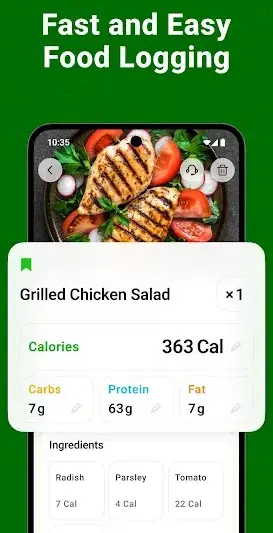
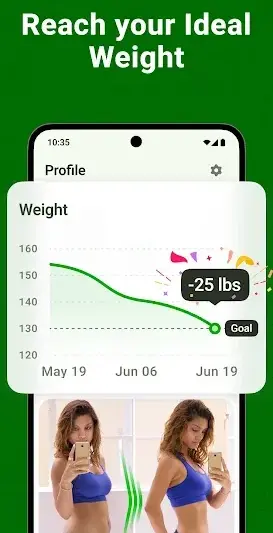
About Calo: AI Food Calorie Counter
In a world where health and fitness take center stage, tracking your calorie intake becomes essential. Calo: AI Food Calorie Counter provides a dynamic solution to help you stay on top of your dietary goals, whether you're at home or on the go.
Related in Health And Fitness: Running App – GPS Run Tracker · Height Increase Workout · GoFasting Intermittent Fasting
| App Name | Calo: AI Food Calorie Counter |
|---|---|
| Version | Latest |
| Developer | Next Vision Limited |
| Package Name | calo.ai.calorie.counter.weight.loss.diet.nutrition.macro.tracker.fasting |
| Category | Health And Fitness |
| Size | Varies with device |
| Downloads | N/A |
| Rating | 4.7 |
| Android Version | Varies |
| Updated | Jul 21, 2026 |
Overview
Calo is a versatile calorie counter designed to empower users in their quest for weight management. This app’s intuitive interface integrates seamlessly into daily routines, making it easy to log meals and monitor nutritional intake without disrupting your day-to-day activities. With advanced AI features, Calo analyzes food choices and suggests healthier alternatives based on personal preferences and dietary needs.
Ideal for anyone looking to enhance their health journey, the app can adapt to various lifestyles. Users can leverage its functionalities during different parts of the day: from logging breakfast nutrition first thing in the morning, keeping track of snacks on a busy work commute, to winding down with an evening meal recap. Its ability to store foods and personalize dietary advice makes maintaining healthy habits easier than ever.
The app's user-friendly design caters not only to seasoned dieters but also beginners seeking guidance in meal planning and caloric awareness. With consistent updates introducing new features, Calo continues evolving alongside its community’s preferences. Ensuring each user finds value throughout their experience is at the forefront of its development strategy.
Who Is Calo: AI Food Calorie Counter For?
Calo is tailored for individuals committed to improving their health through mindful eating practices. Whether you're a busy professional looking to streamline your diet during hectic workdays or someone just starting out with calorie counting, this app offers tools suited for all levels of dieting expertise.
Real-World Use Cases
- Mornings: Use Calo right after waking up to log breakfast options quickly, ensuring you start your day with healthy choices.
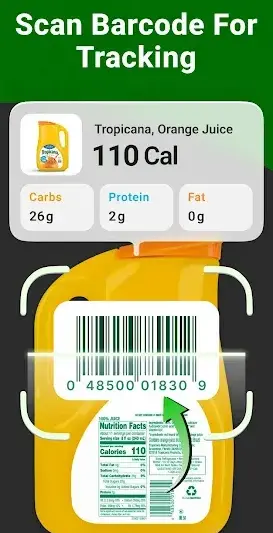
- Your Commute: While traveling to work, utilize downtime by scanning packaged snacks or meals directly through Calo’s AI scanner.
- Lunchtime: Access stored favorites or explore new healthy recipes tailored by Calo when deciding what lunch options fit within your caloric goals.
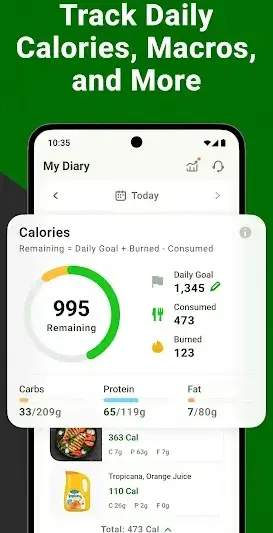
- Evening Routine: At day’s end, review your daily intake with visual trackers that highlight successes and areas needing improvement.
Features
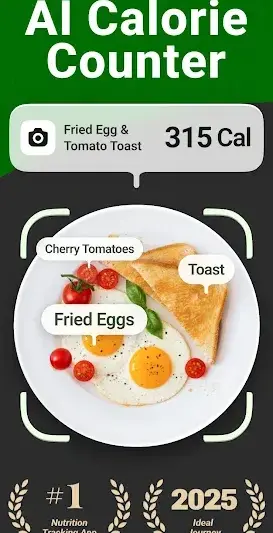
- AI-driven food recognition for seamless entry
- Personalized macro tracking based on user goals
- Comprehensive database of food items including restaurant menus
- Intuitive meal planner that simplifies daily dietary choices
- Visual progress trackers to motivate users
- Customizable notifications for meal reminders
- Integration with fitness apps for a holistic view of health
- Support for intermittent fasting practices
Performance & Battery
Users report that Calo operates smoothly across various Android devices without significant lag or performance issues. The app efficiently processes scanned entries in real-time due to its robust architecture that adapts according to device specifications.
Privacy & Permissions
While specific permissions requested by the app are not disclosed, general best practices suggest that users should be cautious about permissions granted during installation. Always ensure that apps are downloaded from reliable sources like the Google Play Store to safeguard personal information.
What’s New
The latest update introduces refinements to the food scanning feature using AI technology, enhancing accuracy when logging meals. Additionally, improvements have been made to the user interface for faster navigation and better accessibility across devices.
How to Install
- Open the Google Play Store on your Android device.
- Search for ‘Calo: AI Food Calorie Counter’ in the search bar.
- Select the app from the results list.
- Tap ‘Install’ to download and install the application.
- Once installed, open Calo from your application drawer.
- Create an account or log in if you already have one.
- Begin exploring features that cater specifically to your dietary needs!
Pros
- User-friendly interface ideal for all ages
- Advanced AI features enhance usability
- Comprehensive food database improves logging accuracy
- Visual progress monitoring motivates consistent habits
- Customizable settings allow personalized experiences
- Integration capability with other fitness apps
Cons
- Some users may experience bugs requiring frequent updates
- Limited offline functionalities could hinder usage in areas without internet
- Absence of specific diet plans may leave some beginners needing more guidance
- Occasional inaccuracies in food recognition require manual corrections
Download Calo: AI Food Calorie Counter APK
Download Calo: AI Food Calorie Counter vLatest APK
Free · Safe · Opens Google Play / APK source
Frequently Asked Questions
Is Calo free?
Yes, Calo is available as a free download with access to core features.
Can I use it offline?
Certain functionalities require internet access; however, basic meal logging may be available offline.
Does it support multiple diets?
Calo allows customization for various dietary preferences like keto or vegan.
How does it track my progress?
The app provides visual graphs and data summaries reflecting caloric intake versus goals.
Is my data safe?
As long as you download from reputable sources like Google Play Store, precautions are typically taken regarding user data safety.
What type of support does it offer?
Calo offers email support along with an FAQ section within the app for common questions.
Final Thoughts
Calo: AI Food Calorie Counter stands out as an indispensable tool for anyone serious about transforming their relationship with food. Its thoughtful design ensures users can easily integrate healthy habits into every facet of their daily lives.
Related Apps
More apps coming soon.
Disclaimer
*AndroidKnight is not affiliated with Next Vision Limited and assumes no responsibility regarding APK stability or functionality.
All Versions of Calo: AI Food Calorie Counter
Frequently Asked Questions
Yes. Calo: AI Food Calorie Counter is scanned before publishing. Our pipeline verifies each file.
Download the APK, enable 'Install from Unknown Sources' in Settings > Security, then tap the file.
Latest version is Latest.
Requires Android 5.0+.
Yes, completely free.
APKs let you install apps not in your region, use specific versions, or install without Google Play.
Related News Articles

Calo: AI Food Calorie Counter Alternative
Apps similar to Calo: AI Food Calorie Counter that you may also like.


User Reviews
Compatibility Checker
Calo: AI Food Calorie Counter requires Android 5.0+ or higher. Select your device version to check.
Write a Review