Google Translate APK
Google LLCVaries with device · Free · Safe · Verified
Share This App
Scan to Download
Scan with Android camera
Screenshots
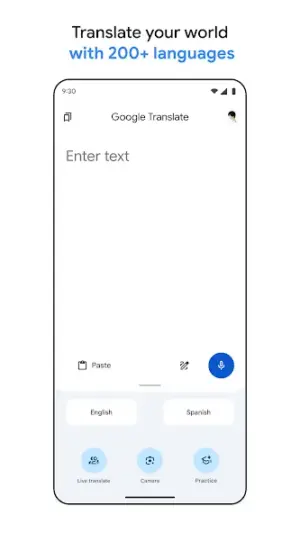
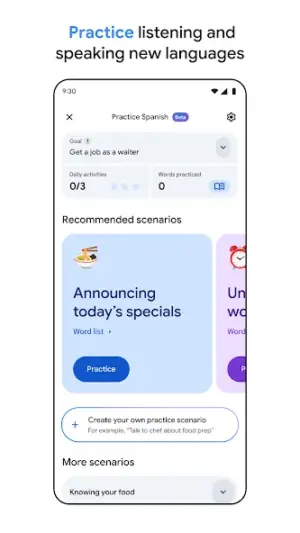
About Google Translate
Google Translate is a tool that transcends language barriers, and with its advanced features, it offers a treasure trove of functionality for the savvy Android user. When used to its full potential, this app becomes more than just a translator—it evolves into a powerful assistant in global communication.
Related in Tools: NordVPN – fast VPN for privacy · Gboard – the Google Keyboard
| App Name | Google Translate |
|---|---|
| Version | Latest |
| Developer | Google LLC |
| Package Name | com.google.android.apps.translate |
| Category | Tools |
| Size | Varies with device |
| Downloads | N/A |
| Rating | 4.3 |
| Android Version | Varies |
| Updated | Jul 25, 2026 |
Overview
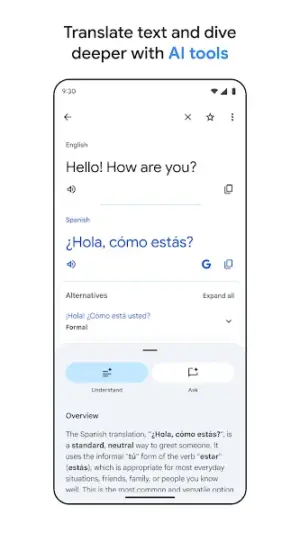
At its core, Google Translate facilitates real-time communication across cultures by supporting over 100 languages. Its intuitive interface might appear simple at first glance, but dig deeper and you'll uncover an array of sophisticated options that appeal to power users seeking efficiency. This universal app isn't just built for casual travelers; it’s optimized for anyone who deals regularly with foreign languages—be it in business, education, or social settings.
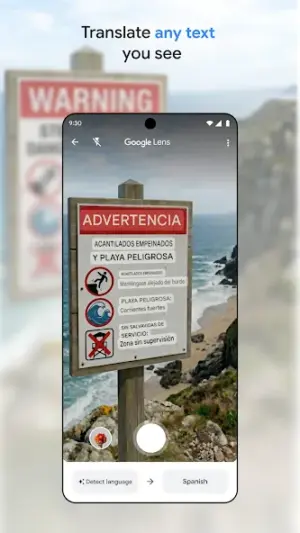
The most impressive feature is undoubtedly the instant camera translation capability, which allows users to point their device's camera at any textual content and see translations in real-time on their screen. This can dramatically enhance productivity for those working with documents in foreign languages or navigating signs while traveling.
Moreover, Google Translate's ability to save phrases and utilize offline translations makes it invaluable for frequent travelers in areas with limited internet access. The smart translation algorithms continuously improve accuracy through machine learning, providing results that are surprisingly context-aware.
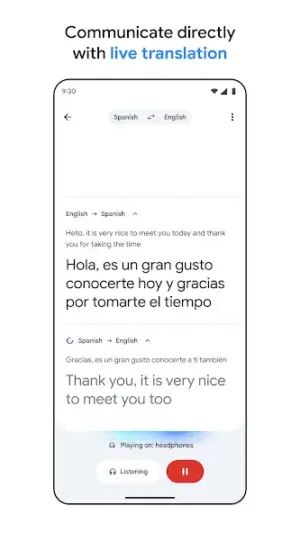
For advanced workflows, the app supports speech recognition for voice input and can read translations aloud. This is particularly beneficial for language learners looking to perfect pronunciation or professionals needing quick verbal translations without typing them out manually.
Lastly, the integration with Android’s multitasking capabilities—like split-screen mode—offers an efficient way to reference translations alongside other apps, creating seamless workflows whether you’re writing correspondence or conducting research.
Who Is Google Translate For?
Google Translate is essential for anyone who frequently encounters multiple languages—students studying foreign languages, business professionals interacting with international clients, or travelers exploring new cultures. Its versatility ensures that whatever your need is—whether casual or demanding—this app delivers.
Real-World Use Cases
- Easily translate menus while dining abroad in a foreign restaurant without needing a server’s help.
- Help students quickly understand foreign literature or academic papers by translating excerpts accurately on-the-fly.
- Simplify communication in work environments where team members speak different native languages during meetings by utilizing instant translations of discussions.
< li>Create multilingual social media posts effortlessly by translating content directly within the app before posting online.
Features
- Over 100 languages supported for text translation.
- Real-time camera translation translates text instantly through your camera.
- Voice input allows hands-free usage for convenient translation tasks.
- Offline translation capabilities when downloaded locally for specific languages.
- Phrasebook feature saves frequently used sentences for quick access.
- Integration with other apps enables easy sharing of translated text.
- Smart suggestions that fine-tune translations based on user context.
- Speech output provides pronunciation guidance ideal for language learners.
- Text-to-speech functionality lets users hear the translated text spoken aloud.
- User-friendly interface designed for quick navigation and efficient access to features.
Performance & Battery
Google Translate performs seamlessly across various Android devices due to its universal architecture. Users report smooth performance regardless of device specifications thanks to optimized coding by Google. However, complex sentence structures may still result in occasional inaccuracies—a caveat worth noting during critical communications where precise wording matters.
Privacy & Permissions
The app operates under standard tool permissions typical of productivity applications. Google emphasizes user privacy but requires internet connectivity to optimize its machine-learning capabilities effectively. Always ensure you download from reputable sources such as the Play Store and remain aware of permissions being granted during installation.
What’s New
While specific updates were not detailed in the latest changelog on July 25, 2026, users can anticipate continuous improvements as Google leverages AI advancements to enhance translation accuracy and speed. Updates often include refinements to machine learning algorithms responsible for contextual understanding and subtle linguistic nuances.
How to Install
- Open the Google Play Store on your Android device.
- Search for ‘Google Translate’ using the search bar.
- Select the official app by Google LLC from the search results.
- Tap on ‘Install’ to download and install the application onto your device.
- Once installed, open the app from your home screen or app drawer.
- Grant necessary permissions so the app can function optimally (like microphone access).
- If desired, download specific language packs for offline use via settings.
Pros
- Robust multi-language support catering to diverse global audiences.
- Effective real-time camera translation simplifies reading foreign texts.
- Offline capabilities make it usable anywhere without internet reliance.
- Intuitive interface designed for efficiency boosts productivity significantly.
- Integration options streamline workflows across multiple applications.
Cons
- Occasional inaccuracies in complex phrase translations; manual checking recommended.
- Requires an active internet connection unless specific language packs are downloaded beforehand.
- Some advanced features may feel hidden or underutilized without extensive exploration.
Download Google Translate APK
Download Google Translate vLatest APK
Free · Safe · Opens Google Play / APK source
Frequently Asked Questions
Can I use Google Translate offline?
Yes! You can download specific language packs within the app settings for offline use.
Does Google Translate support voice commands?
Absolutely! Users can input text via voice commands simplifying hands-free usage.
How do I save phrases in Google Translate?
"Simply highlight a translated phrase you frequently use and select 'Add to Phrasebook' from the options provided."
"Is there a limit to how much text I can translate?"
"Currently, single inputs can be lengthy (up to several paragraphs), but it's best practice to keep them concise for clarity."
Final Thoughts
Google Translate remains a practical choice in the Tools space. If you need the latest build (Latest) for Android, use the download section below and follow the installation guide.
Related Apps
Disclaimer
AndroidKnight is not affiliated with Google LLC. All trademarks belong to their respective owners. Download and use APKs at your own risk and respect local laws and app licenses.
App Permissions Explained
Google Translate requests 1 permission. Auto-fetched from the Play Store.
All Versions of Google Translate
Frequently Asked Questions
Yes. Google Translate is scanned before publishing. Our pipeline verifies each file.
Download the APK, enable 'Install from Unknown Sources' in Settings > Security, then tap the file.
Latest version is Latest.
Requires Android 5.0+.
Yes, completely free.
APKs let you install apps not in your region, use specific versions, or install without Google Play.
More from Google LLC


Google Translate Alternative
Apps similar to Google Translate that you may also like.


User Reviews
Compatibility Checker
Google Translate requires Android 5.0+ or higher. Select your device version to check.
Write a Review