
My Earthquake Alerts - Map APK
JRustonApps B.V.Varies with device · Free · Safe · Verified
Share This App
Scan to Download
Scan with Android camera
Screenshots
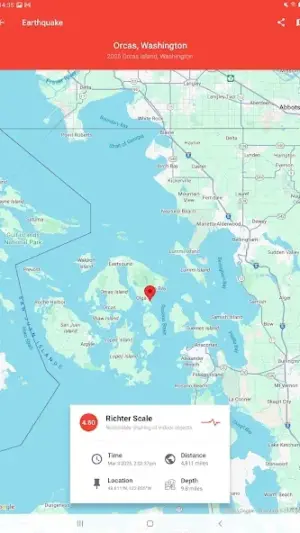
About My Earthquake Alerts - Map
Ready to elevate your monitoring of seismic activity? My Earthquake Alerts – Map combines robust features with a clean interface, making it an essential tool for power users seeking real-time data on earthquake occurrences worldwide. This app transforms how enthusiasts and professionals alike track seismic events with unparalleled precision and speed.
Related in Weather: Yr · Transparent clock and weather · Weather Radar, Live Radar
| App Name | My Earthquake Alerts – Map |
|---|---|
| Version | Latest |
| Developer | JRustonApps B.V. |
| Package Name | com.jrustonapps.myearthquakealerts |
| Category | Weather |
| Size | Varies with device |
| Downloads | N/A |
| Rating | 4.7 |
| Android Version | Varies |
| Updated | Jul 28, 2026 |
Overview
My Earthquake Alerts – Map by JRustonApps B.V. is more than just a notification tool; it's your command center for everything related to earthquakes across the globe. With a blend of advanced alerts and detailed mapping capabilities, it offers insights that can keep you informed about seismic activities in your area or anywhere in the world. Its universal architecture ensures compatibility across various devices, tailoring unique experiences based on device capabilities.
Who Is My Earthquake Alerts – Map For?
This application is tailored for anyone from casual observers to dedicated researchers in geosciences. Power users will particularly appreciate its fine-tuning capabilities—allowing them to tailor alerts based on preferred criteria—while general users can easily keep abreast of significant quakes without overwhelming detail. It's also ideal for those living in seismically active regions who need timely information to ensure safety.
Real-World Use Cases
- A researcher needing consistent updates for academic studies on tectonic movements can set alerts specific to their areas of focus.
- A family in California looking to prepare for potential earthquakes can receive instant notifications about nearby tremors.
- A traveler exploring countries along fault lines will benefit from knowing when seismic events occur during their trips.
- An educator teaching geology can use real-world data from this app as practical examples in classroom discussions.
Features
- Real-time earthquake alerts tailored to your specified locations.
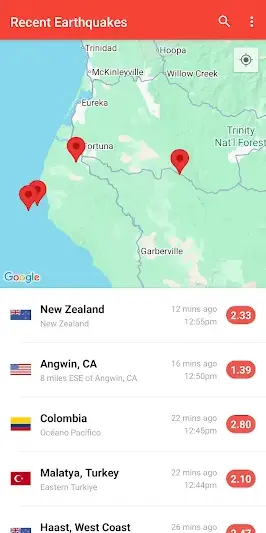
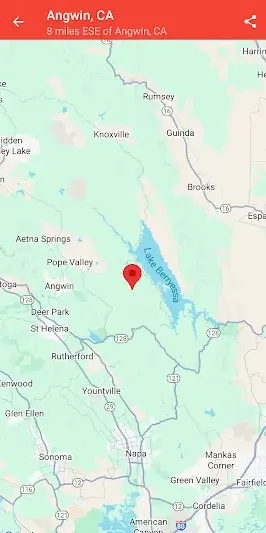
- Interactive maps showcasing affected regions with advanced filtering options.
- Customizable notifications for different magnitude thresholds and areas of interest.
- User-friendly interface designed for quick access to crucial data.
- Intelligent filtering by time frame, allowing you to view recent events easily.
- Offline functionality ensures you remain updated even without internet connectivity.
- Community reporting feature that enhances data accuracy through user contributions.
- Integration with social media platforms for sharing important updates effortlessly.
Performance & Battery
The app's performance significantly benefits from regular optimization updates. Users report a seamless experience while navigating through maps and receiving alerts, highlighting its ability to handle real-time data efficiently without lag. Furthermore, the offline functionality provides peace of mind during emergencies when phone services may falter.
Privacy & Permissions
Given that permissions specifics are not listed, it's essential for users to practice safe APK habits by downloading only from reputable sources like Google Play Store. Ensuring the app remains updated minimizes risks associated with privacy vulnerabilities while maximizing operational safety features.
What’s New
While specific changes were not detailed in the update notes, the latest version likely includes performance optimizations and enhancements aimed at improving user experience. Updates often address bug fixes, ensuring smoother navigation and faster loading times, which are crucial when every second counts during seismic alerts.
How to Install
- Open the Google Play Store on your Android device.
- Search for ‘My Earthquake Alerts – Map’ by JRustonApps B.V.
- Select the app from the search results page.
- Click on ‘Install’ to download it onto your device (size varies based on device).
- Once installed, open the app from your app drawer or home screen.
- Grant any necessary permissions as prompted to enhance functionality.
Pros
- Highly customizable notifications enhance user control over alert sensitivity.
- Intuitive navigation makes complex data easily digestible.
- Offline accessibility allows continued use without cellular service.
- Active community engagement leads to more accurate reports.
- Fast loading times keep critical information at your fingertips.
Cons
- Lacks certain advanced analytical tools found in premium offerings.
- Some regions may experience delayed updates due to network conditions.
- Customization options may feel overwhelming for novice users.
- Absence of detailed historical data limits long-term analysis.
Download My Earthquake Alerts – Map APK
Download My Earthquake Alerts – Map vLatest APK
Free · Safe · Verified APK download
Frequently Asked Questions
How do I customize my alert settings?
Go into the app's settings menu after installation, where you'll find options to set alert thresholds based on magnitude.
Does this app work offline?
Yes! You can access previously loaded information even without an internet connection.
What regions does this app cover?
'My Earthquake Alerts – Map' offers global coverage but allows you to specify local settings.
Can I share alerts on social media?
'Absolutely! The app has built-in sharing options compatible with major platforms.
Are there ads in this version?
'This application is free but does contain ads; however, they should not interfere significantly with usage.'
Final Thoughts
For power users who demand efficiency and precision in monitoring seismic activity, My Earthquake Alerts – Map stands out as an indispensable tool packed with salient features that provide immediate value. Its ability to customize alerts and access real-time data places it ahead of many alternatives—a must-have whether you're preparing for an impending quake or simply curious about global geological trends.
Related Apps
More apps coming soon.
Disclaimer
This review is independent and not affiliated with JRustonApps B.V., nor does it endorse any claims made by third-party sources regarding this APK.
All Versions of My Earthquake Alerts - Map
Frequently Asked Questions
Yes. My Earthquake Alerts - Map is scanned before publishing. Our pipeline verifies each file.
Download the APK, enable 'Install from Unknown Sources' in Settings > Security, then tap the file.
Latest version is Latest.
Requires Android 5.0+.
Yes, completely free.
APKs let you install apps not in your region, use specific versions, or install without Google Play.
Related News Articles

My Earthquake Alerts - Map Alternative
Apps similar to My Earthquake Alerts - Map that you may also like.


User Reviews
Compatibility Checker
My Earthquake Alerts - Map requires Android 5.0+ or higher. Select your device version to check.
Write a Review