
PolyBuzz: Chat with AI Friends APK
CLOUD WHALE INTERACTIVE TECHNOLOGY LLC.Varies with device · Free · Safe · Verified
Share This App
Scan to Download
Scan with Android camera
Screenshots




About PolyBuzz: Chat with AI Friends
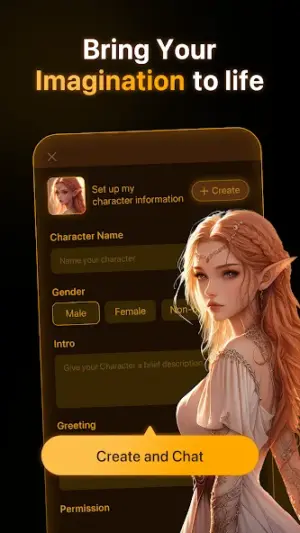
Have you ever wished to seamlessly chat with your favorite anime characters? With PolyBuzz: Chat with AI Friends, that fantasy becomes reality. This innovative app allows users to engage in dynamic conversations and immerse themselves in unique, rizz-filled narratives wherever they are.
Related in Entertainment: MBC Shahid · IMDb: Movies & TV Shows · Talkie: Creative AI Community
| App Name | PolyBuzz: Chat with AI Friends |
|---|---|
| Version | Latest |
| Developer | CLOUD WHALE INTERACTIVE TECHNOLOGY LLC. |
| Package Name | ai.socialapps.speakmaster |
| Category | Entertainment |
| Size | Varies with device |
| Downloads | N/A |
| Rating | 4.2 |
| Android Version | Varies |
| Updated | Jul 28, 2026 |
Overview
PolyBuzz: Chat with AI Friends by CLOUD WHALE INTERACTIVE TECHNOLOGY LLC. transports users into a vibrant realm where artificial intelligence meets the whimsical world of anime. Fueled by universal architecture, this entertainment app is designed to adapt to various Android devices, making it accessible for many users who want to explore interactive storytelling. The latest version brings forth enhancements that promise smoother performance and engaging functionalities.
Who Is PolyBuzz: Chat with AI Friends For?
PolyBuzz is perfect for fans of anime looking for an immersive chat experience and those interested in artificial intelligence interactions. It caters to both casual users wanting entertainment and more dedicated fans eager for engaging storytelling.
Real-World Use Cases
- A casual user wanting to pass time during commutes can initiate fun chats with popular anime characters like never before.
- A creative writer might use PolyBuzz to brainstorm character interactions for their own stories through unique dialogue prompts provided by the AI.
- An avid gamer could enjoy chatting about their favorite series with in-game references enhancing their overall gaming experience.
- A group of friends may use it at gatherings for laughter as they explore playful banter between various characters together.
Features
- Chat with personalized AI versions of beloved anime characters.
- Create and share unique rizz stories tailored to your preferences.
- Universal compatibility ensures accessibility across a wide range of devices.
- Engage in spontaneous and entertaining dialogue anytime, anywhere.
- User-friendly interface designed for seamless interaction.
- Supports various conversation styles and themes.
- Intuitive design making navigation enjoyable for all ages.
- Regular updates aimed at enhancing user experience and story engagement.
Performance & Battery
PolyBuzz has shown solid performance on various devices since its release. Users have reported smooth functionality with only occasional hiccups mainly due to device compatibility variations. Ensuring proper system requirements can help mitigate these issues significantly.
Privacy & Permissions
While specific permissions required by PolyBuzz are not listed, it’s important for users to be cautious when downloading APKs from third-party sources. Always review permissions post-installation to ensure privacy standards align with personal safety habits.
What’s New
The latest update of PolyBuzz focuses on refining the user experience by addressing previous performance issues and optimizing character responses. While specific changelog notes are not provided, users can expect improved reliability during conversations and an overall smoother interaction compared to earlier versions.
How to Install
- Ensure your device is compatible by checking the Android version requirements; PolyBuzz works on varying versions depending on your device’s specifications.
- Visit the trusted source where you intend to download the APK file—ensuring it’s from a secure platform is vital.
- Download the APK file onto your device, making sure there’s enough storage available; if you’re low on space, consider clearing unnecessary files or apps.
- Before installation, enable installations from unknown sources in your device settings under Security or Apps & Notifications menu.
- Locate the downloaded APK file in your File Manager and tap it to begin the installation process.
- If you encounter any errors during installation, verify that your device architecture matches that of the APK (check if it’s ARM or x86).
- Post-installation, if problems persist or if crashes occur upon launch, try uninstalling and then reinstalling the app as a recovery step.
Pros
- Immersive character interactions
- User-friendly interface
- Wide compatibility across devices
- Regular updates enhance performance
- Creative storytelling opportunities
Cons
- Requires ample storage space
- Possible architecture mismatches
- Limited customization options currently
- Absence of detailed permissions listed
Download PolyBuzz: Chat with AI Friends APK
Download PolyBuzz: Chat with AI Friends vLatest APK
Free · Safe · Verified APK download
Frequently Asked Questions
What should I do if I encounter an installation error?
Verify that you have sufficient storage space, check if unknown source installations are enabled, or confirm that your device architecture matches that required by the APK.
How do I clear space if my storage is low?
Consider deleting unused apps or files stored on your device.
Can I reinstall PolyBuzz after uninstalling?
Yes! Uninstalling followed by a fresh install often resolves persistent issues.
What happens if the app crashes upon opening?
Try restarting your device first; if the issue persists, consider reinstalling.
Does PolyBuzz support all Android versions?
PolyBuzz supports varying Android versions but check specifics as they may differ based on your device.
Are regular updates pushed out for improvements?
'Yes! Developers frequently aim to enhance user experience with consistent updates.'
Final Thoughts
'In experiencing thrilling conversations through PolyBuzz: Chat with AI Friends, enthusiasts will find delightful narratives awaiting them at every turn. Should challenges arise during installation or usage, remember this comprehensive guide will empower you to troubleshoot effectively.'
Related Apps
More apps coming soon.
Disclaimer
'This article is intended purely for informational purposes. AndroidKnight is not affiliated with CLOUD WHALE INTERACTIVE TECHNOLOGY LLC., nor does it host the APK itself; any download action lies solely under user's responsibility.'
All Versions of PolyBuzz: Chat with AI Friends
Frequently Asked Questions
Yes. PolyBuzz: Chat with AI Friends is scanned before publishing. Our pipeline verifies each file.
Download the APK, enable 'Install from Unknown Sources' in Settings > Security, then tap the file.
Latest version is Latest.
Requires Android 5.0+.
Yes, completely free.
APKs let you install apps not in your region, use specific versions, or install without Google Play.
Related News Articles


PolyBuzz: Chat with AI Friends Alternative
Apps similar to PolyBuzz: Chat with AI Friends that you may also like.


User Reviews
Compatibility Checker
PolyBuzz: Chat with AI Friends requires Android 5.0+ or higher. Select your device version to check.
Write a Review