
YouCam Makeup: Face Editor APK
Perfect Mobile Corp.Varies with device · Free · Safe · Verified
Share This App
Scan to Download
Scan with Android camera
Screenshots
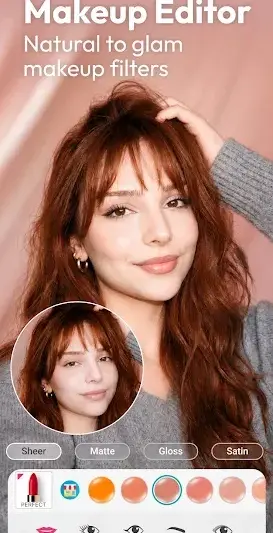
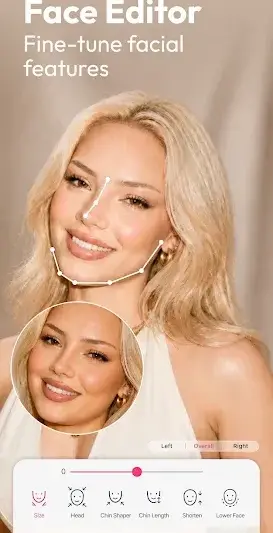
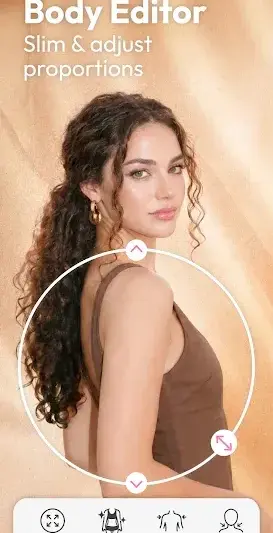
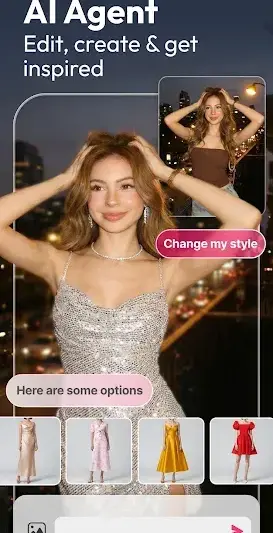
About YouCam Makeup: Face Editor
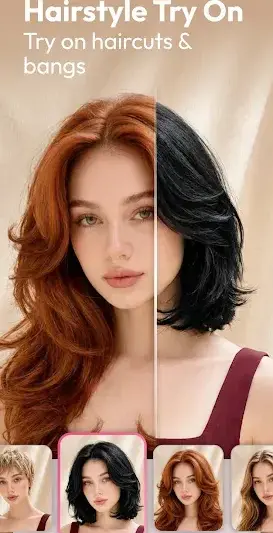
Unleash your creative flair with YouCam Makeup: Face Editor, the ultimate tool to transform your selfies into stunning masterpieces! Perfect for beauty enthusiasts and casual users alike, this app invites you to experiment with an array of makeup styles and hairstyles right from your device.
Related in Photography: Toonapp: Cartoon Photo Editor · VSCO: Photo Editor · Amazon Photos: Photo & Video
| App Name | YouCam Makeup: Face Editor |
|---|---|
| Version | Latest |
| Developer | Perfect Mobile Corp. |
| Package Name | com.cyberlink.youcammakeup |
| Category | Photography |
| Size | Varies with device |
| Downloads | N/A |
| Rating | 4 |
| Android Version | Varies |
| Updated | Jul 21, 2026 |
Overview
YouCam Makeup offers a captivating experience where digital beauty meets endless creativity. The app acts as a personalized beauty studio in your pocket, allowing you to visualize how different hairstyles and makeup products will look on you without ever needing to step foot into a salon or store. With its intuitive interface and user-friendly tools, it makes enhancing your photos both fun and engaging. Whether you're preparing for a special occasion or just wanting to spice up your everyday looks, YouCam Makeup has everything you need to shine.
The all-in-one editor allows users to cleverly combine various elements like lip colors, eye shadows, and blushes, giving you the power to customize every aspect of your look. The facial recognition technology ensures that whatever changes you apply looks natural and suited specifically to your unique features. Plus, social sharing is made seamless—a few taps on the screen can get your new glamorous look shared with friends on all major platforms!
One of the standout aspects of this app is its commitment to keeping things fresh for users. Regular updates infuse new features while improving existing ones based on user feedback. This continuous evolution not only enriches the user experience but also keeps engagement high, providing validation for creative experimentation.
Moreover, YouCam Makeup is more than just a face editor; it's an exhilarating journey into self-discovery. It encourages users to gain confidence in their appearance by trying new looks, fostering an environment where making mistakes is part of the fun—ultimately transforming how we perceive beauty in ourselves and others.
Who Is YouCam Makeup: Face Editor For?
YouCam Makeup is designed for anyone looking to enhance their photographic creations with stylish digital makeovers. This app caters particularly well to those who love experimenting with different aesthetics—from casual use by social media enthusiasts wanting eye-catching posts to professionals who may require polished profiles or marketing materials.
Real-World Use Cases
- You’re preparing for a big night out and want to see how different lipstick shades will look without committing.
- A budding influencer needs engaging content that stands out on their profile feed.
- You enjoy trying new hairstyles virtually before making any cuts or color changes in real life.
- Your friends are planning an event together, and everyone wants an exciting group photo that highlights each individual’s favorite styles!
Features
- Intuitive interface making navigation effortless.
- Real-time makeup application simulation using advanced facial recognition.
- A vast library of trendy hairstyles and virtual makeup options.
- Photo editing tools for face enhancement including skin smoothing and blemish removal.
- Ability to create personalized looks and save them for future reference.
- Social sharing functionalities enable easy posting on social media platforms.
- Augmented reality (AR) technology showcases ultra-realistic application previews.
- Filter options enhance photos further with stylish effects.
Performance & Battery
Users typically experience smooth performance across various devices due to YouCam Makeup's universal architecture designed for optimal compatibility. While device specifications may vary widely, most interactions—including live previews—are responsive with minor lag reported under minimal conditions.
Privacy & Permissions
As specific permission requirements aren't disclosed in-app details at present, it’s advisable for users always to check permissions upon installation. General good practice includes downloading from verified sources only while keeping devices updated regularly to ensure privacy settings correctly safeguard personal information.
What’s New
While specific details about recent changes are not available, it's typical for developers like Perfect Mobile Corp. to include improvements such as enhanced performance capabilities or additional features responding directly to user requests. An updated version often introduces subtle refinements that elevate user experience further while maintaining stability across a variety of devices.
How to Install
- Access Google Play Store on your Android device.
- Search for ‘YouCam Makeup: Face Editor’ in the search bar.
- Select the app from the results list and click ‘Install.’
- Wait for the download process to complete.
- Open the app after installation by tapping on its icon in the app drawer.
Pros
- User-friendly interface perfect for beginners.
- Offers a vast selection of customizable beauty options.
- Real-time AR preview enhances interactivity.
- Regular updates enrich user experience consistently.
- Seamless integration with social media sharing.
Cons
- In-app advertisements may disrupt flow occasionally.
- Some features might be limited unless using premium functions.
- Not all enhancements appeal universally across demographics.
Download YouCam Makeup: Face Editor APK
Download YouCam Makeup: Face Editor vLatest APK
Free · Safe · Opens Google Play / APK source
Frequently Asked Questions
Is YouCam Makeup completely free?
Yes! YouCan Makeup offers numerous features for free while offering optional premium components.
What devices are compatible with this app?
The app supports multiple devices since it is built as a universal application.
Can I use my images directly from my gallery?
Absolutely! Users can easily upload their own images from gallery.
Does it work offline?
Certain basic functionalities can work offline, but real-time features require an internet connection.
Are updates frequent?
Yes! Developers strive regularly updating functionalities based on user feedback.
'How does facial recognition improve my experience?',
Facial recognition enhances realism while applying makeup or hair effects ensuring they fit your unique features.
Final Thoughts
'YouCam Makeup: Face Editor’ merges creativity with practicality in such an engaging way that it revolutionizes how we interact with self-expression through digital enhancements. As you explore its various offerings, you'll undoubtedly find new facets of your beauty just waiting to be discovered!
Related Apps
More apps coming soon.
Disclaimer
'This article is meant solely as an informative review; AndroidKnight holds no affiliation with Perfect Mobile Corp., nor is responsible for APK-related issues.'
All Versions of YouCam Makeup: Face Editor
Frequently Asked Questions
Yes. YouCam Makeup: Face Editor is scanned before publishing. Our pipeline verifies each file.
Download the APK, enable 'Install from Unknown Sources' in Settings > Security, then tap the file.
Latest version is Latest.
Requires Android 5.0+.
Yes, completely free.
APKs let you install apps not in your region, use specific versions, or install without Google Play.
Related News Articles


YouCam Makeup: Face Editor Alternative
Apps similar to YouCam Makeup: Face Editor that you may also like.


User Reviews
Compatibility Checker
YouCam Makeup: Face Editor requires Android 5.0+ or higher. Select your device version to check.
Write a Review