Deezer: Music & Podcast Player APK
Deezer MusicVaries with device · Free · Safe · Verified
Share This App
Scan to Download
Scan with Android camera
Screenshots



About Deezer: Music & Podcast Player
In an era where music streaming is dominated by various platforms, Deezer distinguishes itself with a user-centric design that prioritizes both discovery and personalization. This review delves into the user experience and interface of the Deezer app, examining its onboarding process and everyday usability.
Related in Music And Audio: Boomplay: Music & Live Stream · Groovepad – Music Maker · Offline Music Mp3 Player- Muso
| App Name | Deezer: Music & Podcast Player |
|---|---|
| Version | Latest |
| Developer | Deezer Music |
| Package Name | deezer.android.app |
| Category | Music And Audio |
| Size | Varies with device |
| Downloads | N/A |
| Rating | 4.3 |
| Android Version | Varies |
| Updated | Jul 15, 2026 |
Overview
Deezer: Music & Podcast Player offers an expansive library combining millions of tracks and podcasts, all designed to fit seamlessly into your daily routine. The app's UI is intentionally structured to provide clarity in navigation, allowing users to explore new music or revisit old favorites without unnecessary confusion. Each section of the app is thoughtfully laid out, ensuring that even newcomers can intuitively understand its features at a glance.
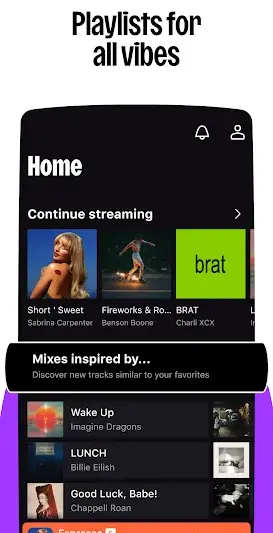
The main screen consists of well-defined sections for playlists, recommended tracks, and curated content tailored specifically for the user. This layout not only enhances user engagement but also helps in effectively managing the vast amount of content available. Accessibility features like voice commands further add to the app’s appeal by making it usable for individuals with varying levels of tech proficiency.
Onboarding within Deezer is designed to encourage exploration from the outset. Upon first launch, users are guided through an introductory tutorial that highlights key functionalities such as playlist creation and offline listening options. This proactive approach ensures that users do not feel overwhelmed by options but instead feel empowered to dive into personalizing their listening experience right away.
As you navigate through different categories such as 'My Music', 'Podcasts', and 'Browse', each tap provides immediate feedback through visual cues or sound effects, reinforcing actions taken within the app. Furthermore, control accessibility remains a priority; buttons and sliders are sized generously enough for ease of use on various devices regardless of screen size.
Overall, Deezer's design successfully marries form with function, providing an enjoyable environment for both casual listeners and audiophiles alike.
Who Is Deezer: Music & Podcast Player For?
Deezer caters primarily to music enthusiasts who appreciate a diverse library spanning numerous genres and eras. It's perfect for casual listeners looking for curated playlists as well as passionate audiophiles wanting deep dives into specific genres or artists.
Real-World Use Cases
- A morning workout playlist filled with high-energy tracks to boost motivation during exercise sessions.
- A relaxing evening spent unwinding with ambient sounds or jazz playlists while reading a book.
- A long commute made enjoyable with favorite podcasts covering topics like true crime or personal development.
- Creating custom playlists for special occasions such as parties or road trips with friends.
Features
- Extensive library with millions of songs and podcasts.
- User-friendly interface designed for easy navigation.
- Personalized recommendations that adapt to listening habits.
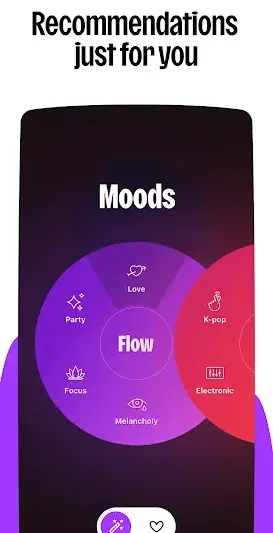
- Create custom playlists based on mood or preference.
- Offline listening capabilities to enjoy music without internet access.
- Curated playlists for seamless discovery of new artists.
- Intuitive controls accessible on all device sizes.
- Dedicated sections for podcasts catering to diverse interests.
- Voice command functionality for hands-free operations.
- Daily mixes that offer fresh tracks tailored for the user.
Performance & Battery
Deezer performs well across devices due largely in part to its lightweight architecture. Users report smooth transitions between screens and minimal buffering during playback even when connected via slower networks. The application's adaptive streaming feature optimizes audio quality based on connection speed which significantly enhances overall performance.
Privacy & Permissions
At this time, specific permissions related to privacy have not been listed; however, users should always recommend downloading apps from trusted sources like Google Play Store while being vigilant about any permissions prompted during installation. Best practices include reviewing what personal data applications access before granting permissions.
What’s New
While specific details about recent updates remain undisclosed, Deezer frequently enhances its platform experience based on user feedback. Regular updates tend to focus on improving performance stability, refining user interface elements, and expanding catalog availability—ensuring users continuously receive top-quality service without disruption.
How to Install
- Open Google Play Store on your Android device.
- Search for ‘Deezer: Music & Podcast Player’.
- Select the app from search results.
- Tap on ‘Install’ to download and install the APK onto your device.
- Once installed, open the app from your home screen or app drawer to start exploring!
Pros
- Vast music library catering to all tastes
- User-friendly interface with clear navigation
- Strong personalized recommendation system
- Offline listening capability
- Regular updates improve functionality
- Engaging design encourages exploration
Cons
- Occasional advertisement interruptions in free version
- Lack of detailed update notes may cause uncertainty
- Some advanced features require a paid subscription
- Limited social sharing options compared to competitors
Download Deezer: Music & Podcast Player APK
Download Deezer: Music & Podcast Player vLatest APK
Free · Safe · Opens Google Play / APK source
Frequently Asked Questions
Is Deezer available offline?
Yes, users can download songs and playlists offline if they have a premium subscription.
What types of music can I find on Deezer?
Deezer has an extensive range including pop, rock, classical, hip-hop, jazz, indie, electronic music among many others.
Can I create my own playlists?
Absolutely! Users can easily create custom playlists by adding their favorite tracks.
Are there ads in the free version?
Yes, free versions include advertisements which can be removed by upgrading to a premium account.
Does Deezer support podcasts?
Yes! In addition to music streaming, users can explore an array of podcasts across various genres.
How often does Deezer update its library?
'Deezer regularly refreshes its library based on emerging trends and user preferences.
Final Thoughts
Deezer: Music & Podcast Player remains a practical choice in the Music And Audio space. If you need the latest build (Latest) for Android, use the download section below and follow the installation guide.
Related Apps
More apps coming soon.
Disclaimer
AndroidKnight is not affiliated with Deezer Music. All trademarks belong to their respective owners. Download and use APKs at your own risk and respect local laws and app licenses.
All Versions of Deezer: Music & Podcast Player
Frequently Asked Questions
Yes. Deezer: Music & Podcast Player is scanned before publishing. Our pipeline verifies each file.
Download the APK, enable 'Install from Unknown Sources' in Settings > Security, then tap the file.
Latest version is Latest.
Requires Android 5.0+.
Yes, completely free.
APKs let you install apps not in your region, use specific versions, or install without Google Play.
Deezer: Music & Podcast Player Alternative
Apps similar to Deezer: Music & Podcast Player that you may also like.


User Reviews
Compatibility Checker
Deezer: Music & Podcast Player requires Android 5.0+ or higher. Select your device version to check.
Write a Review