Pydroid 3 - IDE for Python 3 APK
Lider Soft KZVaries with device · Free · Safe · Verified
Share This App
Scan to Download
Scan with Android camera
Screenshots
About Pydroid 3 - IDE for Python 3
Ready to dive deeper into the world of Python programming? Pydroid 3 – IDE for Python 3 is tailored for advanced users who want to leverage their Android devices as powerful development tools. Unlocking the full potential of this app can elevate your coding game significantly.
Related in Apps: Puzzle Game · Garden Design Makeover · MySivi AI English Speaking App
| App Name | Pydroid 3 – IDE for Python 3 |
|---|---|
| Version | Latest |
| Developer | Lider Soft KZ |
| Package Name | ru.iiec.pydroid3 |
| Category | Apps |
| Size | Varies with device |
| Downloads | N/A |
| Rating | 4.4 |
| Android Version | Varies |
| Updated | May 18, 2026 |
Overview
Pydroid 3 stands out in a crowded market, offering not just a straightforward Python interpreter but a robust Integrated Development Environment (IDE) that transforms your Android device into a versatile coding workstation. Its responsive design ensures that you can write, debug, and execute Python code seamlessly on the go.
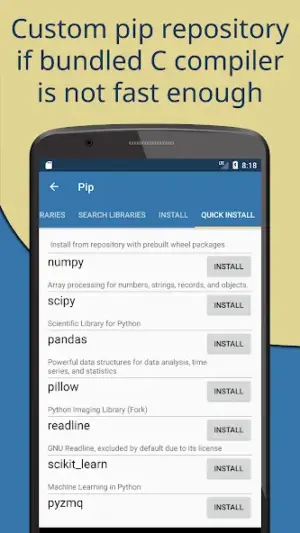
What makes Pydroid 3 particularly appealing is its rich feature set optimized for power users. It includes an extensive library of packages and modules readily available through the built-in package manager. This allows you to import commonly used libraries with ease, saving you time and hassle.
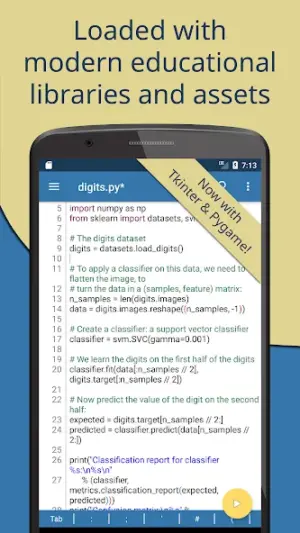
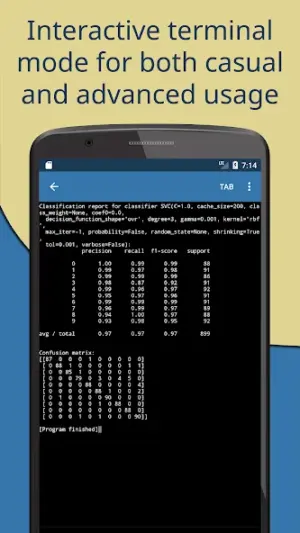
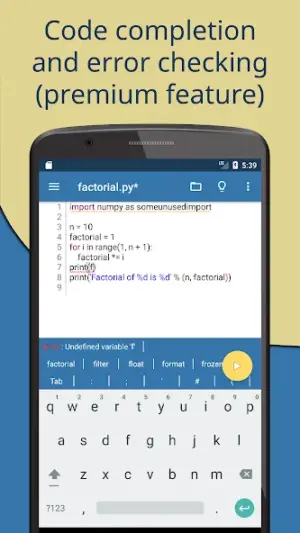
The app boasts an intuitive interface that doesn't shy away from complexity, offering real-time syntax highlighting, code completion, and an interactive terminal—all designed to streamline your workflow. You can also utilize external keyboards for efficient typing shortcuts, making it easier to write extensive code without missing a beat.
For multitaskers, Pydroid 3 supports split-screen functionality on supported devices, enabling seamless reference materials or documentation alongside your coding environment. Such capabilities ensure that distractions remain minimal while productivity spikes.
In a nutshell, Pydroid 3 is more than just an educational tool; it's a powerful ally for experienced coders looking to refine their skills anywhere, anytime.
Who Is Pydroid 3 – IDE for Python 3 For?
Pydroid 3 caters primarily to programmers at all levels seeking flexibility in their development environment. While beginners will benefit from its user-friendly interface and helpful resources, seasoned developers will find valuable tools aimed at boosting efficiency in various coding tasks—making it perfect for those who want more than just basic functionality.
Real-World Use Cases
- Easily run data analysis scripts while commuting using popular libraries like NumPy or Pandas installed directly from PIP.
- Create prototypes of web applications using Flask or Django frameworks while referencing documentation in split-screen mode.
- Experiment with machine learning models using TensorFlow or scikit-learn without needing access to a personal computer.
- Utilize the interactive console feature during lectures or workshops as a live coding tool on-the-go for immediate demonstrations.
Features
- Complete support for Python 3 libraries and packages.
- Built-in pip package manager to install additional libraries effortlessly.
- Real-time syntax checking and error highlighting.
- Interactive Python console integrated within the editor.
- Split-screen mode for multitasking with documents or other apps.
- Customizable themes and fonts for personalized coding environments.
- Offline coding capabilities with no internet dependency required after installation.
- Execution times shown next to outputs to analyze performance quickly.
- Support for external keyboard shortcuts enhancing speed during code editing.
- Easily share scripts via email or social media directly from the app.
Performance & Battery
Users have generally reported smooth interactions when running scripts of varying lengths under typical programming scenarios. The quick response time paired with effective memory management ensures that even demanding tasks do not lead to noticeable lagging or application crashes. For heavy computational tasks, however, resource limitations inherent to mobile devices may require optimizing code efficiency further.
Privacy & Permissions
While specific permissions are not listed within the app details, standard APK safety practices should be observed when installing any application outside of trusted sources. Users are encouraged to check reviews and verify source credibility before downloading apps like Pydroid 3 – ensuring privacy remains intact during usage.
What’s New
The latest updates have focused on enhancing overall stability and improving user experience by refining the IDE's performance metrics. Though detailed changelog notes aren’t provided, users can expect better handling of larger codebases and improved execution speeds with optimized resource use. Minor bug fixes could also enhance functionality across various device architectures.
How to Install
- Open Google Play Store on your Android device.
- Search for ‘Pydroid 3 – IDE for Python 3’.
- Select the app from search results and tap ‘Install’.
- Wait for the download and installation process to complete.
- Open Pydroid 3 from your app drawer once installed.
- If required, update any libraries via the built-in package manager before starting your projects.
Pros
- Comprehensive IDE features tailored for advanced programming.
- Effortless integration of additional libraries via pip.
- Highly responsive interface suitable for extensive projects.
- Supports crucial multitasking features like split-screen mode.
- Customizable workspace catering to individual user preferences.
Cons
- Complexity may overwhelm absolute beginners looking for simplicity.
- Lack of detailed changelog leaves users guessing about improvements.
- Performance might dip on older devices due to increased demands.
- Potential reliance on mobile data when initially installing libraries.
Download Pydroid 3 – IDE for Python 3 APK
Download Pydroid 3 – IDE for Python 3 vLatest APK
Free · Safe · Opens Google Play / APK source
Frequently Asked Questions
Can I use Pydroid 3 offline?
Yes! Once you've installed necessary libraries using pip, you can work offline.
Is there a built-in reference guide?
While not comprehensive, there are helpful resources available within the app.
What packages are supported?
Most popular Python packages can be installed using the built-in pip.
Does it support third-party tutorials?
'Yes', allowing you to follow along easily while coding.
Can I run multiple scripts simultaneously?
'No', you'll need to close one script before opening another.
Final Thoughts
Pydroid 3 – IDE for Python 3 remains a practical choice in the Apps space. If you need the latest build (Latest) for Android, use the download section below and follow the installation guide.
Related Apps
More apps coming soon.
Disclaimer
AndroidKnight is not affiliated with Lider Soft KZ. All trademarks belong to their respective owners. Download and use APKs at your own risk and respect local laws and app licenses.
All Versions of Pydroid 3 - IDE for Python 3
Frequently Asked Questions
Yes. Pydroid 3 - IDE for Python 3 is scanned before publishing. Our pipeline verifies each file.
Download the APK, enable 'Install from Unknown Sources' in Settings > Security, then tap the file.
Latest version is Latest.
Requires Android 5.0+.
Yes, completely free.
APKs let you install apps not in your region, use specific versions, or install without Google Play.
Pydroid 3 - IDE for Python 3 Alternative
Apps similar to Pydroid 3 - IDE for Python 3 that you may also like.


User Reviews
Compatibility Checker
Pydroid 3 - IDE for Python 3 requires Android 5.0+ or higher. Select your device version to check.
Write a Review