
Frames: Carousel Collage Maker APK
Pixelcut IncVaries with device · Free · Safe · Verified
Share This App
Scan to Download
Scan with Android camera
Screenshots

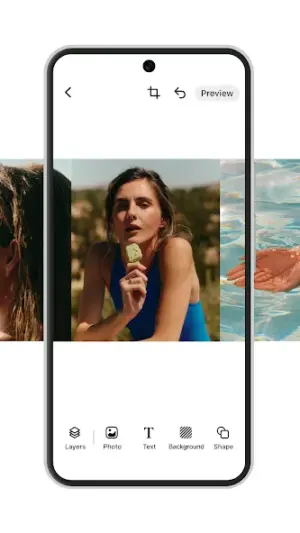

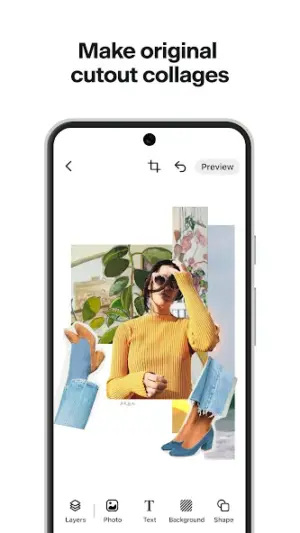
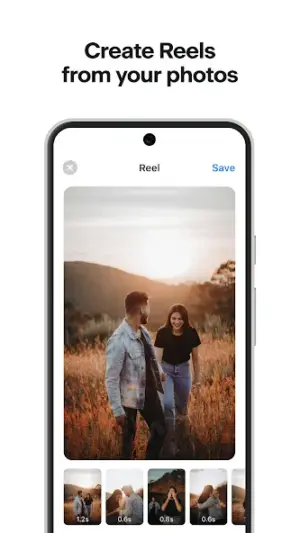
About Frames: Carousel Collage Maker
In an age where social media posts need to shine, having the right tools to craft eye-catching visuals can make all the difference. The Frames: Carousel Collage Maker becomes a trusty companion for travelers and creatives alike, ensuring your Instagram feed is both seamless and stunning even when you're off the grid.
| App Name | Frames: Carousel Collage Maker |
|---|---|
| Version | Latest |
| Developer | Pixelcut Inc |
| Package Name | com.circular.frames |
| Category | Art And Design |
| Size | Varies with device |
| Downloads | N/A |
| Rating | 3.7 |
| Android Version | Varies |
| Updated | Aug 24, 2024 |
Overview
Frames: Carousel Collage Maker is a versatile art and design app that allows users to create beautiful collages and carousel posts for Instagram with ease. Whether you're on the go, in a remote location, or simply wanting to save on data, this app provides essential offline functionality that empowers you to craft memorable visuals without requiring constant internet access.
Crafting a collage has never been more intuitive; the app’s interface is designed for quick edits and user-friendliness. Whether you’re snapping photos during a hike or capturing moments from your travels, these can be transformed into visually appealing layouts in just a few taps. You won’t need extensive experience in graphic design—the app caters to beginners but offers enough features for seasoned creators as well.
One of the standout attributes of Frames is its ability to function effectively offline, making it perfect for those traveling through areas with sporadic connectivity. You can work on your projects without worrying about data consumption or network availability, allowing uninterrupted creativity in low-data settings.
The application's performance generally holds up well across various devices, adapting its features based on your device capabilities. Users have reported smooth transitions between different collage styles and effects—essential when you're looking to quickly share an experience captured during travel.
While specific update notes are sparse, the proactive updating strategy from Pixelcut Inc indicates ongoing enhancements that may address user feedback and introduce useful functionalities tailored for today's social media demands.
Who Is Frames: Carousel Collage Maker For?
Frames: Carousel Collage Maker primarily targets social media enthusiasts looking to enhance their posts with creative collages. It's particularly useful for travelers who want to document their journeys without worrying about data usage while on-the-go. Additionally, hobbyists and professionals in photography or digital design will find practical applications within this easy-to-use tool.
Real-World Use Cases
- Create stunning travel collages without relying on internet connectivity when venturing into remote areas.
- Edit photos on-the-fly during trips to save time and bandwidth before posting them online later.
- Generate engaging visual content while conserving mobile data on limited plans during long journeys.
- Combine multiple shots into one cohesive post without needing extensive editing software; great for those documenting everyday life as well as special occasions.
Features
- Intuitive collage creation for Instagram posts.
- Offline functionality allows for creative work without internet access.
- User-friendly interface suitable for both novice and experienced designers.
- Versatile templates tailored for carousel posts.
- Supports images from your camera roll or device storage.
- Diverse customization options including borders, backgrounds, and text overlays.
- Quick resizing features optimized for social media standards.
- Frequent updates from developers suggest continued improvement.
Performance & Battery
Users generally report stable performance across varying Android devices. The application adapts well to different screen sizes while maintaining functionality without lagging or crashing during collage creation—an essential factor when you’re trying to capture fleeting moments seamlessly.
Privacy & Permissions
As of now, specific permissions needed by Frames: Carousel Collage Maker are not listed within the app details. It is always advisable to review app permissions carefully upon installation. To ensure privacy safety habits while using APKs like this one, refrain from granting unnecessary permissions that may compromise personal information.
What’s New
The latest update hints at improvements aimed at enhancing user experience but lacks detailed changelog specifics. While this can leave users curious about what changes have been made, it often suggests that updates might include speed optimizations or new design elements based on user feedback.
How to Install
- Open the Google Play Store on your Android device.
- Search for ‘Frames: Carousel Collage Maker’ using the search bar.
- Select the app from the search results page.
- Tap ‘Install’ to download the app onto your device.
- Once installed, launch the application by tapping its icon in your app drawer.
Pros
- Intuitive interface makes gallery management effortless.
- Works efficiently offline—ideal for travel scenarios.
- Regular updates mean fresh features could be around the corner.
- Suitable for all skill levels—from beginners to advanced users.
- Customizable templates fit various needs.
Cons
- Lacks detailed change logs after updates.
- Potential issues may arise depending on device specifications.
- Could benefit from additional advanced editing features.
- Not all features accessible offline may limit certain designs.
Download Frames: Carousel Collage Maker APK
Download Frames: Carousel Collage Maker vLatest APK
Free · Safe · Opens Google Play / APK source
Frequently Asked Questions
Can I use Frames without an internet connection?
Yes! The app works effectively offline, allowing you to create collages anytime.
What file formats does Frames support?
The app primarily supports image files stored in common formats such as JPG and PNG.
Is there a cost associated with using Frames?
'Frames: Carousel Collage Maker' is available as a free download.
Will I receive updates automatically?
'Yes,' if you have enabled automatic updates through Google Play.
'Can I share my creations directly from the app?
'Absolutely! You can easily share completed collages directly to Instagram.
Are there any ads within the application?
Users may encounter advertisements although their frequency can vary.
Final Thoughts
'Frames: Carousel Collage Maker' positions itself as an invaluable tool for anyone keen on maximizing their visual storytelling while being resource-conscious. Ideal for travelers who need functions that operate without constant data access, this multi-faceted app encourages creativity no matter where you find yourself in today’s connected world.
Related Apps
More apps coming soon.
Disclaimer
'AndroidKnight is not affiliated with Pixelcut Inc nor responsible for any APK-related issues – please ensure proper device security measures while downloading.'
All Versions of Frames: Carousel Collage Maker
Frequently Asked Questions
Yes. Frames: Carousel Collage Maker is scanned before publishing. Our pipeline verifies each file.
Download the APK, enable 'Install from Unknown Sources' in Settings > Security, then tap the file.
Latest version is Latest.
Requires Android 5.0+.
Yes, completely free.
APKs let you install apps not in your region, use specific versions, or install without Google Play.
Related News Articles


Frames: Carousel Collage Maker Alternative
Apps similar to Frames: Carousel Collage Maker that you may also like.

User Reviews
Compatibility Checker
Frames: Carousel Collage Maker requires Android 5.0+ or higher. Select your device version to check.
Write a Review