
Meme Maker Pro: Design Memes APK
piZapVaries with device · Free · Safe · Verified
Share This App
Scan to Download
Scan with Android camera
Screenshots

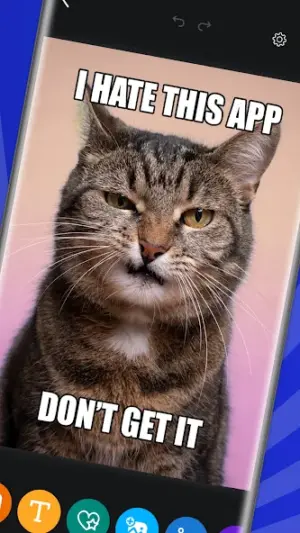

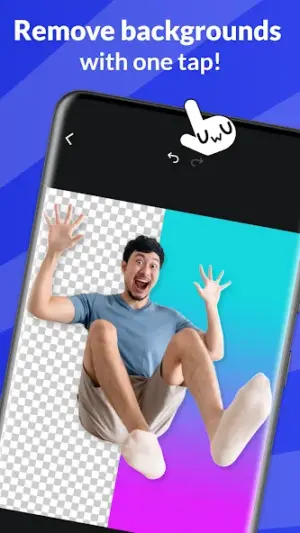
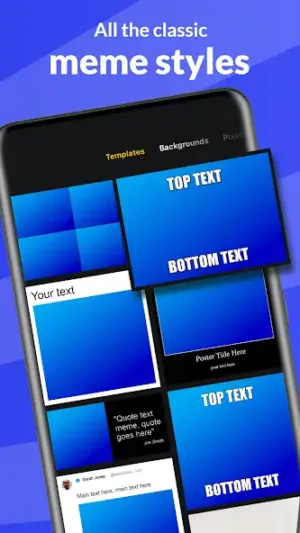
About Meme Maker Pro: Design Memes
Creating memes has become an integral part of online communication, allowing users to express humor and creativity in visually engaging ways. The Meme Maker Pro: Design Memes app by piZap provides a user-friendly platform for crafting unique memes easily accessible to a wide array of users. With its inclusive design principles, it promotes creativity across various demographics and device capabilities.
Related in Art And Design: Frames: Carousel Collage Maker
| App Name | Meme Maker Pro: Design Memes |
|---|---|
| Version | Latest |
| Developer | piZap |
| Package Name | com.digitalpalette.mememakerpro |
| Category | Art And Design |
| Size | Varies with device |
| Downloads | N/A |
| Rating | 4.1 |
| Android Version | Varies |
| Updated | Mar 5, 2025 |
Overview
Meme Maker Pro is an art and design application specifically tailored for those who want to generate and customize memes effortlessly. This app excels in simplicity, making it suitable for everyone from social media enthusiasts to casual users looking to add fun to their conversations. The interface is clean and intuitive, ensuring that new users can get started without feeling overwhelmed by complexity.
Who Is Meme Maker Pro: Design Memes For?
Meme Maker Pro caters to a broad audience, including individuals seeking an easy way to communicate through humor and visual storytelling. It's perfect for social media managers, students looking to create fun project visuals, or anyone wishing to share light-hearted content with friends or family. Additionally, its inclusivity ensures that people of all ages and tech-savviness levels find joy in meme creation.
Real-World Use Cases
- Create engaging memes for social media posts that resonate with followers.
- Add humor-rich captions to personal photos before sharing them with friends.
- Design educational memes that make learning more fun and engaging for students.
- Create event promos using collages of past activities mixed with witty captions for upcoming events.
Features
- User-friendly interface designed with accessibility in mind.
- Supports a variety of fonts that can be easily scaled for readability.
- Offers high contrast options for text clarity against different backgrounds.
- Allows one-handed use via streamlined navigation controls.
- Create collages with multiple images while retaining simplicity in the layout process.
- AI-generated images enhance creative possibilities without requiring technical skills.
- Incorporates stickers and captions to personalize your creations further.
- Universal architecture ensures compatibility with both newer and older devices.
Performance & Battery
Meme Maker Pro is designed with performance considerations suitable for lower-end Android devices. Its universal architecture allows it to adapt seamlessly across various hardware specifications, ensuring that users can create without lagging issues traditionally associated with more graphics-heavy applications.
Privacy & Permissions
As there are no specific permissions listed within the app's metadata, it's advisable always to check the permissions required upon installation. Users should remain vigilant about APK sources; downloading from reputable sites like Google Play Store is recommended for security purposes when handling any apps.
What’s New
While specific update details are scarce, the latest version of Meme Maker Pro introduces optimizations that could enhance usability across diverse devices, reinforcing its commitment to providing a seamless user experience. Improvements likely include performance enhancements that make creating and editing aspects faster on low-end devices.
How to Install
- Open the Google Play Store on your Android device.
- Search for ‘Meme Maker Pro’ by piZap.
- Tap on the app from the search results.
- Select ‘Install’ to download the application onto your device.
- Once installed, open the app from your home screen or app drawer.
- Follow any on-screen prompts or tutorials to begin creating memes!
Pros
- User-friendly design promoting accessibility.
- High customization capabilities through stickers and AI images.
- Efficient operation even on older devices.
- Attractive features suitable for both beginners and advanced users.
- Regular updates enhance functionality.
Cons
- Lack of detailed changelog may leave users unsure about updates.
- Limited advanced editing tools compared to professional design apps.
- No explicit privacy policy noted within the provided metadata.
Download Meme Maker Pro: Design Memes APK
Download Meme Maker Pro: Design Memes vLatest APK
Free · Safe · Verified APK download
Frequently Asked Questions
Is Meme Maker Pro suitable for beginners?
Yes, its intuitive design makes it ideal for both novice users and experienced meme creators.
Can I use this on older Android devices?
Absolutely! The app is optimized for performance across a range of hardware specifications.
Are there any in-app purchases?
The app is free; however, check within the application as there may be optional features available.
Does Meme Maker Pro require internet access?
Basic functionalities can be used offline; however, certain features may require an internet connection.
'What's included in Meme Maker Pro's updates?'
'Specific update details aren't mentioned but look out for general performance improvements.'
'Can I share my created memes directly from the app?'
'Yes! You can easily share your creations on various social media platforms directly.'
Final Thoughts
'Meme Maker Pro: Design Memes' stands out as an accessible platform empowering users of all backgrounds and abilities to unleash their creativity through fun visual content. Whether you're gearing up to add humor into your online communication or simply want an enjoyable tool at your fingertips, this application delivers a satisfactory experience worthy of exploration.
Related Apps
More apps coming soon.
Disclaimer
'This article is not affiliated with piZap or the Meme Maker Pro application. Users are encouraged only to download APKs from trusted sources.'
All Versions of Meme Maker Pro: Design Memes
Frequently Asked Questions
Yes. Meme Maker Pro: Design Memes is scanned before publishing. Our pipeline verifies each file.
Download the APK, enable 'Install from Unknown Sources' in Settings > Security, then tap the file.
Latest version is Latest.
Requires Android 5.0+.
Yes, completely free.
APKs let you install apps not in your region, use specific versions, or install without Google Play.
Related News Articles


Meme Maker Pro: Design Memes Alternative
Apps similar to Meme Maker Pro: Design Memes that you may also like.

User Reviews
Compatibility Checker
Meme Maker Pro: Design Memes requires Android 5.0+ or higher. Select your device version to check.
Write a Review