
Microsoft Authenticator APK
Microsoft CorporationVaries with device · Free · Safe · Verified
Share This App
Scan to Download
Scan with Android camera
Screenshots

About Microsoft Authenticator
If you're striving for enhanced security in your digital life, Microsoft Authenticator is a top contender. This app is essential for anyone looking to eliminate passwords while boosting account protection. However, users who prefer traditional sign-in methods might find it unnecessary.
Related in Business: Salesforce · Uber – Driver: Drive & Deliver · Microsoft Teams
| App Name | Microsoft Authenticator |
|---|---|
| Version | Latest |
| Developer | Microsoft Corporation |
| Package Name | com.azure.authenticator |
| Category | Business |
| Size | Varies with device |
| Downloads | N/A |
| Rating | 4.7 |
| Android Version | Varies |
| Updated | Jul 20, 2026 |
Overview
Microsoft Authenticator redefines how we approach account security by removing the reliance on passwords and incorporating robust multifactor authentication (MFA). The app operates as a universal tool that accommodates various devices and offers an intuitive user experience. Regular updates ensure compatibility with the latest security practices and Android versions, making it a reliable choice for both personal and professional use.
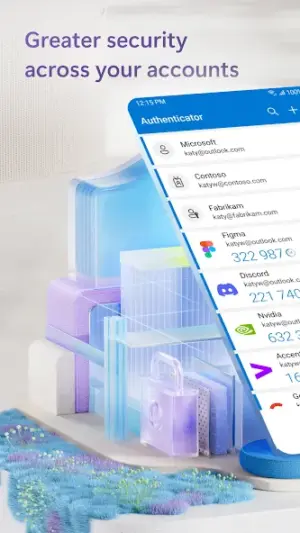
The app’s primary function revolves around generating secure codes that provide access to your accounts, contributing to a more secure online presence. Users can enjoy seamless sign-ins for popular platforms like Microsoft, Google, and more without ever needing a password. Its design prioritizes ease of use while ensuring that security remains the primary focus.
Another notable aspect is the app's ability to store backup codes securely. In case users lose access to their devices, retrieving necessary codes or recovering accounts becomes significantly easier. Additionally, its integration capabilities allow it to tie in with various other applications, providing users a comprehensive security solution without creating friction during their daily activities.
Overall, Microsoft Authenticator stands out as a well-constructed tool for managing digital identities safely and effectively. From casual users to businesses requiring enhanced login protections, this app caters to varied needs.
Who Is Microsoft Authenticator For?
Microsoft Authenticator is ideal for individuals keen on enhancing their online security through MFA options. Businesses also benefit greatly from its capabilities by safeguarding sensitive company information against unauthorized access.
Real-World Use Cases
- A user tired of remembering complex passwords switches entirely to Authenticator-generated codes for hassle-free logins.
- A small business integrates MFA into their employee accounts using Microsoft Authenticator to enhance overall security posture.
- An individual sets up financial apps with Microsoft Authenticator to ensure added layers of protection against cyber threats.
- A frequent traveler can quickly access their email accounts globally without needing local SIM cards or Wi-Fi connections thanks to code generation offline.
Features
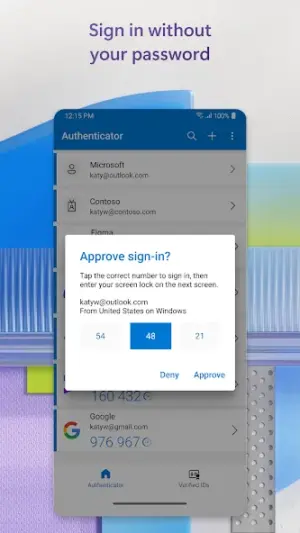
- Eliminates passwords via email or SMS based sign-ins.
- Generates time-based one-time passwords (TOTPs) for extra security.
- Backs up codes securely ensuring recovery in case of lost devices.
- Supports multiple accounts across different platforms seamlessly.
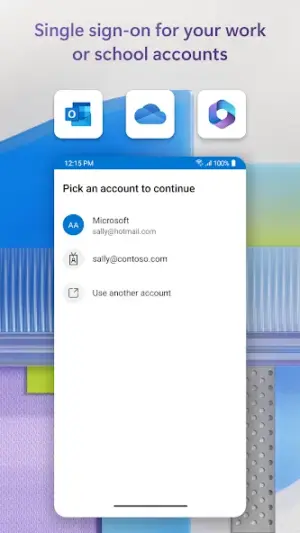
- Integrates directly with common digital services—easy setup and management.
- User-friendly interface designed for quick navigation.
- Real-time notifications alert you of any suspicious activity on your accounts.
- Regular updates enhance functionality and security protocols.
Performance & Battery
Users report smooth performance across various Android devices due in part to Microsoft's extensive testing efforts. The app responds quickly when generating codes or sending notifications, which is crucial during urgent login scenarios. There are no major lag issues reported during typical functions.
Privacy & Permissions
Microsoft Authenticator focuses on safe handling of permissions by requesting only those necessary for functionality—primarily access to notifications. To maximize privacy while using the APK, ensure you download it directly from trusted sources like the official Google Play Store. Regularly updating your apps will also help maintain best privacy practices.
What’s New
While specific notes about new features were not provided in recent updates, it's important to highlight the focus on maintaining functionality across diverse Android devices. The update from July 20, 2026, reflects Microsoft's commitment to ensuring that users have access to cutting-edge security measures crucial for today’s digital landscape.
How to Install
- Open the Google Play Store on your Android device.
- Search for ‘Microsoft Authenticator’ using the search bar.
- Select the app from the list of results and tap ‘Install.’
- Once installed, open Microsoft Authenticator from your home screen or app drawer.
- Create an account or log in using your existing Microsoft credentials.
- Follow on-screen instructions to set up multifactor authentication for desired accounts.
- Adjust settings according to preference for notifications and backup options.
Pros
- Enhanced security without relying on passwords.
- User-friendly interface with easy navigation.
- Support for multiple accounts across various platforms.
- Backup options facilitate seamless recovery when needed.
- Real-time alerts improve account monitoring.
Cons
- May be overwhelming for non-tech-savvy users.
- Not necessary if you prefer traditional password methods.
- Limited functionalities if you're not invested in Microsoft's ecosystem.
- Occasional connectivity issues may arise.
Download Microsoft Authenticator APK
Download Microsoft Authenticator vLatest APK
Free · Safe · Opens Google Play / APK source
Frequently Asked Questions
Is Microsoft Authenticator free?
Yes, Microsoft Authenticator is available at no cost.
What is multifactor authentication?
Multifactor authentication adds an additional layer of protection beyond just usernames and passwords.
Can I use it with non-Microsoft accounts?
Yes! You can use Microsoft Authenticator with various third-party services.
Will it work on older Android versions?
Compatibility varies but mostly supports modern Android versions.
How does it handle multiple accounts?
'Authenticator allows you to manage many different accounts easily within one interface.
'Do I need internet access?
'You can generate codes offline once configured initially.
Final Thoughts
Microsoft Authenticator remains a practical choice in the Business space. If you need the latest build (Latest) for Android, use the download section below and follow the installation guide.
Related Apps
Disclaimer
This review is purely informational and does not endorse any app nor assume responsibility regarding APK downloads.
App Permissions Explained
Microsoft Authenticator requests 2 permissions. Auto-fetched from the Play Store.
All Versions of Microsoft Authenticator
Frequently Asked Questions
Yes. Microsoft Authenticator is scanned before publishing. Our pipeline verifies each file.
Download the APK, enable 'Install from Unknown Sources' in Settings > Security, then tap the file.
Latest version is Latest.
Requires Android 5.0+.
Yes, completely free.
APKs let you install apps not in your region, use specific versions, or install without Google Play.
Related News Articles


More from Microsoft Corporation

Microsoft Authenticator Alternative
Apps similar to Microsoft Authenticator that you may also like.


User Reviews
Compatibility Checker
Microsoft Authenticator requires Android 5.0+ or higher. Select your device version to check.
Write a Review