
Shazam: Find Music & Concerts APK
Apple Inc.Varies with device · Free · Safe · Verified
Share This App
Scan to Download
Scan with Android camera
Screenshots
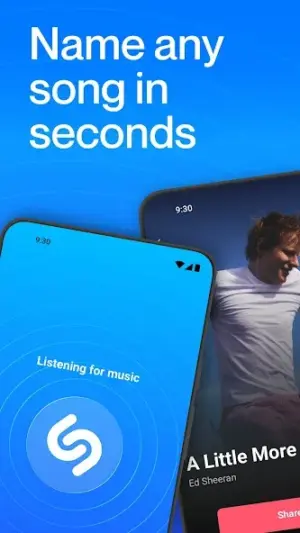
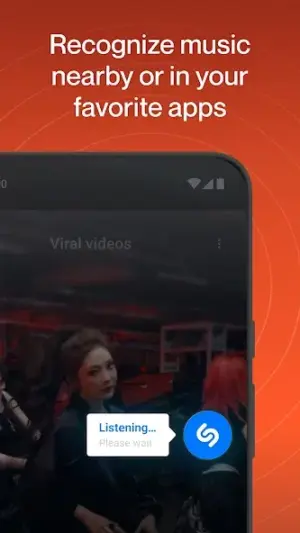
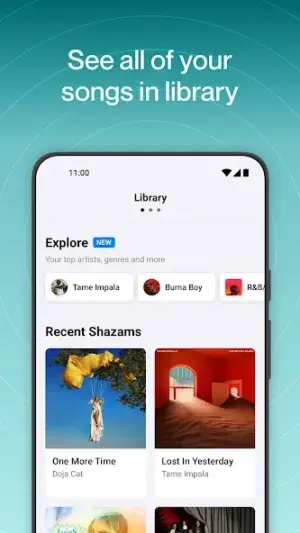


About Shazam: Find Music & Concerts
Are you ready to discover music like never before? With Shazam: Find Music & Concerts, you can easily identify songs, explore concerts, and enjoy a rich musical experience right from your device. Let’s dive into what makes this app a must-have for music lovers of all levels!
Related in Music And Audio: Phonk Music – Song Remix Radio · Gaana: Music App, MP3 Songs · Garage Ringtones
| App Name | Shazam: Find Music & Concerts |
|---|---|
| Version | Latest |
| Developer | Apple Inc. |
| Package Name | com.shazam.android |
| Category | Music And Audio |
| Size | Varies with device |
| Downloads | N/A |
| Rating | 4.8 |
| Android Version | Varies |
| Updated | Jul 24, 2026 |
Overview
Shazam is a powerful music identification app developed by Apple Inc., designed to aid users in finding songs quickly and effortlessly. Whether you're at a party, in your car, or just hanging out at home, the app enables you to identify any song playing around you with a simple tap. Its intuitive interface is perfect for beginners who may not be familiar with APKs yet.
This universal app works on various Android devices and has features that appeal to both casual listeners and die-hard music fans. By connecting the dots between songs and their respective albums or artists, Shazam helps enrich your music knowledge while keeping the fun alive.
In addition to identifying songs, Shazam provides access to lyrics and even videos, allowing users to enjoy their favorite tracks in multiple ways. Plus, the integration with concert updates ensures you're always informed about upcoming shows by your favorite artists.
The latest version of Shazam boasts several enhancements designed to improve user experience further, making it easier than ever for first-time users to dive straight into the world of music. So don’t worry if you’re new; this user-friendly app has been tailored especially for you!
Let’s now explore some standout features that make Shazam special.
Who Is Shazam: Find Music & Concerts For?
Shazam is perfectly suited for anyone who loves discovering new music or reconnecting with old favorites. Whether you're casually browsing through songs at home or actively searching out tunes during outings or events, this app offers something valuable for everyone. It’s beginner-friendly enough that even those unfamiliar with technology will find joy in using it.
Real-World Use Cases
- You hear a captivating tune on the radio but don’t know its name—simply open Shazam!
- You want to impress friends at a gathering by instantly identifying popular tracks playing in the background.
- You’re planning a road trip and wish to compile your favorite tunes found throughout various outings.
- You attend concerts often and want real-time updates about upcoming shows near your area based on your artist interests.
Features
- Instantly identify any song playing around you.
- Access lyrics for an engaging sing-along experience.
- Watch official music videos related to your favorite tracks.
- Discover concerts happening near you featuring artists you love.
- Create playlists to save your identified songs for later listening.
- Explore additional information about artists and albums.
- Connect with streaming services for seamless playback.
- Enjoy a user-friendly interface designed for everyone.
Performance & Battery
Overall performance of Shazam is quite commendable as it swiftly identifies songs even when played against background noise. The universal architecture allows it to adapt well across different devices without major lag or hiccups during use.
Privacy & Permissions
When using Shazam, it's important to be mindful of permissions like microphone access needed for sound detection. Always download apps from reputable sources and read through permission requests carefully; they are there to enhance functionality while also prioritizing user privacy.
What’s New
While specific update details aren't provided, users can expect continual improvements in performance and functionality as Apple Inc. regularly updates Shazam. The latest changes aim at making song recognition quicker and efficiency-driven, ensuring that music discovery is smooth and reliable every time.
How to Install
- Before downloading, ensure you’ve enabled installations from unknown sources in your device settings (Settings > Security > Unknown Sources).
- Download the Shazam APK from a trusted source or directly from the official website.
- Locate the downloaded file in your device’s file manager.
- Tap on the APK file to begin installation; follow on-screen prompts as they appear.
- Once installed, open Shazam and grant necessary permissions (like microphone access) when prompted; don’t worry—this helps it recognize music!
Pros
- Easy-to-use interface suitable for all users.
- Fast song identification capabilities.
- Includes lyrics and video options.
- Regular updates improve functionality.
- Access concert information based on preferences.
Cons
- Limited offline functionality without prior song identification.
- Some features may require constant internet connection.
- Occasional inaccuracies in song detection due to noise levels.
Download Shazam: Find Music & Concerts APK
Download Shazam: Find Music & Concerts vLatest APK
Free · Safe · Opens Google Play / APK source
Frequently Asked Questions
Is it safe to install third-party APKs?
Yes, but ensure you download them from reputable sources only.
What permissions does Shazam need?
Initially requires microphone access for recognizing songs.
How do I update the app?
Updates typically occur automatically unless disabled; check settings.
Can I use Shazam offline?
'Requires online access after initial identification unless saved.
Final Thoughts
Shazam: Find Music & Concerts remains a practical choice in the Music And Audio space. If you need the latest build (Latest) for Android, use the download section below and follow the installation guide.
Related Apps
More apps coming soon.
Disclaimer
AndroidKnight is not affiliated with Apple Inc.. All trademarks belong to their respective owners. Download and use APKs at your own risk and respect local laws and app licenses.
All Versions of Shazam: Find Music & Concerts
Frequently Asked Questions
Yes. Shazam: Find Music & Concerts is scanned before publishing. Our pipeline verifies each file.
Download the APK, enable 'Install from Unknown Sources' in Settings > Security, then tap the file.
Latest version is Latest.
Requires Android 5.0+.
Yes, completely free.
APKs let you install apps not in your region, use specific versions, or install without Google Play.
Shazam: Find Music & Concerts Alternative
Apps similar to Shazam: Find Music & Concerts that you may also like.


User Reviews
Compatibility Checker
Shazam: Find Music & Concerts requires Android 5.0+ or higher. Select your device version to check.
Write a Review