Notion Calendar APK
Notion Labs, Inc.Varies with device · Free · Safe · Verified
Share This App
Scan to Download
Scan with Android camera
Screenshots
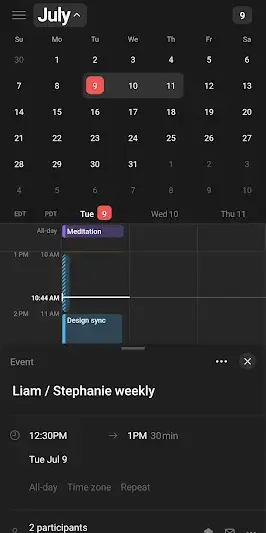
About Notion Calendar
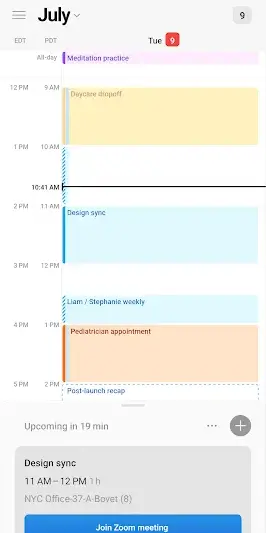
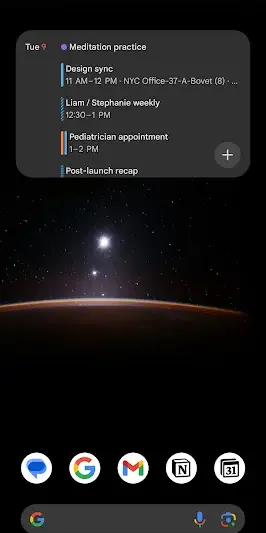
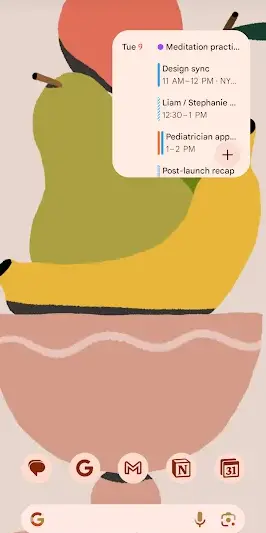
Entwine your work and personal agendas with the Notion Calendar, a delightful blend of functionality and organization. This vibrant app is designed for those who seek to streamline their schedules while adding a dash of creativity to their planning process.
Related in Productivity: Focus Friend by Hank Green · CamScanner- scanner, PDF maker
| App Name | Notion Calendar |
|---|---|
| Version | Latest |
| Developer | Notion Labs, Inc. |
| Package Name | com.cron.calendar |
| Category | Productivity |
| Size | Varies with device |
| Downloads | N/A |
| Rating | 3.5 |
| Android Version | Varies |
| Updated | Jul 15, 2026 |
Overview
Notion Calendar brings an innovative approach to productivity tools, inviting users to engage with their time management in a way that feels both intuitive and exciting. With its universal architecture, this app is tailored for various devices, making it accessible whether you're on a smartphone or tablet. The interface is sleek and user-friendly, effortlessly guiding you through adding events, reminders, and deadlines without overwhelming you with clutter. Plus, with its free license model, it's easy to start organizing your life without any financial commitment or risk.
While the app currently holds a rating of 3.5 stars from users, it stands out among its peers by focusing not just on task completion but also on enhancing the user's engagement with their goals. The last update in July 2026 showcases ongoing improvements that reflect user feedback and needs, promising an evolving product catered to modern workflows. As you delve into Notion Calendar's features, you'll find numerous ways to enhance your day-to-day productivity while enjoying the process.
From customizable views to integration possibilities that make it easy to connect other Notion services or platforms you already use—it’s an all-in-one tool encouraging seamless scheduling. Notion's ethos champions transparency and clarity; therefore users can expect updates reflecting their dynamic everyday routines and aspirations as they navigate through work-life balance challenges.
Who Is Notion Calendar For?
Notion Calendar is perfect for busy professionals juggling multiple responsibilities as well as students striving for academic excellence in managing class schedules and assignments. It's also appealing to creative individuals who enjoy infusing personal flair into their organizational systems without sacrificing functionality.
Real-World Use Cases
- Scheduling project deadlines alongside personal milestones – keep track of both realms without confusion.
- Coordinating team meetings efficiently by sharing calendars within your organization – boosts collaboration effortlessly!
- Aspiring writers can plot out writing milestones versus pitching due dates smoothly when using color-coded events.
- A student can map out semester assignments against extracurricular activities seamlessly—all visible at a glance!
Features
- Effortless event creation: Add appointments quickly using simple touch commands.
- Customizable calendar views: Switch between daily, weekly, or monthly layouts tailored to your preference.
- Integration capabilities: Easily connect with other Notion apps for streamlined task management.
- Interactive reminders: Set up notifications so you never miss important dates again.
- User-friendly interface: Navigate through tasks without confusion thanks to clean design principles.
- Collaboration tools: Share your calendar with others for joint planning and enhanced teamwork.
- Color-coded events: Organize your agenda visually by assigning different colors to various types of activities.
- Recurring events support: Schedule repeating tasks or appointments with ease.
Performance & Battery
The performance of Notion Calendar is generally smooth across various devices thanks to its optimized design catering specifically for each architecture type. Users reported quick load times when implementing new events or switching views—a crucial aspect when managing fast-paced environments.
Privacy & Permissions
Currently there are no explicit permissions listed for Notion Calendar which indicates a focus on minimal data requirements—always a plus when concerning user privacy. As always, practice safe APK habits by downloading from trusted sources only.
What’s New
Although specific details about recent changes were not disclosed at this time, the latest update signifies Notion's ongoing commitment to refining user experience based on community feedback. Expect subtle enhancements that aim at improving overall usability and feature stability—important elements for anyone serious about productivity.
How to Install
- Open Google Play Store on your device.
- Search for ‘Notion Calendar’ using the search bar.
- Find the app listed under ‘Notion Labs, Inc.’
- Tap ‘Install’ to begin downloading the application.
- Once installed, open the application from your app drawer or home screen.
- Create an account or log in if you are an existing Notion user.
Pros
- User-friendly interface promotes quick adaptation.
- Customizable views address diverse scheduling preferences.
- Seamless integration capabilities enhance organizational synergy.
- Robust collaboration features aid teamwork efficiency.
- Frequent updates signal developer responsiveness.
Cons
- The current rating suggests room for improvement based on user feedback.
- Limited information available regarding privacy specifics may concern some users.
- The absence of detailed release notes hinders visibility into specific improvements.
Download Notion Calendar APK
Download Notion Calendar vLatest APK
Free · Safe · Opens Google Play / APK source
Frequently Asked Questions
Is Notion Calendar free?
Yes! It operates under a free license model.
What devices can I use it on?
It has a universal architecture allowing compatibility across various devices.
Are there any hidden costs?
There are no hidden costs associated with using Notion Calendar.
Can I share my calendar with others?
'Absolutely! Sharing capabilities promote collaborative scheduling.'
Final Thoughts
Notion Calendar remains a practical choice in the Productivity space. If you need the latest build (Latest) for Android, use the download section below and follow the installation guide.
Related Apps
More apps coming soon.
Disclaimer
AndroidKnight is not affiliated with Notion Labs, Inc.. All trademarks belong to their respective owners. Download and use APKs at your own risk and respect local laws and app licenses.
All Versions of Notion Calendar
Frequently Asked Questions
Yes. Notion Calendar is scanned before publishing. Our pipeline verifies each file.
Download the APK, enable 'Install from Unknown Sources' in Settings > Security, then tap the file.
Latest version is Latest.
Requires Android 5.0+.
Yes, completely free.
APKs let you install apps not in your region, use specific versions, or install without Google Play.
Related News Articles


Notion Calendar Alternative
Apps similar to Notion Calendar that you may also like.


User Reviews
Compatibility Checker
Notion Calendar requires Android 5.0+ or higher. Select your device version to check.
Write a Review