Facebook Lite APK
Meta Platforms, Inc.Varies with device · Free · Safe · Verified
Share This App
Scan to Download
Scan with Android camera
Screenshots



About Facebook Lite
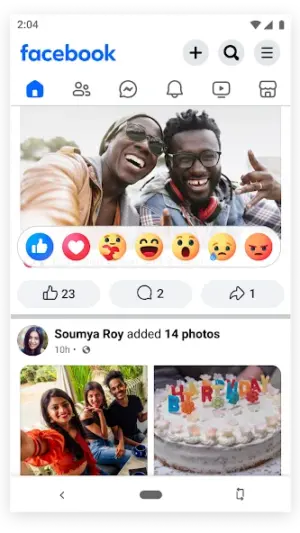
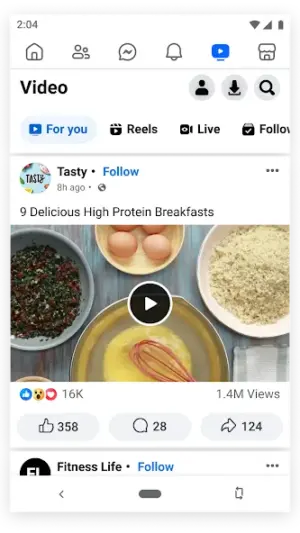
If you're an advanced Android user craving a lightweight social media experience, Facebook Lite is your go-to solution. Designed for efficiency, it harnesses minimal data while offering a powerful blend of features tailored to keep you connected without compromising on speed.
Related in Social: Taka – Chat, Live, Games room · Anonymous Chat / AnonChat · poqe – video chat
| App Name | Facebook Lite |
|---|---|
| Version | Latest |
| Developer | Meta Platforms, Inc. |
| Package Name | com.facebook.lite |
| Category | Social |
| Size | Varies with device |
| Downloads | N/A |
| Rating | 4.5 |
| Android Version | Varies |
| Updated | Jul 21, 2026 |
Overview
Facebook Lite is the streamlined cousin of the full-fledged Facebook app, crafted specifically for users who prioritize speed and efficiency over a bloated app experience. While its minimal size ensures swift downloads and less memory consumption, it doesn't skimp on core functionalities that make Facebook a household name. This version shines in poorly connected environments, allowing you to share updates and engage with friends even when network conditions are far from ideal.
One of the most appealing aspects of Facebook Lite is its adaptability across various devices, making it universally compatible and scalable based on the specifications of the user's hardware. The app's minimalist design offers no-frills navigation, which encourages users to focus more on interactions rather than getting lost in menus or heavy graphics. It's an intelligent choice for anyone who needs quick access to social feeds without becoming overwhelmed by excessive visuals.
Moreover, Facebook Lite not only conserves data but also optimizes battery life—essential for power users who are often on the go and need their device longevity maximized. You can seamlessly multitask using split-screen views as well, which allows you to switch between apps while still keeping an eye on your Facebook feed.
While it may lack some features found in its heavier counterpart—like advanced options for video storage or analytics that social media managers might crave—it’s versatile enough for casual users looking to maintain an active online presence without draining resources.
Whether you’re in a crowded place with spotty Wi-Fi or simply seeking a simpler interface for browsing your news feed, Facebook Lite provides an optimal solution packed with hidden gems worth exploring.
Who Is Facebook Lite For?
Facebook Lite is ideal for users who frequently find themselves in areas with weak internet connectivity yet still desire access to vital social interactions. It's perfect for those seeking efficient solutions without sacrificing significant device resources—think students, travelers, or anyone juggling multiple tasks throughout their day.
Real-World Use Cases
- Easily check updates from friends while commuting—no need for high-speed internet!
- Share pictures from outdoor adventures without worrying about data limits or app bloat.
- Navigating multiple apps seamlessly using split-screen functionality during work breaks.
- Connect with groups when traveling abroad using inconsistent Wi-Fi connections.
Features
- Ultra-lightweight design minimizes installation size.
- Optimized for slow or unstable network conditions without compromising user experience.
- Quick loading times ensure you stay connected during busy days.
- Allows posting updates, sharing photos, and engaging through comments with ease.
- Supports notifications so you never miss important updates.
- Easy UI navigates rapidly through friend requests and messages.
- Dark Mode is available to enhance usability in low-light settings.
- Battery-efficient operation saves power during long usage sessions.
- Customizable settings allow insight into data usage patterns.
- Offline capabilities mean you can browse cached content even without a connection.
Performance & Battery
Users report consistent performance improvements thanks to the streamlined nature of Facebook Lite compared to heavier counterparts. It enables smooth navigation even under constrained memory scenarios due to its lean footprint. Regular updates help ensure compatibility with newer Android versions while maintaining responsiveness across various devices.
Privacy & Permissions
As it stands, specific permissions required by Facebook Lite remain unlisted; however, embracing good security practices such as downloading from reputable sources will mitigate potential risks. Be vigilant with personal information shared within groups and posts as privacy settings can vary widely depending on interactions.
What’s New
The latest update solidifies its reputation as a dependable alternative within the social media landscape, although specific details about improvements remain elusive. As always, keeping up with updates guarantees new fixes and performance enhancements that align with evolving user needs.
How to Install
- Open Google Play Store or download APK from trusted sources like APKMirror.
- Select ‘Install’ to begin downloading Facebook Lite onto your device.
- After installation completes, locate the app icon on your home screen or app drawer.
- Tap the icon to open; log in or create a new account if needed.
- Explore settings to adjust notification preferences and refine data usage limits based on your habits.
Pros
- Lightweight design keeps installations small and efficient.
- Faster load times enhance user satisfaction during social interactions.
- Works well across varied network conditions ensuring reliable connectivity.
- Ability to engage via comments/photos without resource strain.
- Battery saver mode enhances device longevity during use.
Cons
- Limited features compared to the standard Facebook app may disappoint heavy users.
- Lacks sophisticated analytics tools desired by marketers.
- Certain multimedia content viewing options are restricted;
- Some advanced functions aren't available due to simplicity focus.
Download Facebook Lite APK
Download Facebook Lite vLatest APK
Free · Safe · Verified APK download
Frequently Asked Questions
What is the primary benefit of using Facebook Lite?
Its primary benefit lies in its lightweight nature ensuring efficient use of data and seamless functionality across all types of networks.
Does it support images and videos?
Yes, you can upload images and share videos; however, some advanced video features from the standard app may not be present.
Can I use it offline?
You can view previously loaded content offline; real-time functions require a stable network.
Are my contacts secure?
While security measures are taken seriously by Meta Platforms Inc., always monitor privacy settings closely.
Does it support group chats?
Group chat functionality exists but is simplified versus that found in full apps.
Final Thoughts
> For power users wanting efficiency especially under resource constraints,<strong>,</strong>=Facebook Lite delivers a robust performance paired with essential functionalities.<strong>, therefore </strong>, its appeal lies not just in saving bandwidth but redefining how we connect socially—especially critical when juggling multiple tasks throughout hectic routines as they adapt their lifestyles around technology}
Related Apps
Disclaimer
*This article does not represent any official affiliation with Meta Platforms Inc., nor does it take responsibility for any APK downloaded outside trusted sources.
All Versions of Facebook Lite
Frequently Asked Questions
Yes. Facebook Lite is scanned before publishing. Our pipeline verifies each file.
Download the APK, enable 'Install from Unknown Sources' in Settings > Security, then tap the file.
Latest version is Latest.
Requires Android 5.0+.
Yes, completely free.
APKs let you install apps not in your region, use specific versions, or install without Google Play.
Related News Articles

More from Meta Platforms, Inc.


Facebook Lite Alternative
Apps similar to Facebook Lite that you may also like.


User Reviews
Compatibility Checker
Facebook Lite requires Android 5.0+ or higher. Select your device version to check.
Write a Review