
Meta Ads Manager APK
Meta Platforms, Inc.Varies with device · Free · Safe · Verified
Share This App
Scan to Download
Scan with Android camera
Screenshots
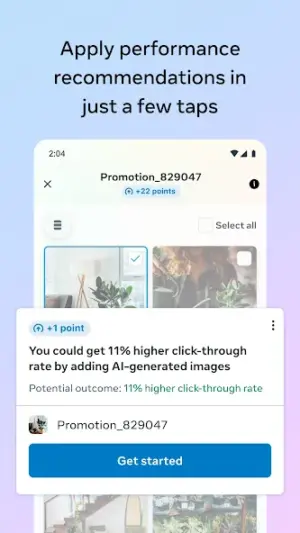
About Meta Ads Manager
In the ever-evolving world of digital advertising, effective campaign management is crucial. The Meta Ads Manager app provides a mobile solution for advertisers looking to create and manage their ads efficiently on-the-go. However, as with any application, there are some common misconceptions surrounding its safety and functionality that deserve clarification.
| App Name | Meta Ads Manager |
|---|---|
| Version | Latest |
| Developer | Meta Platforms, Inc. |
| Package Name | com.facebook.adsmanager |
| Category | Business |
| Size | Varies with device |
| Downloads | N/A |
| Rating | 4.3 |
| Android Version | Varies |
| Updated | Jul 23, 2026 |
Overview
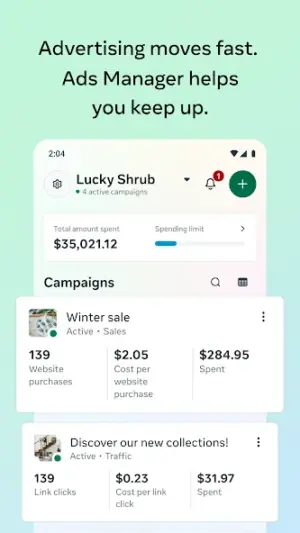
Meta Ads Manager, formerly known as Facebook Ads Manager, is an essential business tool developed by Meta Platforms, Inc. This app allows marketers and business owners to create new advertisements, monitor existing campaigns, and analyze performance metrics—all from the convenience of their mobile devices. With a user-friendly interface tailored for mobile use, it ensures that users can keep track of their advertising efforts anytime and anywhere.
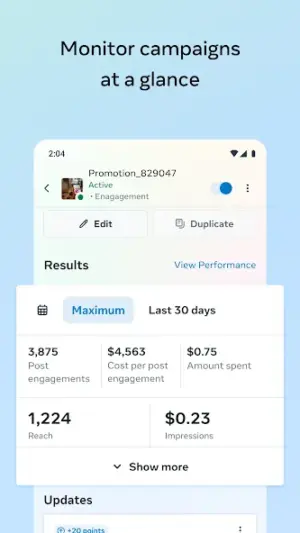
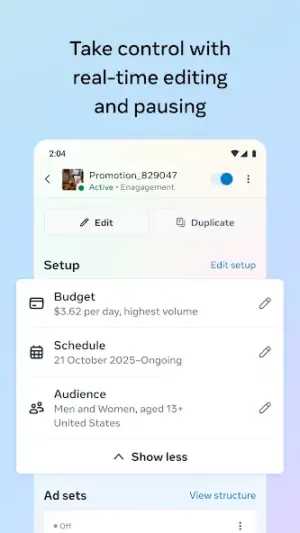
One of the standout features of Meta Ads Manager is its ability to access vast amounts of data regarding ad performance in real-time. This capability enables users to make informed decisions on-the-fly, adjusting campaign strategies as necessary without being tied to a desktop computer. Moreover, this tool integrates seamlessly with other Meta platforms like Instagram and Messenger, thereby expanding your marketing reach.
The app caters to various user needs—from small business owners running local ads to seasoned digital marketers managing extensive online campaigns across multiple platforms. With a rating of 4.3 stars in the Play Store, users generally find it helpful and efficient for their advertising pursuits.
However, prospective users often have questions about the app's safety, its differences compared to official web interfaces, and concerns over permissions required during installation. Addressing these myths can help users feel more confident in utilizing this powerful advertising tool effectively.
Overall, the Meta Ads Manager aims to simplify advertisement management while providing flexibility and insights needed for any marketing strategy within the dynamic realm of social media.
Who Is Meta Ads Manager For?
Meta Ads Manager is designed for anyone involved in digital marketing—from small business owners looking to increase local visibility through ads to larger agencies managing extensive marketing campaigns across various platforms. Whether you are an experienced marketer or just getting started in online advertising, this app intends to accommodate diverse needs.
Real-World Use Cases
- A small retail store owner uses the app to create targeted promotions during holiday seasons.
- A freelance marketer analyzes previous campaign performances directly from their mobile device while commuting.
- A large agency manages multiple ad accounts across different clients simultaneously using one interface.
- The social media manager monitors real-time engagement data during a live event promotion.
Features
- User-friendly interface for easy navigation
- Create targeted ads tailored to specific audiences
- Comprehensive analytics dashboard for tracking performance
- Integration with Instagram and Messenger ads
- Real-time updates on ad performance metrics
- Ability to manage multiple ad accounts seamlessly
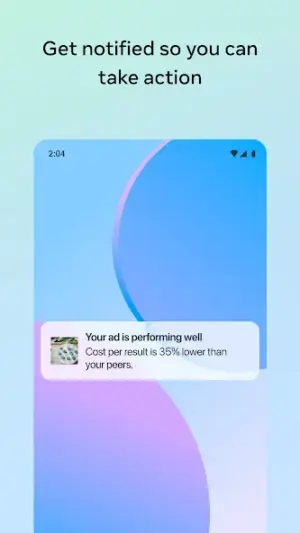
- Push notifications for campaign milestones
- Enhanced budget management options
Performance & Battery
Meta Ads Manager performs well under various conditions; however, actual performance can vary depending on factors such as device specifications and network connectivity. Users generally report positive experiences due to regular optimization by Meta's development team aimed at enhancing speed and reliability.
Privacy & Permissions
While specific permissions are not listed in the available metadata, users should always ensure they download apps from trusted sources like Google Play Store. Practicing safe APK habits—such as checking reviews before installing unexpected apps—can further protect personal information while utilizing tools like Meta Ads Manager.
What’s New
The latest updates primarily focus on enhancing user experience with streamlined navigation and improved performance analytics features. While specific changelog details are not disclosed in the release notes, ongoing enhancements are expected as part of Meta's commitment to continuous improvement based on user feedback.
How to Install
- Open Google Play Store on your Android device.
- Search for ‘Meta Ads Manager’ using the search bar.
- Select the correct listing from Meta Platforms, Inc.
- Tap on ‘Install’ button and wait for the download.
- Permission requests will prompt; approve necessary permissions.
- Once installed, tap ‘Open’ or locate it from your home screen.
- Create or log into your existing Meta account to start using the app.
Pros
- Streamlined ad creation process
- Real-time analytics
- Cross-platform integration
- User-friendly design
- Constant updates based on user feedback
Cons
- May require higher device specifications for optimal functionality
- Absence of detailed changelog may leave users uncertain about changes
- Learning curve associated with advanced features
Download Meta Ads Manager APK
Download Meta Ads Manager vLatest APK
Free · Safe · Opens Google Play / APK source
Frequently Asked Questions
Is it safe to use Meta Ads Manager?
Yes, if downloaded from trusted sources like Google Play Store. Always keep your apps updated.
What’s the difference between official websites and APKs?
'Official apps' refer typically to those found on official marketplaces (like Google Play), while APKs can also be downloaded from third-party sites which may not always be trustworthy.
How does updating work for this app?
'Meta Ads Manager' regularly receives updates; check Google Play Store for available updates periodically.
'What permissions does Meta Ads Manager require?
'Permissions may vary; commonly it requests access related to internet connectivity and notifications.'
'Can I use it without a Facebook account?
'No; you'll need a valid Facebook account or linked information to utilize its features.'
'How does it ensure data privacy?
'Meta has stringent privacy policies in place that govern how user data is handled within their applications.'
Final Thoughts
'Meta Ads Manager' stands out as an efficient tool for businesses navigating the complexities of digital advertising. By debunking common myths surrounding its usage and safety measures, potential users can confidently leverage this application for better campaign management.
Related Apps
More apps coming soon.
Disclaimer
'This article is not affiliated with Meta Platforms Inc., nor does AndroidKnight endorse any specific APKs beyond providing information aimed at helping users make informed choices regarding mobile applications.'
All Versions of Meta Ads Manager
Frequently Asked Questions
Yes. Meta Ads Manager is scanned before publishing. Our pipeline verifies each file.
Download the APK, enable 'Install from Unknown Sources' in Settings > Security, then tap the file.
Latest version is Latest.
Requires Android 5.0+.
Yes, completely free.
APKs let you install apps not in your region, use specific versions, or install without Google Play.
Related News Articles


More from Meta Platforms, Inc.


Meta Ads Manager Alternative
Apps similar to Meta Ads Manager that you may also like.


User Reviews
Compatibility Checker
Meta Ads Manager requires Android 5.0+ or higher. Select your device version to check.
Write a Review