Sygic GPS Navigation & Maps APK
Sygic.Varies with device · Free · Safe · Verified
Share This App
Scan to Download
Scan with Android camera
Screenshots



About Sygic GPS Navigation & Maps
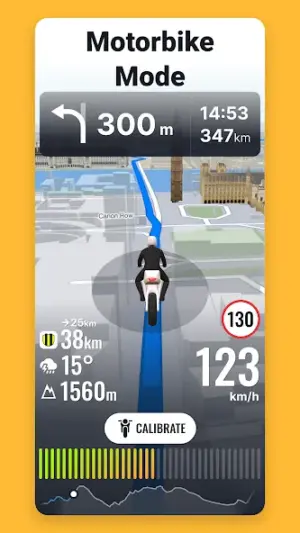
In an era where navigation apps are indispensable, Sygic GPS Navigation & Maps stands out with its robust features tailored to diverse users. Offering 3D offline maps and compatibility with Android Auto, this app is designed not only for tech-savvy drivers but also for those who appreciate straightforward navigation solutions.
Related in Maps And Navigation: Yandex Maps and Navigator · Careem: Taxi, Food & Delivery · MarineTraffic – Ship Tracking
| App Name | Sygic GPS Navigation & Maps |
|---|---|
| Version | Latest |
| Developer | Sygic. |
| Package Name | com.sygic.aura |
| Category | Maps And Navigation |
| Size | Varies with device |
| Downloads | N/A |
| Rating | 4.2 |
| Android Version | Varies |
| Updated | Jul 16, 2026 |
Overview
Sygic GPS Navigation & Maps delivers a user-friendly interface suitable for individuals across various demographics, including older adults and those using devices with limited performance capabilities. The app places strong emphasis on accessibility by providing easy-to-read fonts and adjustable scaling, ensuring that everyone can navigate with confidence.
One of the key elements of Sygic's design is its high-contrast visuals which improve readability in different lighting conditions. This accessibility consideration allows users to find their way without straining their eyes unnecessarily. Furthermore, the app’s simplicity extends to its overall design, making it intuitive for all users regardless of their familiarity with technology.
The universal architecture of Sygic ensures it runs smoothly on a wide range of Android devices—old and new alike—which is a significant advantage for those not looking to upgrade their hardware frequently. Its ability to stay functional on lower-end devices makes it an excellent option for anyone seeking reliable navigation without hefty resource demands.
Additionally, Sygic’s offline map functionality is invaluable in areas with unreliable internet coverage, meaning users can plan journeys effectively no matter where they are. As most essential features are available even when offline, this aspect adds another layer of convenience that complements the accessibility mindset of the app designers.
Regular updates from the developer also mean that Sygic stays relevant and bolsters its usability over time. By addressing user feedback promptly and consistently improving performance, the app maintains a strong relationship with its user base.
Who Is Sygic GPS Navigation & Maps For?
Sygic GPS Navigation & Maps caters to a broad audience ranging from casual drivers needing straightforward navigation solutions to more seasoned travelers seeking comprehensive route planning tools. Its inclusive design makes it particularly suitable for older individuals or those who may be less familiar with advanced technology but still wish to maintain their independence while driving.
Real-World Use Cases
- A retiree exploring local towns can use Sygic’s offline maps during road trips without worrying about data charges.
- A busy parent commuting between school runs appreciates hands-free voice guidance for safer multitasking.
- A truck driver navigating through less developed regions relies on reliable routing without internet dependency.
- A tourist traveling abroad benefits from pre-downloaded maps to avoid costly roaming charges while navigating unfamiliar destinations.
Features
- 3D offline maps that do not require constant internet access.
- Adjustable font scaling for better readability.
- High-contrast visual options to aid visibility.
- Intuitive interface aimed at ease-of-use for all age groups.
- Compatibility with Android Auto for seamless in-car navigation.
- Regular updates ensure continual improvement and feature enhancements.
- Low storage requirements making it ideal for low-end Android devices.
- Voice-guided turn-by-turn directions support hands-free operation.
Performance & Battery
Sygic has been optimized for various device performances, making it accessible even on older smartphones or tablets. Users have reported smooth usage without significant lags or crashes, which is crucial during travel when timely directions are essential.
Privacy & Permissions
While specific permissions required by Sygic GPS Navigation aren't listed here, it's generally advisable to review permissions before installation. Always download APKs from trusted sources to ensure safety and protect personal information.
What’s New
While specific details about recent updates were not provided, it's clear that developers focus on continuously enhancing the functionality and performance based on user feedback. Regular enhancements often include UI refinements and additional features aimed at improving overall user experience in diverse driving conditions.
How to Install
- Open the Google Play Store or your preferred APK source.
- Search for ‘Sygic GPS Navigation & Maps’.
- Select the app from the search results.
- Click ‘Install’ to download the application onto your device.
- Once installed, open the app and follow setup instructions to customize your preferences.
Pros
- User-friendly interface tailored for all demographics.
- Offline map access minimizes data expenses.
- Frequent updates enhance overall functionality.
- High contrast visuals improve visibility in bright conditions.
- Voice guidance facilitates safe driving practices.
Cons
- Some advanced features may require premium subscriptions.
- Initial setup can be slightly technical for some users.
- Occasional lag in map rendering depending on device specifications.
Download Sygic GPS Navigation & Maps APK
Download Sygic GPS Navigation & Maps vLatest APK
Free · Safe · Opens Google Play / APK source
Frequently Asked Questions
Can I use Sygic GPS Navigation offline?
Yes, one of Sygic's key features is its ability to function fully offline once maps are downloaded.
Is Sygic compatible with Android Auto?
Absolutely! Sygic works seamlessly with Android Auto for an enhanced driving experience.
What devices are supported?
Sygic GPS Navigation supports a wide range of Android devices due to its universal architecture.
Are there any ads in the free version?
Typically, free versions may contain ads; you may purchase a premium version if you prefer an ad-free experience.
How do I update my maps?
Maps can be updated through the app settings, allowing you to receive new map data regularly.
Final Thoughts
Sygic GPS Navigation & Maps remains a practical choice in the Maps And Navigation space. If you need the latest build (Latest) for Android, use the download section below and follow the installation guide.
Related Apps
More apps coming soon.
Disclaimer
AndroidKnight is not affiliated with Sygic.. All trademarks belong to their respective owners. Download and use APKs at your own risk and respect local laws and app licenses.
All Versions of Sygic GPS Navigation & Maps
Frequently Asked Questions
Yes. Sygic GPS Navigation & Maps is scanned before publishing. Our pipeline verifies each file.
Download the APK, enable 'Install from Unknown Sources' in Settings > Security, then tap the file.
Latest version is Latest.
Requires Android 5.0+.
Yes, completely free.
APKs let you install apps not in your region, use specific versions, or install without Google Play.
Related News Articles


Sygic GPS Navigation & Maps Alternative
Apps similar to Sygic GPS Navigation & Maps that you may also like.


User Reviews
Compatibility Checker
Sygic GPS Navigation & Maps requires Android 5.0+ or higher. Select your device version to check.
Write a Review