
GroupMe APK
GroupMeVaries with device · Free · Safe · Verified
Share This App
Scan to Download
Scan with Android camera
Screenshots

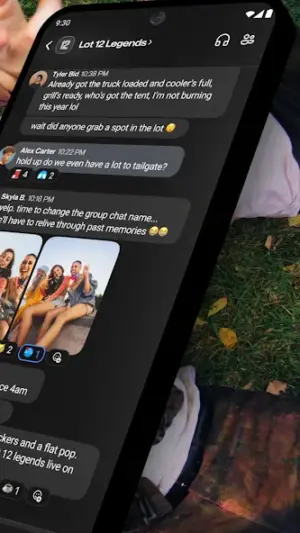
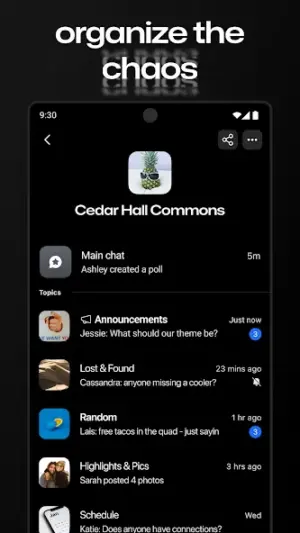


About GroupMe
Have you ever wanted an easy way to keep in touch with friends and family, no matter where they are? With GroupMe, you can chat, share photos, and stay connected effortlessly. This beginner-friendly walkthrough will guide you through the app's features and install process.
Related in Communication: BiP – Messenger, Video Call · FREE ADBLOCKER BROWSER · Tor Browser
| App Name | GroupMe |
|---|---|
| Version | Latest |
| Developer | GroupMe |
| Package Name | com.groupme.android |
| Category | Communication |
| Size | Varies with device |
| Downloads | N/A |
| Rating | 4.6 |
| Android Version | Varies |
| Updated | Jul 20, 2026 |
Overview
GroupMe is a communication app that helps you connect with the people who matter most in your life. Whether you're organizing a group outing or just catching up with friends, GroupMe makes chatting simple and fun. Since its launch, it has gained popularity for its user-friendly interface and practical features that cater to various social scenarios.
The app offers group messaging capabilities, enabling users to create groups for any purpose—be it for friends, family gatherings, work projects, or hobbies. You can also send direct messages if you prefer one-on-one conversations. It supports sharing images and videos too, allowing users to share precious moments easily.
What sets GroupMe apart from other messaging apps is its ability to keep everyone in the loop without overwhelming them with notifications. Users can mute or customize alert settings for each group chat according to their preferences. It’s designed to fit seamlessly into your daily routine while ensuring meaningful connections.
GroupMe is free to use and available on various devices, making it accessible whether you’re at home or on the go. Plus, it features universal architecture support so that it works well on different Android devices without issues. With regular updates and improvements from the developers at GroupMe, users can expect a reliable experience every time.
So if you're looking for a way to strengthen your connections while having fun chatting with your loved ones, GroupMe might just be what you need!
Who Is GroupMe For?
GroupMe is perfect for anyone who wants a simple way to communicate with groups of people—whether they're students planning a study session or families coordinating holiday get-togethers. It's also ideal for those who appreciate multimedia sharing within conversations—by allowing files like images and videos in chats.
Real-World Use Cases
- Organizing a group project with classmates by creating a dedicated chat room for discussions and updates.
- Keeping friends informed about weekend plans through easy-to-follow polls and group messages.
- Sharing photos from vacations or family events seamlessly in real-time.
- Catching up with distant relatives by staying connected through private messages or shared group chats.
Features
- Create and join group chats effortlessly.
- Send direct messages for private conversations.
- Share photos and videos instantly.
- Customize notifications to avoid distractions.
- Use emojis and GIFs to express yourself better.
- Access conversations across multiple devices.
- Easily find old messages with search features.
- Participate in polls within group chats for quick decisions.
Performance & Battery
GroupMe performs efficiently across various Android devices thanks to universal architecture compatibility. Users generally report smooth messaging experiences without significant delays or technical glitches during usage.
Privacy & Permissions
As with many messaging applications, privacy considerations are essential when using GroupMe. While specific permissions weren't listed in the metadata provided, it's crucial always to review access requests during installation carefully. Regularly updating your app ensures you'll benefit from enhanced security protocols as they become available.
What’s New
While specific details about recent updates weren’t provided in the metadata, like many communication apps, GroupMe is likely focusing on enhancing user experience based on feedback. Enhancements may include better performance stability or new features aimed at improving connectivity among users.
How to Install
- Open your device’s web browser and navigate to a reputable APK download site where GroupMe is available.
- Download the APK file; ensure it’s from a trusted source to avoid malware.
- Before installation, go to your phone’s settings > Security > Enable ‘Unknown Sources’ if not already done (this allows installations outside of Google Play).
- Locate the downloaded APK file in your device’s file manager or downloads folder.
- Tap on the file and follow the installation prompts that appear on-screen.
- Once installed, open GroupMe from your apps menu.
- Create an account using either your email or phone number to start using the app!
Pros
- User-friendly interface suitable for beginners.
- Supports both group chats and individual messaging.
- Allows multimedia sharing such as images/videos.
- Highly customizable notification settings.
- Free of charge without hidden fees.
Cons
- May have limited functionalities compared to bigger mainstream messaging apps.
- User privacy concerns may arise due to lack of featured permissions transparency.
- Device performance can vary based on specifications.
- Occasionally unreliable internet connectivity affects message delivery.
Download GroupMe APK
Free · Safe · Verified APK download
Frequently Asked Questions
Is my personal data safe when using GroupMe?
While GroupMe has security measures in place, always be cautious about what personal information you share within any messaging app.
Do I need an internet connection?
Yes! GroupMe requires an internet connection (Wi-Fi or mobile data) to send messages.
How do I update GroupMe after installation?
You can update by visiting the same download site where you obtained the APK or by checking in-app notifications related to updates.
# What storage space does GroupMe require?
# The size of GroupMe varies depending on your device which ensures optimized performance across different platforms.
Final Thoughts
|If you're seeking an accessible platform that brings people together through easy communication methods like texting, photo-sharing & polling—all wrapped up nicely within one app: Give GroupMe a try today! You're bound to find it meets all communication needs pleasantly.|
Related Apps
More apps coming soon.
Disclaimer
|This article is not affiliated with nor endorsed by the developers of GroupMe. Use this APK responsibly by downloading it only from trusted sites.|
All Versions of GroupMe
Frequently Asked Questions
Yes. GroupMe is scanned before publishing. Our pipeline verifies each file.
Download the APK, enable 'Install from Unknown Sources' in Settings > Security, then tap the file.
Latest version is Latest.
Requires Android 5.0+.
Yes, completely free.
APKs let you install apps not in your region, use specific versions, or install without Google Play.
Related News Articles

GroupMe Alternative
Apps similar to GroupMe that you may also like.


User Reviews
Compatibility Checker
GroupMe requires Android 5.0+ or higher. Select your device version to check.
Write a Review