
X Browser -Light & Super fast APK
byteman.suVaries with device · Free · Safe · Verified
Share This App
Scan to Download
Scan with Android camera
Screenshots

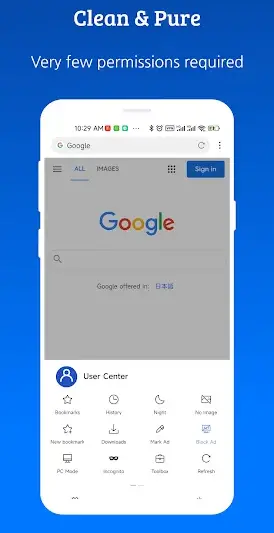
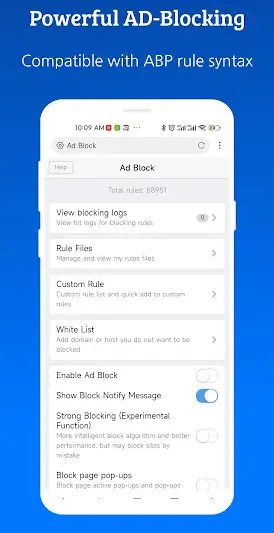
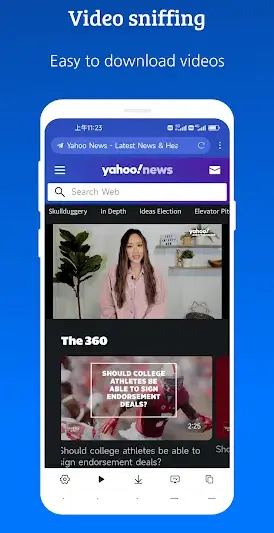
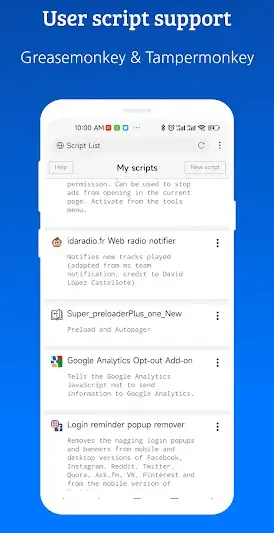
About X Browser -Light & Super fast
Are you ready to explore the world of fast and efficient web browsing? If you've just installed your first APK, X Browser is a fantastic place to start. This lightweight browser offers a smooth experience without weighing down your device.
Related in Communication: Zangi – Private Messenger · Opera Mini: Fast Web Browser · Link Messenger
| App Name | X Browser -Light & Super fast |
|---|---|
| Version | Latest |
| Developer | byteman.su |
| Package Name | com.xbrowser.play |
| Category | Communication |
| Size | Varies with device |
| Downloads | N/A |
| Rating | 4.4 |
| Android Version | Varies |
| Updated | Jul 16, 2026 |
Overview
X Browser, developed by byteman.su, is designed for users who want speed and simplicity in their online activities. It stands out with its small size, making it suitable for devices with limited storage. With its user-friendly interface, even beginners can navigate their way around effortlessly. Whether you're checking emails or streaming videos, X Browser aims to deliver a swift experience without compromising on quality.
The application boasts a variety of features that cater to both casual web surfers and those who require more robust functionalities. It includes an ad blocker to ensure your browsing is not interrupted by unwanted advertisements, creating a smoother experience, especially when watching videos or accessing content-heavy websites.
What’s truly appealing about X Browser is the versatility it offers to users across different Android devices. Compatibility varies as it supports a broad range of Android versions and architectures. This universality means you can enjoy its benefits regardless of whether you have a newer or older device.
Regular updates are crucial for any app’s performance and security, and X Browser keeps up with the times with its recent updates ensuring improved user experience and functionality enhancements. The last update was released on July 16, 2026, emphasizing commitment towards evolving with user needs.
In essence, X Browser enables seamless web navigation that feels intuitive and quick. As a newly installed APK on your device, it's equipped to guide you through the digital landscape efficiently.
Who Is X Browser -Light & Super fast For?
X Browser is perfect for anyone looking for an efficient way to browse the internet without unnecessary complexities. It's especially suited for those with lower-end devices who need an app that won’t hog resources but still allows for enjoyable web surfing experiences. Whether you're a student needing quick research capabilities or someone who simply enjoys using apps without clutter, this browser fits seamlessly into daily routines.
Real-World Use Cases
- Easily stream videos on platforms like YouTube without interruptions caused by ads.
- Conduct online research quickly thanks to speedy page loads—perfect for students or professionals alike.
- Download videos conveniently directly onto your phone—a useful feature when traveling without consistent internet access.
- Navigating social media more smoothly by blocking distracting advertisements enhances focus while scrolling through feeds.
Features
- Lightweight design ensuring minimal impact on device performance.
- Fast loading times for quicker access to your favorite sites.
- Built-in ad blocker that enhances focus during browsing.
- Ability to download videos directly from various platforms.
- User-friendly interface that’s easy for anyone to master.
- Universal architecture supporting numerous Android devices.
- Privacy-focused browsing without excessive data requests.
- Minimal permissions required for installation and use.
Performance & Battery
While exact performance benchmarks aren’t available in this context, users can expect fast load times and quick navigation due to X Browser's lightweight nature. It optimizes resource usage effectively while maintaining responsiveness even on less powerful devices.
Privacy & Permissions
X Browser does not explicitly list any permissions required upon installation; however, it maintains a good reputation regarding user privacy by minimizing data collection practices common in more intrusive applications. As always with installing APKs from third-party sources, ensure you're downloading from reliable platforms and keep security settings updated.
What’s New
While specific details about recent changes aren't provided in the app listing, it's clear that ongoing updates like those from July 2026 typically enhance overall performance stability and user interface improvements. Users can generally anticipate better loading speeds and additional features based on feedback from prior versions.
How to Install
- Download the APK file from a trusted source—ensure safety by avoiding unknown or unofficial websites.
- Before you install anything new, check your device settings: go to Settings > Security > Enable ‘Install Unknown Apps’ for your chosen source (like your file manager).
- Once downloaded, open the APK file from your notification bar or file manager.
- Review any permissions requested—though none are specifically listed here; be cautious; ensure they align with expected functionality.
- If prompted, tap ‘Install’—this process may take a few moments while the app installs.
- After installation completes, click ‘Open’ or find X Browser in your apps list.
- You may want to adjust settings within the app according to your preferences before diving into browsing!
Pros
- Extremely lightweight footprint reducing impact on storage.
- Fast loading times enhance overall usability.
- Ad blocking capabilities provide uninterrupted browsing pleasure.
- Video downloading feature increases flexibility when viewing multimedia.
- User-friendly layout perfect for beginners.
Cons
- Lack of detailed information about permissions raises safety concerns.
- No specified changelog could affect user trust regarding updates.
- Limited support may be difficult if technical issues arise.
- Not much customization options compared to larger browsers.
Download X Browser -Light & Super fast APK
Download X Browser -Light & Super fast vLatest APK
Free · Safe · Verified APK download
Frequently Asked Questions
Is it safe to install X Browser?
Yes! If you download it from reliable sources like well-known repositories.
What permissions does X Browser ask for?
No specific permissions are listed; always check after installation though.
Will I receive updates once I install it?
'Yes; but ensure you keep checking back manually unless auto-updates are enabled through your source.'
Does this browser take up too much space?
'No! It's designed specifically to remain lightweight.'
'Can I customize settings within the browser?'
'While options may be limited compared to larger competitors, some settings are adjustable.'
'How does ad blocking work in this browser?'
'Integrated automatically makes browsing smoother.'
'Can I browse privately?'
'Yes! With reduced data tracking overall.'
Final Thoughts
'If you’re just beginning your journey into Android applications or looking for an alternative browser option that's light and efficient—give X Browser a try! Its combination of speed and simplicity may make it one of your go-to choices!'
Related Apps
More apps coming soon.
Disclaimer
This article is intended solely as an informational resource about X Browser – Light & Super Fast and does not imply any affiliation or endorsement by Byteman.su. Users assume full responsibility when installing any APKs.
All Versions of X Browser -Light & Super fast
Frequently Asked Questions
Yes. X Browser -Light & Super fast is scanned before publishing. Our pipeline verifies each file.
Download the APK, enable 'Install from Unknown Sources' in Settings > Security, then tap the file.
Latest version is Latest.
Requires Android 5.0+.
Yes, completely free.
APKs let you install apps not in your region, use specific versions, or install without Google Play.
Related News Articles

X Browser -Light & Super fast Alternative
Apps similar to X Browser -Light & Super fast that you may also like.


User Reviews
Compatibility Checker
X Browser -Light & Super fast requires Android 5.0+ or higher. Select your device version to check.
Write a Review