
Incognito Browser - Go Private APK
CoinCircle, Inc.Varies with device · Free · Safe · Verified
Share This App
Scan to Download
Scan with Android camera
Screenshots

About Incognito Browser - Go Private
In a world where data usage can skyrocket during travel, having a reliable browser that prioritizes privacy without consuming precious bandwidth is essential. The Incognito Browser – Go Private offers users a solution for secure web surfing while keeping offline functionality in mind and saving on data costs.
Related in Communication: X Browser -Light & Super fast · Contacts · Zangi – Private Messenger
| App Name | Incognito Browser – Go Private |
|---|---|
| Version | Latest |
| Developer | CoinCircle, Inc. |
| Package Name | com.androidbull.incognito.browser |
| Category | Communication |
| Size | Varies with device |
| Downloads | 5M+ |
| Rating | 4.7 |
| Android Version | Varies |
| Updated | May 4, 2026 |
Overview
The Incognito Browser – Go Private stands out as an ideal communication tool for those who value privacy and security. Developed by CoinCircle, Inc., this free browser not only provides robust ad-blocking features but also emphasizes offline capability, enabling users to browse without the constant need for an internet connection. With over five million downloads and an impressive rating of 4.7, it caters to individuals from various walks of life—be it travelers looking for safe online experiences or data-conscious users seeking efficiency.
Designed to function seamlessly across different devices, the app automatically adapts to varying screen sizes and Android versions while maintaining a universal architecture. This versatility is beneficial for people on the go, allowing them to access previously loaded content even in areas with limited connectivity.
Security remains at the forefront of this browser's design. The Incognito mode enables private browsing sessions that do not store history, cookies, or cache, ensuring your online activity remains confidential—a must-have feature when using public Wi-Fi networks often found in hotels and cafes.
While functionality doesn't seem compromised in terms of user experience, potential users will find they can navigate the app smoothly regardless of their previous tech experience. An intuitive layout makes it easy to enjoy everything this ultra-secure browser has to offer without confusion or unnecessary complications.
In addition to its core features promoting security and privacy, the Incognito Browser has built-in tools dedicated to enhancing user experience by minimizing unwanted ads and improving loading times through efficient resource management. This is particularly valuable for users concerned with data usage while exploring new locales.
Who Is Incognito Browser – Go Private For?
The Incognito Browser – Go Private is perfect for any user seeking a secure browsing experience without compromising usability—especially those who travel frequently. Whether you’re accessing sensitive information over public Wi-Fi or simply prefer a private browsing environment while exploring online content during off-the-grid moments, this app serves as a reliable companion.
Real-World Use Cases
- A traveler in Europe wanting to look up maps or guides without using cellular data during sightseeing trips can rely on offline access after preloading pages.
- A student using public libraries may want to conduct research securely without risking personal data exposure on shared computers.
- A hiker venturing into remote areas wishes to check weather reports once before losing connectivity—using cached information available on the browser reigns supreme here.
- An individual living in low-signal zones aims at reducing data consumption while staying connected—this browser lets them browse safely with minimal resource use.
Features
- Secure incognito browsing without storing search history.
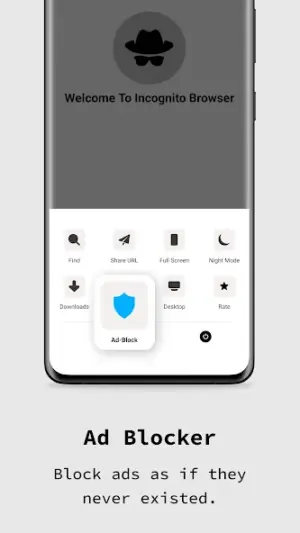
- Robust ad-blocker minimizes interruptions while navigating.
- Universal architecture ensures compatibility across multiple devices.
- Offline caching allows access to previously visited sites without data.
- User-friendly interface designed for easy navigation.
- No tracking cookies stored for enhanced privacy protection.
- Ability to toggle between regular and incognito modes easily.
- Free access with no hidden charges or subscriptions required.
Performance & Battery
While direct speed tests cannot be cited here, anecdotal evidence suggests that due to its ad-blocking capabilities paired with optimized data caching techniques, page load times tend to be noticeably faster than many competing browsers—particularly in resource-constrained environments.
Privacy & Permissions
As noted above, this browser does not list explicit permissions; however, traditional best practices indicate awareness of apps needing certain access rights potentially linked to location services or storage management. Users are always encouraged to download APKs from verified sources only and review permission requests thoroughly before granting them.
What’s New
While specific details about recent updates are not provided, continuous improvements suggest enhancements likely focusing on stability, security protocols, and user-interface refinements based on evolving web standards. Regular updates assure users that the app stays current with security threats while optimizing performance based on user feedback.
How to Install
- Open Google Play Store or another trusted APK source.
- Search for ‘Incognito Browser – Go Private’.
- Select the application from search results.
- Tap ‘Install’ and wait for the download complete.
- Once installed, open the app from your device’s application menu.
- If prompted, allow necessary permissions for optimal functionality.
Pros
- Excellent privacy features protecting user identity
- Effective ad-blocker enhances website loading speed
- Easy-to-use interface fosters seamless navigation
- Offers offline capabilities saving valuable data
- Regular updates ensure ongoing security improvements
Cons
- Some advanced features may be limited compared to major browsers
- Offline options depend heavily on prior website caching habits
- Potential issues might arise when handling non-standard web formats
- Ad-blocking might occasionally interfere with desired site functionalities
Download Incognito Browser – Go Private APK
Download Incognito Browser – Go Private vLatest APK
Free · Safe · Verified APK download
Frequently Asked Questions
Is Incognito Browser truly private?
Yes! It does not store browsing history or cookies.
Can I use it offline?
Yes! Once you preload sites you can view cached content later.
Does it work well in low-data situations?
Absolutely! The app is designed for efficient use of resources.
'How do I access my favorite sites quickly?
'Bookmarking options are available within the app interface.
Are there ads when using this browser?
Ad-blocking features minimize interruptions significantly.
Is there customer support if needed?
For any specific inquiries visit their support page via official channels.
Final Thoughts
'With its focus on offline utility alongside unwavering privacy measures, Incognito Browser – Go Private proves itself as an indispensable tool for anyone seeking a secure browsing experience when traveling or managing limited connectivity conditions.'
Related Apps
More apps coming soon.
Disclaimer
'This article is purely informational and independent; we are not affiliated with CoinCircle, Inc., nor do we bear responsibility regarding any APK downloads.'
All Versions of Incognito Browser - Go Private
Frequently Asked Questions
Yes. Incognito Browser - Go Private is scanned before publishing. Our pipeline verifies each file.
Download the APK, enable 'Install from Unknown Sources' in Settings > Security, then tap the file.
Latest version is Latest.
Requires Android 5.0+.
Yes, completely free.
APKs let you install apps not in your region, use specific versions, or install without Google Play.
Related News Articles


Incognito Browser - Go Private Alternative
Apps similar to Incognito Browser - Go Private that you may also like.


User Reviews
Compatibility Checker
Incognito Browser - Go Private requires Android 5.0+ or higher. Select your device version to check.
Write a Review