
PowerDirector - Video Editor APK
Cyberlink CorpVaries with device · Free · Safe · Verified
Share This App
Scan to Download
Scan with Android camera
Screenshots
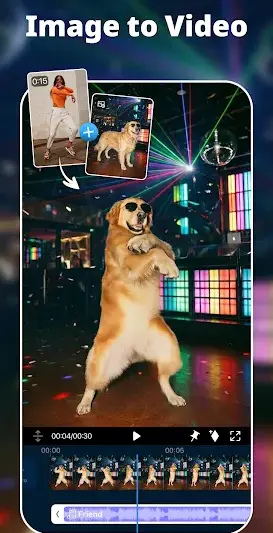

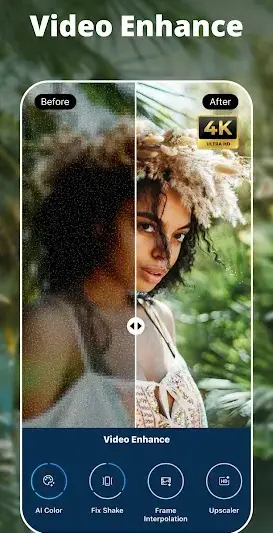


About PowerDirector - Video Editor
If you're looking to turn your videos into cinematic masterpieces, PowerDirector – Video Editor might just be the app for you. This powerful tool is perfect for aspiring filmmakers or casual users wanting to enhance their video content with ease. However, if you're a seasoned editor seeking advanced functionality beyond standard features, you may want to consider alternatives.
Related in Video Players: Edits: Video Editor · TikTok Studio · MX Player
| App Name | PowerDirector – Video Editor |
|---|---|
| Version | Latest |
| Developer | Cyberlink Corp |
| Package Name | com.cyberlink.powerdirector.DRA140225_01 |
| Category | Video Players |
| Size | Varies with device |
| Downloads | N/A |
| Rating | 4.2 |
| Android Version | Varies |
| Updated | Jul 27, 2026 |
Overview
PowerDirector – Video Editor by Cyberlink Corp is a versatile application that caters to varying levels of video editing expertise. With its user-friendly interface and sophisticated tools, this app allows anyone from beginners to experienced editors to craft high-quality videos. The latest version brings refined AI effects and a green screen feature that enhances creative possibilities significantly.
One standout aspect of PowerDirector is its flexibility with device compatibility; it operates universally across various Android devices while automatically adjusting performance based on your hardware specifications. Furthermore, continuous updates ensure that users experience the latest features and improvements without needing separate downloads.
The integration of AI has revolutionized the editing experience. Features like automated enhancements and simplified effects integration allow even novices to achieve professional-looking results. Whether you're creating content for social media or preparing an engaging presentation, the efficiency of PowerDirector can save precious editing time.
However, despite its robust offering, newcomers should note that some advancements in editing capabilities may require a learning curve. Users will need patience and practice to fully harness the software's potential. PowerDirector aims to provide superior results, making it crucial for users to understand the tools at their disposal for optimal creativity.
Who Is PowerDirector – Video Editor For?
PowerDirector is designed for anyone who wants a robust video editing solution – from casual users creating personal videos to budding influencers crafting content for platforms like Instagram or TikTok. Its extensive features also cater well to educators looking to make engaging teaching materials or businesses wanting polished promotional material.
Real-World Use Cases
- Edit travel vlogs with stunning transitions and music overlays.
- Create tutorials showcasing step-by-step processes in visually appealing formats.
- Produce social media clips ready for sharing on platforms like Facebook or YouTube.
- Compile family memories into polished year-end videos.
Features
- AI-powered effects for automated video enhancements
- Green screen support for seamless background changes
- User-friendly interface with intuitive controls
- A vast array of templates and themes for quick edits
- High-quality exports up to 4K resolution
- Audio editing capabilities with multi-track support
- Access to stock photos and music for enriched projects
- Easily-shareable videos on popular social media platforms
- Open Google Play Store on your Android device.
- Search for ‘PowerDirector – Video Editor’.
- Select the app from the search results.
- Tap ‘Install’ and wait for the download to complete.
- Once installed, open the app and follow any setup prompts.
- User-friendly interface suitable for all skill levels
- Robust features including AI effects and green-screen support
- Frequent updates providing new functionalities
- Support for 4K video exports enhances visual quality
- Rich library of templates speeds up project creation
- Some advanced features may overwhelm beginners
- Learning curve required for full effectiveness
- Periodic ads can interrupt workflow in free mode
- Limited customization options compared to professional software
Performance & Battery
Users generally report smooth performance across devices; however, actual experience may vary based on specific Android models and configurations. Regular updates further mitigate bugs while enhancing operational efficiencies, ensuring an overall reliable editing interface.
Privacy & Permissions
Although specific permissions are not listed, it's standard practice that apps requesting access include permissions related to media storage and camera use. To maintain safety when using APKs, always download from trusted sources like Google Play Store to reduce exposure risk.
What’s New
While detailed changelog notes are not provided, recent updates typically focus on enhancing user experience with new effects and performance optimizations. Continuous adjustments aim at ensuring stability across various devices and introducing trending features relevant in the modern editing environment.
How to Install
Pros
Cons
Download PowerDirector – Video Editor APK
Download PowerDirector – Video Editor vLatest APK
Free · Safe · Opens Google Play / APK source
Frequently Asked Questions
Can I use PowerDirector offline?
Yes, once downloaded, many functions can be used offline.
Is there a subscription fee?
The base version is free but additional features may require payment.
Does it support video exports over 1080p?
Yes, you can export videos in up to 4K resolution.
Can I share my projects directly from the app?
Absolutely! Videos can be shared directly on various social media platforms.
Are there tutorials available within the app?
Yes, helpful guides and tutorials are integrated into the app.
What types of media can I import into PowerDirector?
You can import videos, photos, audio tracks including MP3 files.
Final Thoughts
'Is PowerDirector – Video Editor worth installing? Absolutely! If you're eager to create visually stunning videos with ease while having access to powerful tools at your fingertips,' this app caters effectively to both novice creators looking for straightforward functionality as well as those needing more advanced options.
Related Apps
More apps coming soon.
Disclaimer
'This article is not affiliated with Cyberlink Corp nor does it represent their claims about PowerDirector.' Always download APKs responsibly.
All Versions of PowerDirector - Video Editor
Frequently Asked Questions
Yes. PowerDirector - Video Editor is scanned before publishing. Our pipeline verifies each file.
Download the APK, enable 'Install from Unknown Sources' in Settings > Security, then tap the file.
Latest version is Latest.
Requires Android 5.0+.
Yes, completely free.
APKs let you install apps not in your region, use specific versions, or install without Google Play.
Related News Articles

PowerDirector - Video Editor Alternative
Apps similar to PowerDirector - Video Editor that you may also like.


User Reviews
Compatibility Checker
PowerDirector - Video Editor requires Android 5.0+ or higher. Select your device version to check.
Write a Review