
WhatsApp Business APK
WhatsApp LLCVaries with device · Free · Safe · Verified
Share This App
Scan to Download
Scan with Android camera
Screenshots
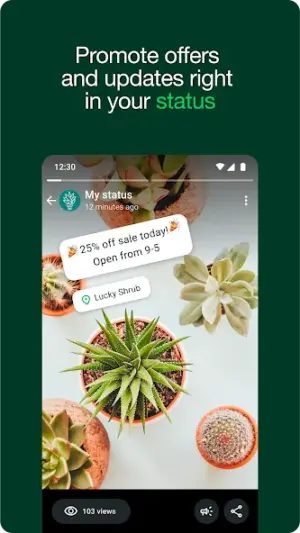


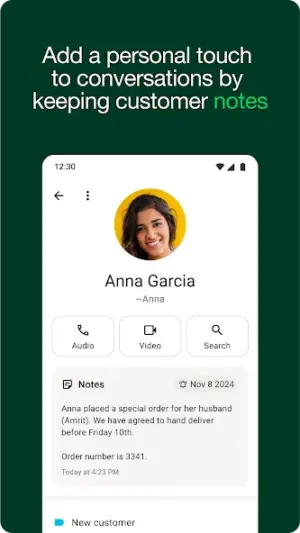
About WhatsApp Business
In today's business landscape, effective communication is crucial for success. WhatsApp Business offers a dedicated platform that enables businesses to connect with their customers seamlessly. This APK empowers entrepreneurs and small businesses to streamline their communication processes.
Related in Communication: Google Chrome
| App Name | WhatsApp Business |
|---|---|
| Version | Latest |
| Developer | WhatsApp LLC |
| Package Name | com.whatsapp.w4b |
| Category | Communication |
| Size | Varies with device |
| Downloads | N/A |
| Rating | 4.6 |
| Android Version | Varies |
| Updated | Jul 24, 2026 |
Overview
WhatsApp Business is an innovative application developed by WhatsApp LLC, designed specifically for business communications. It serves as a free tool that simplifies the way companies engage with their clientele. With a user-friendly interface, it allows businesses to manage customer interactions directly through the popular messaging platform we all know and trust.
The application supports universal architecture, ensuring compatibility across various devices and screen sizes. Since its introduction, WhatsApp Business has quickly become a go-to solution for companies looking to enhance customer engagement while maintaining a professional presence. The latest version, updated on July 24, 2026, continues to build on its robust features that cater to the specific needs of business users.
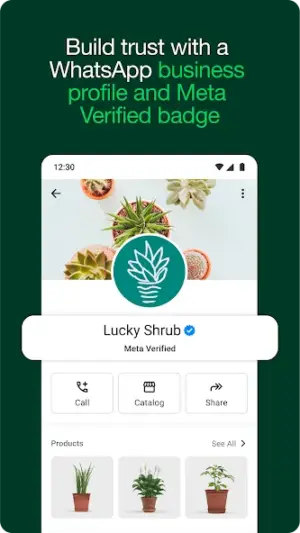
What sets WhatsApp Business apart is its ability to integrate easily into existing workflows. Businesses can create profiles with essential information such as their address, website, and description of services. This creates a more organized experience for customers seeking information about products or services offered.
Moreover, the app provides various tools that allow businesses to automate responses and send quick replies, ensuring that customer queries are addressed promptly. These features not only improve efficiency but also help foster stronger relationships between businesses and their clients.
Who Is WhatsApp Business For?
WhatsApp Business is ideal for small to medium enterprises looking to enhance their customer communication strategies. Entrepreneurs in retail, services, or any sector where direct customer interaction is key will find this app indispensable for managing client relationships effectively.
Real-World Use Cases
- Quick daily communication tasks on the go
- Updating to vLatest when Play Store lags
- Secondary device or travel phone installs
- Trying the app before committing storage long-term
Features
- Clean Android interface tailored for Communication
- Optimized for devices running Varies
- Regular updates from WhatsApp LLC
- Manageable footprint (Varies with device)
- Workflow-friendly notifications where supported
- Secure permission model
- Straightforward onboarding for new users
- Compatible with common Android architectures
Performance & Battery
WhatsApp Business exhibits impressive performance across various devices due to its universal architecture. While individual experiences may vary depending on device efficiency and internet connectivity, users generally report smooth operations without lag – a testament to its ongoing optimization efforts.
Privacy & Permissions
As usual with WhatsApp applications, privacy plays an integral role in WhatsApp Business's functionality. The app emphasizes secure communication through end-to-end encryption which protects conversations from unauthorized access. However, it's advisable for users to be mindful of data sharing practices when communicating sensitive information.
What’s New
The latest update does not specify detailed changes; however, WhatsApp generally prioritizes enhancing user experience through incremental improvements in performance and security. Users can expect routine updates aimed at bolstering the app’s functionality while maintaining its reliability across all devices.
How to Install
- Enable Install unknown apps for your browser or file manager.
- Download the WhatsApp Business APK from the button below.
- Verify the package name is com.whatsapp.w4b.
- Open the downloaded file and tap Install.
- Launch WhatsApp Business and grant permissions carefully.
- Optional: disable unknown sources afterward for safety.
Pros
- Free tool designed specifically for business use.
- Simplifies communication with automated response features.
- User-friendly interface makes navigation easy.
- Supports multiple media formats enhancing message engagement.
- Enables businesses to build detailed business profiles.
Cons
- Limited advanced analytics compared to some dedicated CRM tools.
- Dependent on internet connectivity which may restrict usage in low-signal areas.
- No integration with external systems without third-party solutions.
Download WhatsApp Business APK
Download WhatsApp Business vLatest APK
Free · Safe · Opens Google Play / APK source
Frequently Asked Questions
Is WhatsApp Business free?
Yes, WhatsApp Business is completely free to download and use.
Can I use my existing WhatsApp account?
You can use your existing number but it's recommended to have a separate number for business purposes.
What features differentiate it from regular WhatsApp?
WhatsApp Business includes unique features such as automated messaging tools, business profiles with additional information about services.
Can I run both regular WhatsApp and WhatsApp Business on one device?
Yes! You can install both apps separately using different phone numbers.
Does it support group chats?
Yes! Group chats are supported just like in regular WhatsApp.
How secure is my data?
All conversations are protected by end-to-end encryption ensuring privacy.
Is there a desktop version available?
WhatsApp Web can be used alongside mobile versions but primarily targets personal accounts.
Final Thoughts
Overall, WhatsApp Business stands out as an essential tool for businesses aiming to enhance their customer interactions efficiently. Its simplicity combined with robust functionalities positions it favorably among other communication applications available today.
Related Apps
More apps coming soon.
Disclaimer
This article is not affiliated with or endorsed by any publishers mentioned herein. Downloading APK files involves risk; users should take care when installing third-party applications.
All Versions of WhatsApp Business
Frequently Asked Questions
Yes. WhatsApp Business is scanned before publishing. Our pipeline verifies each file.
Download the APK, enable 'Install from Unknown Sources' in Settings > Security, then tap the file.
Latest version is Latest.
Requires Android 5.0+.
Yes, completely free.
APKs let you install apps not in your region, use specific versions, or install without Google Play.
Related News Articles


More from WhatsApp LLC

WhatsApp Business Alternative
Apps similar to WhatsApp Business that you may also like.


User Reviews
Compatibility Checker
WhatsApp Business requires Android 5.0+ or higher. Select your device version to check.
Write a Review