WPS Office-PDF, Word, Sheet APK
WPS SOFTWARE PTE. LTD.Varies with device · Free · Safe · Verified
Share This App
Scan to Download
Scan with Android camera
Screenshots
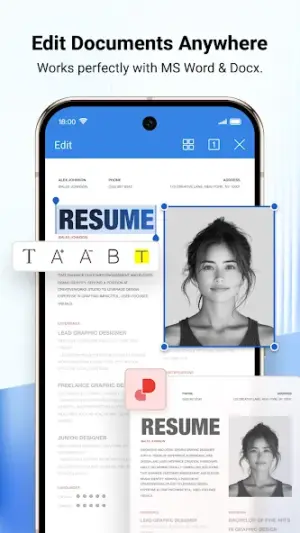

About WPS Office-PDF, Word, Sheet
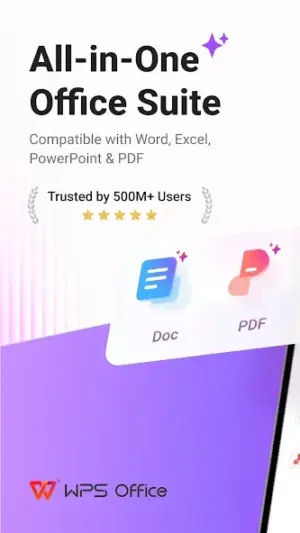
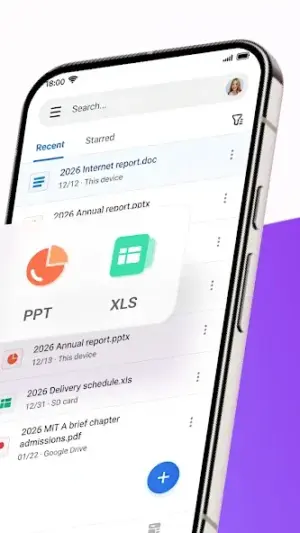
In a world brimming with digital documents, WPS Office-PDF, Word, Sheet emerges as your trusty companion for productivity and creativity! Whether you’re drafting reports, editing PDFs, or conjuring up stunning spreadsheets, this app promises to keep your workflow seamless and enjoyable.
Related in Productivity: AI Chatbot – Nova · DigiLocker · Perplexity – Ask Anything
| App Name | WPS Office-PDF, Word, Sheet |
|---|---|
| Version | Latest |
| Developer | WPS SOFTWARE PTE. LTD. |
| Package Name | cn.wps.moffice_eng |
| Category | Productivity |
| Size | Varies with device |
| Downloads | N/A |
| Rating | 4.4 |
| Android Version | Varies |
| Updated | Jul 20, 2026 |
Overview
WPS Office-PDF, Word, Sheet is more than just a mere office suite; it’s a vibrant ecosystem designed to elevate your document management experience. With a user-friendly interface tailored for both novices and seasoned professionals alike, this powerful tool helps you tackle daily tasks efficiently.
One of the standout features of WPS Office is its versatility. You’ll find robust support for various file formats including DOCX, PDF, XLSX, and PPT. This means you can create, edit, and share documents across different platforms without missing a beat. Additionally, the integration of AI tools within the app adds a layer of innovation allowing users to streamline their writing processes effortlessly.
Moreover, this app caters to the needs of individuals on the go with its scanning capabilities. Quickly convert physical documents into editable formats with just a few taps—ideal for students and business professionals alike! Coupled with cloud storage integration, WPS Office makes accessing important files from any place an absolute breeze.
WPS Office also emphasizes collaboration, a crucial aspect in today's dynamic work environments. By seamlessly sharing files and collaborating in real-time with peers or team members across industries, the app fosters creativity while maintaining productivity. It’s more than just software; it's your partner in getting things done effectively!
Lastly, being free-to-use only sweetens the deal. While premium features are available via subscription for power users seeking enhanced functionalities like advanced PDF editing or additional templates, the essential tools are presented at no cost—a true value proposition.
Who Is WPS Office-PDF, Word, Sheet For?
WPS Office-PDF is perfect for anyone who regularly works with documents—be it students who need to draft essays or professionals who prepare reports and presentations. Additionally, those managing small businesses will find value in its collaborative features that help streamline teamwork.
Real-World Use Cases
- A student scanning lecture notes into editable PDFs for easy review later.
- A business professional creating impactful presentations on-the-go during travel.
- A writer utilizing AI suggestions to enhance their narrative style while composing articles or reports.
- A small team collaborating in real-time on project updates via shared spreadsheets stored in the cloud.
Features
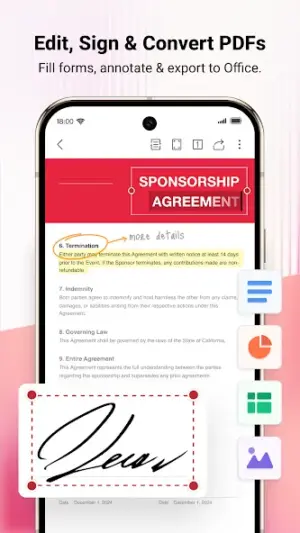
- Create and edit PDF documents seamlessly.
- Support for multiple formats: Word documents (DOC/DOCX), Excel sheets (XLS/XLSX), PowerPoint presentations (PPT/PPTX).
- AI-powered writing assistance to enhance your content creation.
- Document scanning feature to convert physical papers into digital formats.
- Quick PDF conversion options for efficient document handling.
- Intuitive user interface tailored for easy navigation and usability.
- Cloud integration allows access to documents from anywhere at any time.
- Collaborative features that enable real-time editing and sharing with teams.
Performance & Battery
WPS Office-PDF delivers solid performance across various devices without significant lag times during document processing. Given its universal architecture design allowing adaptability across multiple screen sizes ensures users can enjoy a smooth experience whether they're on phones or tablets.
Privacy & Permissions
As privacy remains paramount in today's digital landscape, it's essential to adopt safe APK habits when using applications like WPS Office. While specific permissions have not been listed by developers directly within the app's metadata itself, general practices suggest ensuring that only necessary permissions are granted during installation.
What’s New
While specific details were not provided about recent updates in the app's changelog notes, users can expect continuous improvements focused on enhancing stability and introducing innovative features that respond to community feedback.
Regular updates like these typically include performance enhancements along with new functionalities aimed at making document handling even smoother—a testament to WPS Software's commitment to providing top-notch productivity tools.
How to Install
- Open the Google Play Store on your Android device.
- In the search bar, type ‘WPS Office-PDF’ and press enter.
- Select ‘WPS Office-PDF, Word, Sheet’ from the search results.
- Tap on the ‘Install’ button to download the app onto your device.
- Once installed, open the app and grant necessary permissions when prompted.
Pros
- Robust functionality across multiple document types.
- User-friendly interface suitable for all skill levels.
- Free-to-use model with valuable core features.
- AI-assisted tools enhance text creation efficiency.
- Document scanning feature simplifies digitizing paperwork.
- Collaboration capabilities foster effective teamwork.
Cons
- Limited advanced features may require subscriptions.
- Occasional compatibility issues with rare file types.
- Performance may vary depending on device specifications.
- Some users may find ads intrusive in free versions.
Download WPS Office-PDF, Word, Sheet APK
Download WPS Office-PDF, Word, Sheet vLatest APK
Free · Safe · Opens Google Play / APK source
Frequently Asked Questions
Is WPS Office completely free?
Yes! The basic functionality is available at no cost.
Can I use it offline?
Yes! Most core features can be accessed without an internet connection.
What file formats does it support?
It supports DOC/DOCX, PDF, XLS/XLSX among others.
Is there cloud storage integration?
Absolutely! You can connect various cloud services for easy file access.
How does AI assist in writing?
AI tools offer suggestions to improve clarity and style.
Can I collaborate with others in real-time?
Yes! Shared documents allow simultaneous editing.
Final Thoughts
Embracing WPS Office-PDF means unlocking a world where document management becomes both straightforward and enjoyable. With its array of functions designed to engage users—from drafting imaginative pieces to creating polished business presentations—this app proves itself invaluable for anyone keen on boosting their productivity without breaking the bank!
Related Apps
More apps coming soon.
Disclaimer
This article does not endorse any applications nor does it imply affiliation with any developers mentioned herein. Users should exercise caution when downloading APKs from third-party sources.
All Versions of WPS Office-PDF, Word, Sheet
Frequently Asked Questions
Yes. WPS Office-PDF, Word, Sheet is scanned before publishing. Our pipeline verifies each file.
Download the APK, enable 'Install from Unknown Sources' in Settings > Security, then tap the file.
Latest version is Latest.
Requires Android 5.0+.
Yes, completely free.
APKs let you install apps not in your region, use specific versions, or install without Google Play.
Related News Articles


WPS Office-PDF, Word, Sheet Alternative
Apps similar to WPS Office-PDF, Word, Sheet that you may also like.


User Reviews
Compatibility Checker
WPS Office-PDF, Word, Sheet requires Android 5.0+ or higher. Select your device version to check.
Write a Review