
Microsoft OneDrive APK
Microsoft CorporationVaries with device · Free · Safe · Verified
Share This App
Scan to Download
Scan with Android camera
Screenshots

About Microsoft OneDrive
In a world where our digital lives are constantly expanding, having a reliable cloud storage solution is essential. Microsoft OneDrive elegantly steps into this space, combining convenience and security to keep your precious files and memories close at hand. Whether you're looking to store photos, documents, or videos, OneDrive offers a seamless solution for everyone.
Related in Productivity: Document Scanner – PDF Creator · WPS Office-PDF, Word, Sheet · AI Chatbot – Nova
| App Name | Microsoft OneDrive |
|---|---|
| Version | Latest |
| Developer | Microsoft Corporation |
| Package Name | com.microsoft.skydrive |
| Category | Productivity |
| Size | Varies with device |
| Downloads | N/A |
| Rating | 4.6 |
| Android Version | Varies |
| Updated | Jul 25, 2026 |
Overview
Microsoft OneDrive is more than just a productivity tool; it's your digital vault that provides peace of mind while ensuring easy access to your files from any device. With its universal architecture, the app works harmoniously on various Android devices, adapting to the specific needs of each one. The last update on July 25, 2026, showcases Microsoft's commitment to enhancing user experience with fresh features while maintaining high standards of performance and functionality.
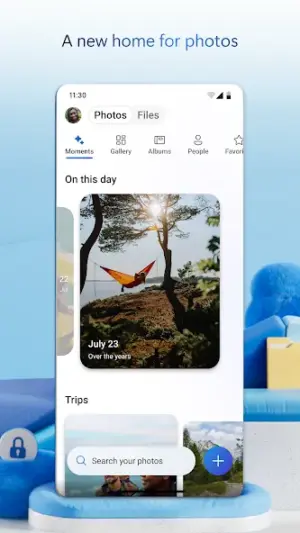
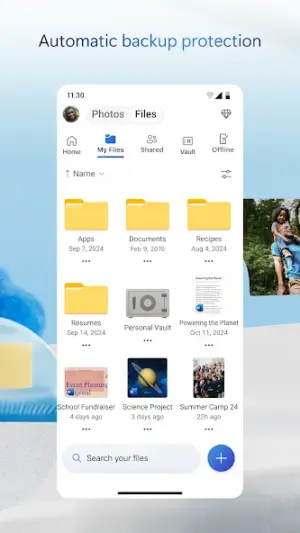
The interface is designed with user-friendliness in mind, presenting an organized hierarchy of folders and files that makes navigating through your stored items as delightful as browsing through your favorite photographs. The app allows you to effortlessly create shareable links for selected files or entire folders, fostering collaboration whether working on group projects or sharing family photos.
What sets OneDrive apart is its focus on keeping things synchronized across all your devices without disrupting your workflow. This means that no matter where you are or which device you're using—be it a smartphone, tablet, or computer—you can enjoy consistent access to your data. OneDrive not only backs up your files but also protects them with robust security measures implemented by Microsoft.
Additionally, OneDrive integrates seamlessly with other Microsoft services like Office 365 and Teams, reinforcing the idea that this app serves as a hub for enhancing both personal and professional productivity. Its design focuses on retention loops encouraging users to come back by making storage and collaboration engaging rather than tedious.
Overall, Microsoft OneDrive emerges as a reliable companion for those who value organization in their digital lives while also needing quick access to their documents anytime and anywhere.
Who Is Microsoft OneDrive For?
Microsoft OneDrive caters to anyone who needs reliable cloud storage solutions—be it students juggling assignments, professionals collaborating on projects, or families wanting secure backups of their cherished memories. It's ideal for those who frequently switch between devices yet crave uninterrupted access to their files.
Real-World Use Cases
- A student stores lecture notes and presentations on OneDrive for easy access across different devices.
- A family uses it to back up vacation photos so that all members can easily share memories without losing them.
- A team collaborates on a project document in real-time using integrated Microsoft Office tools available within OneDrive.
- An entrepreneur saves important business contracts securely while granting clients direct access via shareable links.
Features
- Effortless file synchronization across multiple devices
- User-friendly interface for easy navigation
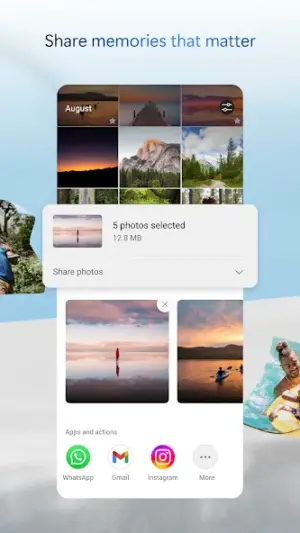
- Shareable links for collaborative work
- Automatic photo and video backup
- Integration with Microsoft Office apps for seamless editing
- Robust security features to protect your data
- Ability to recover deleted files from the recycle bin
- Offline access capabilities allow you to view files without internet
- Search function helps locate files quickly
- Folder sharing options enhance teamwork
Performance & Battery
OneDrive runs smoothly across various Android devices due to its universal architecture designed by Microsoft. Users generally experience fast upload speeds when syncing large photo albums or documents. Additionally, OneDrive’s offline mode ensures continued accessibility even when connectivity is unreliable.
Privacy & Permissions
While specific permissions are not listed directly within the app metadata provided here, standard practice involves granting access only necessary for efficient functioning. Always ensure downloads come from official sources like the Google Play Store while keeping security settings updated.
What’s New
While specific updates were not detailed in the latest changelog, user feedback has shaped many of the organizational tools within OneDrive. Improvements to file management features ensure that accessing shared documents and tracking project progress remains smooth as silk. Users can expect ongoing enhancements in speed and efficiency with regular updates inspired by community input.
How to Install
- Open the Google Play Store on your Android device.
- Search for ‘Microsoft OneDrive’ using the search bar.
- Select the app from the list of results.
- Tap ‘Install’ and wait for the download process to complete.
- Once installed, open the app and sign in or create an account.
Pros
- Simple interface enhances user experience
- Strong integration with Microsoft Office applications
- Robust security keeps data safe
- Collaboration features encourage teamwork
- Automatic backups prevent data loss
Cons
- Requires internet connection for full functionality
- Free storage tier may be limited compared to competitors
- Some users report occasional syncing delays
Download Microsoft OneDrive APK
Download Microsoft OneDrive vLatest APK
Free · Safe · Opens Google Play / APK source
Frequently Asked Questions
Is Microsoft OneDrive free?
Yes, Microsoft OneDrive offers a free version with basic features.
Can I use OneDrive offline?
Yes! You can access previously downloaded files even without internet connectivity.
How much storage do I get with my free account?
'Free accounts typically start with limited storage; check Microsoft's website for current offerings.'
'Can I use OneDrive on my desktop?'
'Absolutely! There are versions available for both Windows and macOS.'
'What happens if I delete a file? Is it gone forever?'
'No! Deleted files go into the recycle bin section where you can restore them within a certain period.'
'Can I share my files with others?'
'Yes! You can easily create shareable links or invite people directly through the app.'
Final Thoughts
'Microsoft OneDrive delivers not only convenience but also an engaging way of storing memories and important work seamlessly across all devices. It stands strong against competitors by offering rich features coupled with robust security measures—truly an essential tool in today's digital landscape.'
Related Apps
Disclaimer
'This article is not affiliated with Microsoft Corporation. Users should consider all APK responsibilities when downloading applications from any source.'
All Versions of Microsoft OneDrive
Frequently Asked Questions
Yes. Microsoft OneDrive is scanned before publishing. Our pipeline verifies each file.
Download the APK, enable 'Install from Unknown Sources' in Settings > Security, then tap the file.
Latest version is Latest.
Requires Android 5.0+.
Yes, completely free.
APKs let you install apps not in your region, use specific versions, or install without Google Play.
Related News Articles


More from Microsoft Corporation


Microsoft OneDrive Alternative
Apps similar to Microsoft OneDrive that you may also like.


User Reviews
Compatibility Checker
Microsoft OneDrive requires Android 5.0+ or higher. Select your device version to check.
Write a Review