
Google Classroom APK
Google LLCVaries with device · Free · Safe · Verified
Share This App
Scan to Download
Scan with Android camera
Screenshots
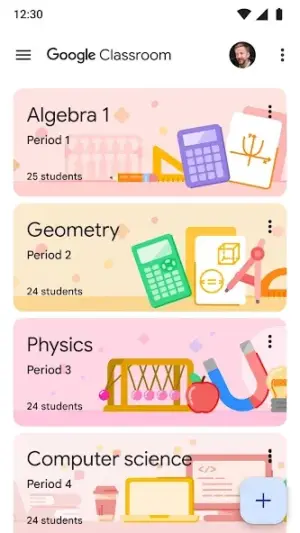

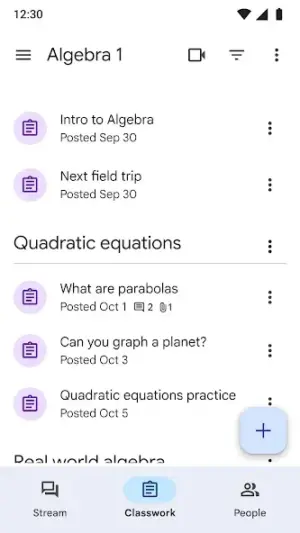
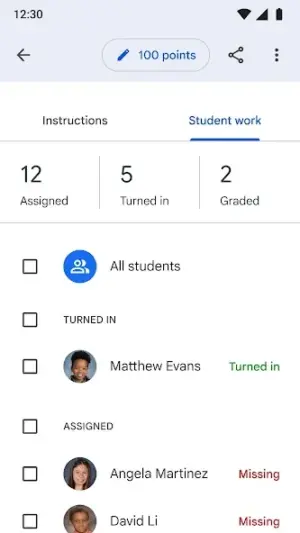
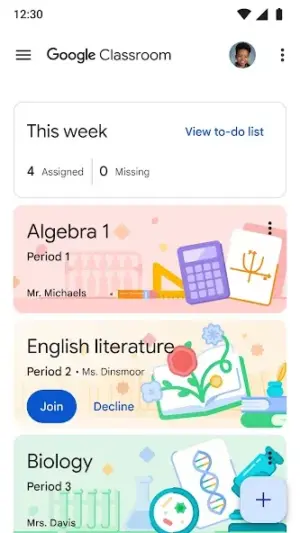
About Google Classroom
In today's fast-paced educational landscape, staying connected and organized is crucial for success. Google Classroom empowers students to manage their classes, assignments, and collaborations seamlessly from their devices, making it an essential tool for anyone in academia.
Related in Education: ELSA Speak: English Learning · Busuu: Learn & Speak Languages · Babbel – Learn Languages
| App Name | Google Classroom |
|---|---|
| Version | Latest |
| Developer | Google LLC |
| Package Name | com.google.android.apps.classroom |
| Category | Education |
| Size | Varies with device |
| Downloads | N/A |
| Rating | 2.8 |
| Android Version | Varies |
| Updated | Jul 24, 2026 |
Overview
Google Classroom is a versatile platform designed specifically for the education sector, providing students and teachers with a streamlined way to interact with coursework. With this app, learners can access class materials, submit assignments, and engage in discussions—all from the convenience of their Android devices. Whether you're on campus or studying from home on a budget-friendly tablet, Google Classroom ensures you never miss a beat in your academic journey.
The app strikes a balance between functionality and accessibility, making it suitable for lightweight devices that might be prevalent among students. Its universal architecture means that it adapts effectively across various screen sizes and operating systems, allowing even those with minimal resources to take full advantage of its capabilities.
One of the most significant aspects of Google Classroom is its integration with other Google services like Google Drive and Google Docs. This synergy simplifies file sharing and collaborative projects, making group work more efficient—a vital factor in today’s educational approach which often emphasizes teamwork.
Moreover, the user interface is designed to be intuitive; navigating through your courses feels natural whether you are tech-savvy or just getting started with digital learning tools. Notifications keep you updated about deadlines and feedback from instructors, helping you stay organized amidst your busy student life.
Regular updates ensure that the app remains relevant to its users by adapting based on feedback and emerging educational needs. By incorporating elements like adaptive permissions and updated connectivity features, Google Classroom evolves continuously while maintaining its core purpose: supporting learners in their quest for knowledge.
Who Is Google Classroom For?
Google Classroom caters to a wide audience within educational environments—from high school students preparing for college to university learners juggling multiple courses. It's particularly valuable for those utilizing budget-friendly devices as it offers robust functionality without demanding excessive hardware capabilities.
Real-World Use Cases
- Easily access lecture notes while commuting using your smartphone or tablet.
< liEngage in course discussion forums right after lectures for deeper understanding.
Features
- Streamlined assignment management.
- Real-time collaboration tools for group projects.
- Integration with Google Drive for file storage.
- User-friendly mobile interface adaptable to different devices.
- Organized class materials accessible at all times.
- Instant notifications about assignment deadlines and updates.
- Discussion boards for peer interaction and support.
- Offline mode available for accessing materials without internet.
Performance & Battery
Google Classroom operates efficiently across various Android devices including those with lower specifications. Users report smooth performances even when handling multiple tasks simultaneously such as downloading files while participating in discussions. The layout is optimized to minimize memory usage without sacrificing functionality.
Privacy & Permissions
As a widely used app developed by Google LLC, security features are built-in though users should remain cautious concerning personal data shared within classroom interactions. It requires standard permissions relevant to educational purposes—ensuring ease of use without unnecessary data collection beyond what's necessary for operation.
What’s New
While specific new features have not been detailed recently, ongoing updates generally aim to enhance usability based on user feedback. Improvements often include performance optimizations that prevent lagging during high-demand periods—something crucial during intense study sessions before finals or project due dates.
How to Install
- Open the Google Play Store on your Android device.
- Search for ‘Google Classroom’ using the search bar.
- Select the official app developed by Google LLC from the results.
- Tap on ‘Install’ to begin downloading the application.
- Once installed, open the app and log in using your school account credentials.
- Follow any prompts to set up your profile or link classes for immediate access.
Pros
- Highly functional tool suitable for diverse learning contexts.
- Seamless integration with other Google applications enhances usability.
- A free resource with no hidden costs associated.
- User-friendly design ensures accessibility for all technical skill levels.
- Effective communication tools boost collaboration among peers.
Cons
- The app has received mixed reviews regarding performance stability.
- Some users may find features overwhelming at first glance.
- Limited customization options could affect user experience negatively.
- Not all schools have embraced the platform fully affecting content availability.
Download Google Classroom APK
Download Google Classroom vLatest APK
Free · Safe · Verified APK download
Frequently Asked Questions
Is Google Classroom free?
Yes, it is entirely free to use.
Do I need a school account?
Yes, you'll require a valid school email address to join classes.
Can I use it offline?
Yes, there's an offline mode that allows access to previously downloaded materials.
What types of assignments can I submit through the app?
( Texts, images, links) allowing diverse submission formats.
Final Thoughts
Google Classroom remains a practical choice in the Education space. If you need the latest build (Latest) for Android, use the download section below and follow the installation guide.
Related Apps
Disclaimer
This article is not affiliated with Google LLC. Responsibilities pertaining to APK downloads rest solely on users.
App Permissions Explained
Google Classroom requests 1 permission. Auto-fetched from the Play Store.
All Versions of Google Classroom
Frequently Asked Questions
Yes. Google Classroom is scanned before publishing. Our pipeline verifies each file.
Download the APK, enable 'Install from Unknown Sources' in Settings > Security, then tap the file.
Latest version is Latest.
Requires Android 5.0+.
Yes, completely free.
APKs let you install apps not in your region, use specific versions, or install without Google Play.
Related News Articles


More from Google LLC


Google Classroom Alternative
Apps similar to Google Classroom that you may also like.


User Reviews
Compatibility Checker
Google Classroom requires Android 5.0+ or higher. Select your device version to check.
Write a Review