Google Meet APK
Google LLCVaries with device · Free · Safe · Verified
Share This App
Scan to Download
Scan with Android camera
Screenshots




About Google Meet
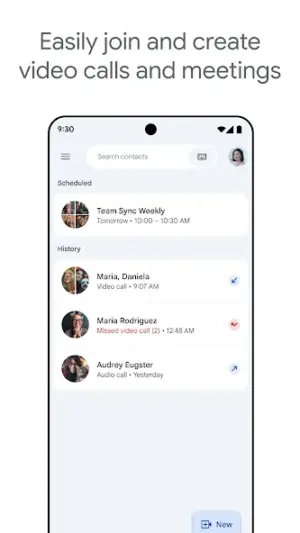
In today's interconnected world, effective communication is essential for academic success and personal connections. Google Meet offers an intuitive platform designed to cater to the needs of students, professionals, and anyone looking to engage meaningfully through video calls. With its user-friendly interface and high-quality performance, Google Meet stands out as a staple in personal and collaborative settings.
Related in Communication: LINE: Calls & Messages · Firefox Fast & Private Browser · Discord – Talk, Play, Hang Out
| App Name | Google Meet |
|---|---|
| Version | Latest |
| Developer | Google LLC |
| Package Name | com.google.android.apps.tachyon |
| Category | Communication |
| Size | Varies with device |
| Downloads | N/A |
| Rating | 4.4 |
| Android Version | Varies |
| Updated | Jul 23, 2026 |
Overview
Google Meet is a powerful video conferencing tool developed by Google LLC that provides seamless communication for Android users. Whether you're attending virtual classes, conducting study group sessions, or simply catching up with friends, this app elevates your video calling experience with remarkable clarity and reliability. Launched as a response to the growing demand for remote interactions, it has quickly become a go-to choice among users who require dependable connectivity across various devices.
One of the key advantages of Google Meet is its adaptability across diverse platforms — from smartphones and tablets to web browsers and smart displays like Google Nest. This universal accessibility ensures that no matter what device you’re using, you can participate in meetings or gatherings effortlessly. As educational institutions continue to embrace hybrid learning models, tools like Google Meet provide students with the flexibility to connect from anywhere, making it an invaluable resource.
Another notable aspect is the lightweight nature of the app. It runs smoothly on budget Android devices without consuming excessive resources — perfect for those on campus who may not have access to high-end gadgets. Students can focus on their studies instead of worrying about technical limitations during crucial lectures or group discussions.
Moreover, Google Meet prioritizes user security and privacy during calls. The platform integrates various safety features designed to keep conversations private while providing users with control over their meetings. This attention to security reassures students and parents alike that their online interactions are safeguarded.
Finally, ongoing enhancements ensure that Google Meet remains at the forefront of communication technology in education and beyond. Frequent updates aimed at improving functionality and user experience indicate a commitment from Google to meet evolving user needs effectively.
Who Is Google Meet For?
Google Meet caters primarily to students who seek effective ways to collaborate remotely while maintaining strong connections during their educational journey. Its functionalities make it essential not only for academic purposes but also ideal for young adults engaging in campus life activities such as virtual events or society meetings. Whether it’s discussing homework assignments or engaging with professors during office hours, this tool fits seamlessly into student life.
Real-World Use Cases
- A college student participates in an online lecture while studying abroad.
- A group project team collaborates remotely using screen sharing features during their research presentation practice.
- A study buddy connects regularly via video calls to review material before exams.
- A campus organization hosts virtual meet-and-greet sessions for new members via Google Meet.
Features
- High-definition video quality for clear communication.
- Supports large group calls accommodating multiple participants.
- Screen sharing capabilities ideal for presentations or collaborative projects.
- Integration with Google Calendar for easy scheduling of meetings.
- Virtual backgrounds for enhanced privacy during calls.
- Real-time captions available in multiple languages for accessibility.
- User-friendly interface suitable for all age groups.
- No need for separate account; uses your existing Google Account.
Performance & Battery
Google Meet operates efficiently on various Android devices regardless of specifications, making it accessible even on budget models frequently used by students. The application optimizes performance based on network conditions; thus ensuring minimal lag during critical moments like class discussions or project presentations.
Privacy & Permissions
Privacy settings within Google Meet allow users to control who can join meetings and limit access to sensitive information shared during calls. With robust encryption measures employed by Google's infrastructure, users can feel confident knowing their conversations remain protected against unauthorized access.
What’s New
While specific notes about recent updates aren't detailed, regular improvements are part of Google Meet's evolution driven by user feedback. Enhancements typically focus on increasing stability, refining features based on usage patterns, and expanding accessibility options. Users can expect continual improvements that respond directly to the needs of learners in today’s dynamic educational environment.
How to Install
- Open the Google Play Store on your Android device.
- Search for ‘Google Meet’ using the search bar.
- Select ‘Install’ from the app’s page.
- Wait for the installation process to complete.
- Once installed, find the icon in your apps list and launch it.
- Sign in using your Google Account credentials or create a new account if necessary.
Pros
- Excellent video quality enhances engagement.
- Accessible across many types of devices.
- User-friendly design appropriate for all skill levels.
- Regular updates improve usability and features.
- Integrated tools enhance collaboration demonstrated through real-time features.
Cons
- Requires stable internet connection for optimal performance.
- Limited customization options compared to other platforms.
- Some advanced features may be locked behind enterprise versions.
- Learning curve may exist for new users unfamiliar with videoconferencing.
Download Google Meet APK
Download Google Meet vLatest APK
Free · Safe · Verified APK download
Frequently Asked Questions
Is Google Meet free?
Yes, Google Meet is completely free to use.
Can I use it on my tablet?
Absolutely! It supports both phones and tablets.
Do I need a Google account?
Yes, you'll need a valid Google account to access its features.
How many participants can join a call?
You can host calls with up to 100 participants in free versions.
Are there any time limits on meetings?
No time limits apply when using basic accounts.
Final Thoughts
In summary
Related Apps
Disclaimer
This article is independent and does not endorse any APKs directly; always exercise caution when downloading applications.
All Versions of Google Meet
Frequently Asked Questions
Yes. Google Meet is scanned before publishing. Our pipeline verifies each file.
Download the APK, enable 'Install from Unknown Sources' in Settings > Security, then tap the file.
Latest version is Latest.
Requires Android 5.0+.
Yes, completely free.
APKs let you install apps not in your region, use specific versions, or install without Google Play.
Related News Articles

More from Google LLC


Google Meet Alternative
Apps similar to Google Meet that you may also like.


User Reviews
Compatibility Checker
Google Meet requires Android 5.0+ or higher. Select your device version to check.
Write a Review