Google Home APK
Google LLCVaries with device · Free · Safe · Verified
Share This App
Scan to Download
Scan with Android camera
Screenshots
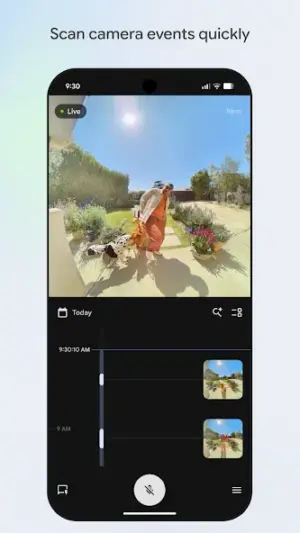
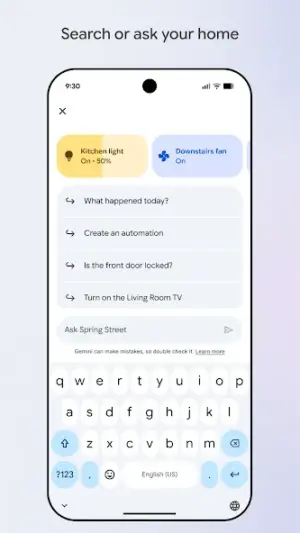
About Google Home
Welcome to the world of smart home management! If you've just installed the Google Home app, you're in for a treat. This app simplifies controlling your smart devices, making it easy for anyone to create a more connected living space.
Related in Lifestyle: Amazon Alexa · MR.DIY Club · Astrotalk – Talk to Astrologer
| App Name | Google Home |
|---|---|
| Version | Latest |
| Developer | Google LLC |
| Package Name | com.google.android.apps.chromecast.app |
| Category | Lifestyle |
| Size | Varies with device |
| Downloads | N/A |
| Rating | 4 |
| Android Version | Varies |
| Updated | Jul 29, 2026 |
Overview
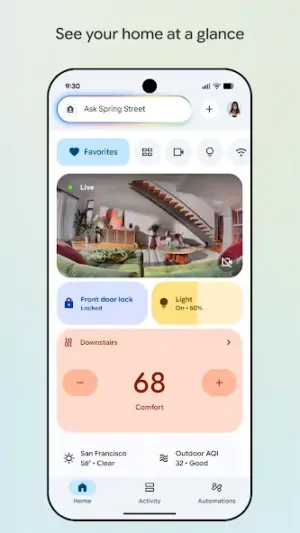
The Google Home app is designed to be your central hub for managing various smart home devices, including Nest products and Chromecast. With its user-friendly interface, you can effortlessly set up and control your compatible devices with just a few taps on your smartphone.
As part of the Lifestyle category, this app caters to those looking to enhance their daily routines through technology. Whether you're streaming content on your TV or adjusting the temperature of your home, Google Home enables seamless interactions between your devices.
One of the standout features of Google Home is its ability to recognize voice commands via Google Assistant. This functionality means you can simply speak to control appliances in your home—handy when you're busy or multitasking!
Compatibility is also a strong point; whether you're using tablets or various Android phones, this app supports multiple device architectures and sizes. So regardless of what you own, getting started is straightforward.
Regular updates from Google mean new features are often added, enhancing usability and keeping things fresh. Remember that this app utilizes permissions based on what functions you wish to access, maintaining a balance between practicality and security.
Who Is Google Home For?
Google Home is perfect for individuals looking to manage their smart devices efficiently without needing extensive technical knowledge. Whether you're tech-savvy or just beginning with smart technology, this application caters to every level of user proficiency. Families can also benefit from centralized control over entertainment systems and household environments.
Real-World Use Cases
- Streaming movies directly from your phone to Chromecast while enjoying hands-free controls.
- Adjusting heating or cooling settings at home via voice commands when returning after a long day.
- Setting morning routines that turn lights on gradually as you wake up.
- Simplifying family movie nights by controlling multiple devices with one command.
Features
- User-friendly interface for easy navigation
- Voice command capabilities with Google Assistant integration
- Setup guidance for various smart home devices
- Real-time control over Chromecast for media streaming
- Group control options for synchronized device management
- Climate management for Nest thermostats
- Customizable lighting controls compatible with smart bulbs
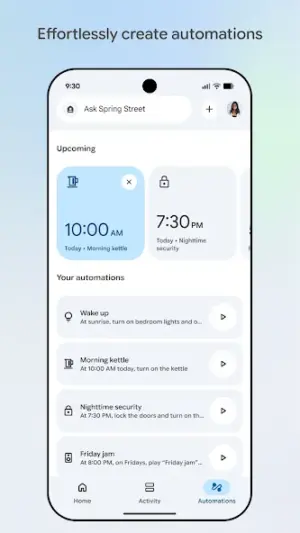
- Routine scheduling for daily automation tasks
Performance & Battery
This app performs well across various Android devices thanks to its universal architecture. Users have reported smooth transitions between screens and minimal lag when issuing voice commands or toggling settings. Overall usability remains high even when connected to multiple smart devices simultaneously.
Privacy & Permissions
While specific permissions weren’t listed in detail, it’s important as an APK user to be cautious about granting access only when necessary. Always check which permissions are required before installing any APK; this helps ensure that privacy remains intact without unnecessary data sharing.
What’s New
While specific details about the latest features were not provided in this version update from July 29, 2026, users can expect enhancements aimed at improving device compatibility and user experience. As always, staying updated with the newest releases ensures you benefit from ongoing improvements.
How to Install
- Navigate to the Google Play Store on your Android device.
- Search for ‘Google Home’ using the search bar.
- Select the app from the results and tap ‘Install’.
- Once installed, open the app by tapping ‘Open’ or finding it on your home screen.
- Create or log into your Google account if prompted.
- Follow on-screen instructions to connect any compatible devices.
- Consider reviewing permission requests carefully during setup; only grant them if they seem relevant to functionality.
Pros
- Intuitive design that's easy for beginners
- Voice control boosts convenience immensely
- Regular updates improve functionality over time
- Widespread compatibility with many brands
- Allows remote access to monitor home systems
Cons
- Some features may require additional purchases
- Device compatibility can vary widely
- Initial setup may involve some learning curve
- Privacy concerns depending on granted permissions
Download Google Home APK
Download Google Home vLatest APK
Free · Safe · Verified APK download
Frequently Asked Questions
What permissions does Google Home need?
While specific permissions weren't listed, typically it requires access related to network connectivity and storage for optimal operation.
Will the app update automatically?
Yes, if enabled in your Play Store settings, apps generally update automatically unless turned off.
Is my data safe with Google Home?
Google has robust privacy policies in place; however, being selective about granting permissions enhances safety.
How much storage space do I need?
'Google Home' varies in size but typically requires minimal space compared to heavy game applications.
'Can I use it without Wi-Fi?'
'Google Home' requires an internet connection via Wi-Fi or cellular data for most functionalities.
'Does it work internationally?'
'Google Home' is available widely but certain features may depend on regional service availability.
Final Thoughts
'Google Home' unlocks endless possibilities in managing how you interact with technology at home. With a straightforward interface full of innovative tools, even first-time users will find joy in creating a smarter living environment.
Related Apps
Disclaimer
'AndroidKnight' is not affiliated with Google LLC or its applications. Downloading APKs comes with responsibility; please ensure you understand each application's requirements before installation.
All Versions of Google Home
Frequently Asked Questions
Yes. Google Home is scanned before publishing. Our pipeline verifies each file.
Download the APK, enable 'Install from Unknown Sources' in Settings > Security, then tap the file.
Latest version is Latest.
Requires Android 5.0+.
Yes, completely free.
APKs let you install apps not in your region, use specific versions, or install without Google Play.
Related News Articles

More from Google LLC


Google Home Alternative
Apps similar to Google Home that you may also like.


User Reviews
Compatibility Checker
Google Home requires Android 5.0+ or higher. Select your device version to check.
Write a Review