Link to Windows APK
Microsoft CorporationVaries with device · Free · Safe · Verified
Share This App
Scan to Download
Scan with Android camera
Screenshots
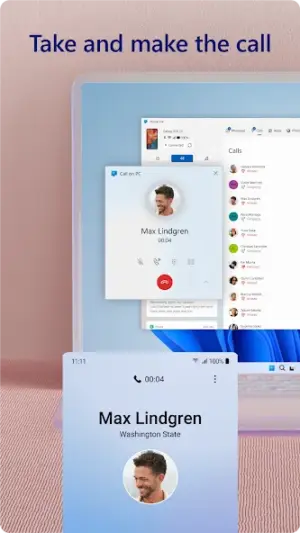
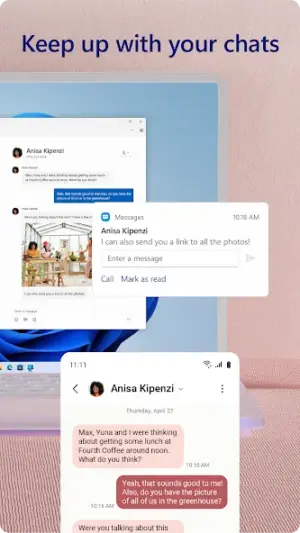
About Link to Windows
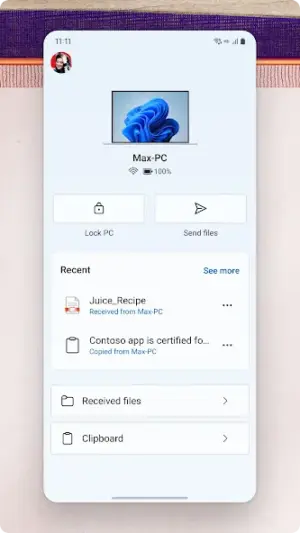
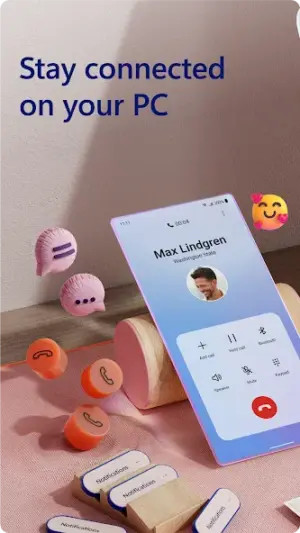
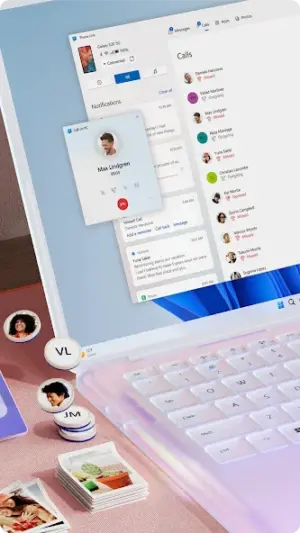
In a world where multitasking is paramount, the 'Link to Windows' app from Microsoft aims to bridge the gap between Android devices and Windows PCs effectively. This productivity tool allows users to seamlessly access notifications, calls, photos, and texts on their PCs without switching back and forth between devices.
Related in Productivity: MEGA · Google Slides · SHAREit Lite – Fast File Share
| App Name | Link to Windows |
|---|---|
| Version | Latest |
| Developer | Microsoft Corporation |
| Package Name | com.microsoft.appmanager |
| Category | Productivity |
| Size | Varies with device |
| Downloads | N/A |
| Rating | 3.8 |
| Android Version | Varies |
| Updated | Jul 20, 2026 |
Overview
Developed by tech giant Microsoft Corporation, 'Link to Windows' offers a unique solution for individuals looking to integrate their mobile experience with desktop convenience. With its universal compatibility across various architectures, this app caters to a wide range of Android devices while ensuring a smooth connection with Windows operating systems. The app's lightweight nature makes it suitable for users with varying hardware specifications but may show different performance dynamics depending on device capabilities.
One of the key aspects of 'Link to Windows' is its ability to synchronize essential information between your Android device and PC in real-time. Users can expect quick access to their mobile notifications directly on their desktop, which can significantly enhance productivity by reducing the number of times they need to pick up their phone while working.
However, heavy usage patterns may lead to increased RAM consumption as multiple functions run simultaneously. Keeping this in mind, it's crucial for users with devices running older Android versions or those limited by lower-end hardware to monitor background processes and manage resources effectively. By doing so, you can ensure that the app operates smoothly without considerable lag or interruptions.
Furthermore, understanding battery consumption impacts is vital for prolonged device usability throughout the day. While 'Link to Windows' isn't resource-heavy under normal circumstances, consistently using data-intensive features can drain your battery more rapidly than typical usage patterns would suggest. Therefore, continuous monitoring of battery levels when engaging with such apps will help maintain performance integrity over longer periods.
Who Is Link to Windows For?
'Link to Windows' is designed primarily for users who frequently oscillate between their smartphone and PC. It's particularly beneficial for professionals who wish to stay connected without being tethered constantly to their phones or those who prefer managing texts and notifications from a larger screen. Additionally, it serves students or content creators who need efficient file transfer capabilities while working or studying.
Real-World Use Cases
- Easily respond to work-related messages during meetings without picking up your phone.
- Simplify file transfers by dragging photos directly from your smartphone gallery into presentations on your computer.
- Manage personal calls without disrupting workflow; answer them directly from your PC.
- Receive text alerts about important notifications directly while focusing on tasks at hand.
Features
- Real-time access to phone notifications on your PC
- Seamless integration of calls between devices
- Effortless sharing of photos and files across platforms
- Text message management through your PC
- User-friendly interface designed for quick navigation
- Supports multiple device synchronization
- No additional hardware required—connect via Wi-Fi
- Compatible with various versions of Windows OS
Performance & Battery
'Link to Windows' generally performs well across a broad spectrum of Android devices; however, users should be aware that performance may vary based on RAM availability and processor capacity. For optimal experience, consider closing other unused applications while using this tool, especially if multitasking heavily within high-use contexts.
Privacy & Permissions
'Link to Windows' does not explicitly list permissions required during installation; however, users should stay vigilant regarding privacy practices when linking personal data across devices. To ensure safety while utilizing APKs like this one, always download from trusted sources such as the Google Play Store and regularly check permissions within application settings.
What’s New
The latest update for 'Link to Windows' includes general improvements that enhance user experience and stability. While specific changes have not been elaborated in detail, ongoing updates often focus on refining connectivity features and enabling smoother interactions between mobile and desktop interfaces.
How to Install
- Open the Google Play Store on your Android device.
- Search for ‘Link to Windows’.
- Select ‘Install’ from the application page.
- Once installed, launch the app from your home screen.
- Follow setup prompts to link your Android device with a Windows PC.
- On your PC, open the ‘Your Phone’ application (ensure it’s updated).
- Sign in using the same Microsoft account used on your Android device.
- Create the necessary permissions as prompted during setup.
Pros
- Seamless integration between mobile and desktop.
- User-friendly interface promoting ease of use.
- Ability to manage texts and calls directly from PC.
- Facilitates instant notifications viewing without distractions.
- A valuable productivity booster for professionals.
Cons
- Performance can vary based on device specifications.
- Potential battery drain when used intensively.
- Requires both devices online simultaneously.
- Limited functionalities compared to native apps.
Download Link to Windows APK
Download Link to Windows vLatest APK
Free · Safe · Verified APK download
Frequently Asked Questions
What types of notifications can I see?
You can receive notifications from any app installed on your phone.
Do I need a special version of Windows?
'Link to Windows' works with most recent versions of Windows 10 or higher.
Can I use it on any Android device?
'Link to Windows' supports a variety of Android versions but check compatibility.
Is my data safe?
'Link to Windows' uses secure connections; however, always monitor what data you share.
Will it slow down my phone?
'Link to Windows' is not overly resource-heavy but may impact older devices slightly.
'Can I use it offline?
'No', an internet connection is required for synchronization.
Are there any fees associated?
'No', 'Link to Windows' is free with no hidden charges.
Final Thoughts
'Link to Windows' offers a feasible solution for those seeking an integrated digital workflow that connects smartphones with PCs seamlessly. By understanding potential performance nuances linked with different device specifications and adjusting usage accordingly, users can fully leverage this app’s capabilities without compromising system efficiency.
Related Apps
Disclaimer
'AndroidKnight is not affiliated with Microsoft Corporation or responsible for any issues arising from APK installations.'
All Versions of Link to Windows
Frequently Asked Questions
Yes. Link to Windows is scanned before publishing. Our pipeline verifies each file.
Download the APK, enable 'Install from Unknown Sources' in Settings > Security, then tap the file.
Latest version is Latest.
Requires Android 5.0+.
Yes, completely free.
APKs let you install apps not in your region, use specific versions, or install without Google Play.
Related News Articles


More from Microsoft Corporation


Link to Windows Alternative
Apps similar to Link to Windows that you may also like.


User Reviews
Compatibility Checker
Link to Windows requires Android 5.0+ or higher. Select your device version to check.
Write a Review