MyFitnessPal: Calorie Counter APK
MyFitnessPal, Inc.Varies with device · Free · Safe · Verified
Share This App
Scan to Download
Scan with Android camera
Screenshots
About MyFitnessPal: Calorie Counter
For travelers and fitness enthusiasts alike, having a reliable app to track nutrition and fitness on the go is more important than ever. MyFitnessPal: Calorie Counter seamlessly blends functionality with offline accessibility, making it a vital companion for anyone wanting to maintain their health while exploring new destinations or saving data.
Related in Health And Fitness: BitePal: AI Calorie Counter · Impulse – Brain Training Games · Calo: AI Food Calorie Counter
| App Name | MyFitnessPal: Calorie Counter |
|---|---|
| Version | Latest |
| Developer | MyFitnessPal, Inc. |
| Package Name | com.myfitnesspal.android |
| Category | Health And Fitness |
| Size | Varies with device |
| Downloads | N/A |
| Rating | 4.4 |
| Android Version | Varies |
| Updated | Jul 24, 2026 |
Overview
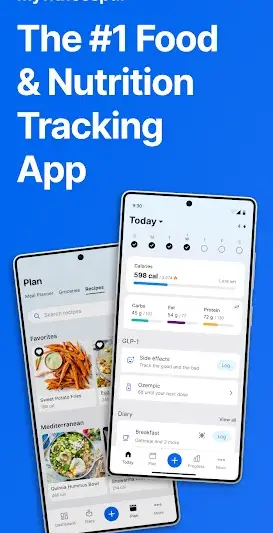
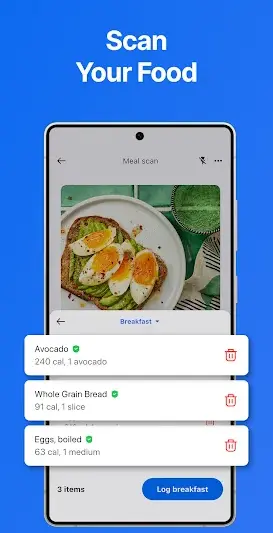
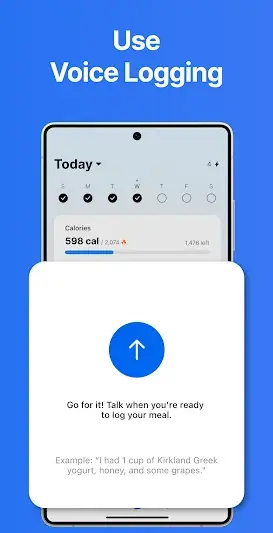
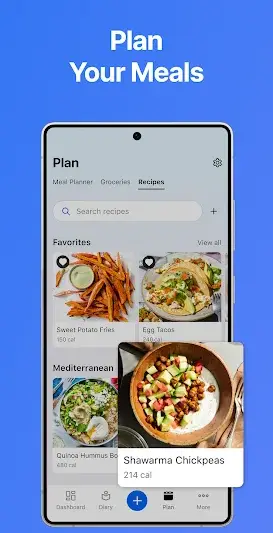
MyFitnessPal: Calorie Counter is designed to help users track calories, macros, and overall nutrition effortlessly. Its user-friendly interface allows for easy logging of meals and workouts whether you're at home or on the road. With features powered by AI, it personalizes your nutritional experience based on input data and historical usage patterns.
The app caters to a wide range of dietary preferences and lifestyles, supporting everything from tracking basic nutrients to caloric goals tailored for specific fitness regimes. Offline capabilities come into play particularly when you're traveling in remote areas where data signals can be unpredictable or nonexistent.
While most of the app's core functionalities can operate offline, users will need internet access for initial setup, downloading food databases, and syncing with other fitness apps. Its ability to store previously logged meals ensures that you can still log your intake anywhere without worrying about mobile data usage.
Moreover, MyFitnessPal focuses on helping you stay motivated with its community features. You can connect with friends, share achievements, and partake in challenges that encourage accountability—perfect for those who thrive in social settings but may find themselves out of network range during travels.
In essence, MyFitnessPal strikes an excellent balance between being an essential wellness tool while offering practical solutions for users who are constantly on the move.
Who Is MyFitnessPal: Calorie Counter For?
MyFitnessPal is ideal for anyone invested in maintaining a healthy lifestyle—be it active travelers looking to balance indulgent dining experiences or individuals managing specific dietary needs. Fitness enthusiasts seeking accountability through tracking will also find this app immensely useful. The versatility in its features makes it suitable for casual users as well as serious athletes.
Real-World Use Cases
- A traveler navigating foreign restaurants can log unfamiliar meals offline using previously saved items without worrying about data costs.
- An outdoor enthusiast hiking through nature reserves may lose cellular service but can still track daily caloric intake using cached entries.
< li>A busy professional on a business trip could log calorie counts ahead of time without relying on Wi-Fi during meetings or events.< li>Someone monitoring their diet post-surgery may find it convenient to maintain records consistently—even when visiting family outside connectivity zones.
Features
- Offline meal tracking for uninterrupted logging.
- AI-driven nutritional analysis tailored to individual preferences.
- User-friendly interface makes logging quick and intuitive.
- Extensive food database that supports brand name foods.
- Customizable macronutrient goals for diverse diets.
- Integration with fitness trackers and other health apps.
- Ability to save favorite meals for quick access.
- Community engagement through challenges and shared achievements.
Performance & Battery
MyFitnessPal’s performance caters well even in low-connectivity regions. While initial setup and specific features may require network access—such as syncing across devices—the majority of meal logging remains functional offline. Users have reported smooth operation without lagging issues when reconnecting after periods offline.
Privacy & Permissions
Although MyFitnessPal does not list explicit permissions required within its APK description, general safe practices apply here; avoid sharing sensitive personal information within public forums accessed via the app. Always download from reputable sources to protect your privacy.
What’s New
The latest updates have focused on enhancing user experience through improved meal recommendations based on previous entries. Bug fixes and performance enhancements also aim to make the app run smoother across various devices—a benefit for travelers who rely on consistent functionality.<br/>
How to Install
- Visit the Google Play Store or trusted APK repository.
- Search for ‘MyFitnessPal: Calorie Counter’.
- Select the app from the search results.
- Tap ‘Install’ to download the APK onto your device.
- Once installed, open the app and follow the prompts to set up your account.
< li>If required, download any additional resources while connected online before heading offline!
Pros
- Excellent offline functionalities ensuring calorie tracking wherever you are.
- AI-driven insights make nutrition tracking smarter.
- Extensive food database minimizes manual entry time.
- User-friendly interface enhances overall experience.
- Strong community support fosters accountability.
Cons
- Initial setup requires internet connection prior to going offline.
- Some advanced features do not fully function without network access.
- Requires periodic syncing which may be cumbersome during extended trips.
Download MyFitnessPal: Calorie Counter APK
Download MyFitnessPal: Calorie Counter vLatest APK
Free · Safe · Verified APK download
Frequently Asked Questions
Can I use MyFitnessPal without an internet connection?
Yes! You can log meals and track nutrition offline once you've set up initial permissions.
Is there a cost associated with MyFitnessPal?
MyFitnessPal is free but offers optional premium features.
How does MyFitnessPal handle different dietary restrictions?
You can customize macronutrient goals according to your dietary preferences.
Can I connect MyFitnessPal with other apps?
Yes! It integrates well with many fitness trackers.
Will my data sync if I’ve been offline?
Yes, once you regain connectivity, all logged data should sync automatically.
Can I save my favorite meals for quick logging?
Absolutely! You can easily save frequently eaten meals.
Final Thoughts
In a world where data savings and functionality are paramount during travel adventures or daily routines, MyFitnessPal shines as an invaluable tool that combines accessibility with robust features tailored towards improving overall health management efficiently both online and offline.
Related Apps
More apps coming soon.
Disclaimer
This article is not affiliated with or endorsed by MyFitnessPal Inc., and readers assume responsibility when downloading APK files.
All Versions of MyFitnessPal: Calorie Counter
Frequently Asked Questions
Yes. MyFitnessPal: Calorie Counter is scanned before publishing. Our pipeline verifies each file.
Download the APK, enable 'Install from Unknown Sources' in Settings > Security, then tap the file.
Latest version is Latest.
Requires Android 5.0+.
Yes, completely free.
APKs let you install apps not in your region, use specific versions, or install without Google Play.
Related News Articles



MyFitnessPal: Calorie Counter Alternative
Apps similar to MyFitnessPal: Calorie Counter that you may also like.


User Reviews
Compatibility Checker
MyFitnessPal: Calorie Counter requires Android 5.0+ or higher. Select your device version to check.
Write a Review