
Yuka - Food & Cosmetic Scanner APK
Yuka AppVaries with device · Free · Safe · Verified
Share This App
Scan to Download
Scan with Android camera
Screenshots

About Yuka - Food & Cosmetic Scanner
Are you keen on making healthier choices by understanding the food and cosmetic products you use? Yuka – Food & Cosmetic Scanner allows you to effortlessly scan items and discover their nutritional impact, helping you make informed decisions for your health and well-being.
Related in Health And Fitness: MyFitnessPal: Calorie Counter · Planet Fitness · WiseMeal: AI Calorie Tracker
| App Name | Yuka – Food & Cosmetic Scanner |
|---|---|
| Version | Latest |
| Developer | Yuka App |
| Package Name | io.yuka.android |
| Category | Health And Fitness |
| Size | Varies with device |
| Downloads | N/A |
| Rating | 4.7 |
| Android Version | Varies |
| Updated | Jul 27, 2026 |
Overview
Yuka is a powerful application designed to aid users in analyzing the health implications of their food and cosmetic products through thoughtful scanning features. It caters to health enthusiasts who want to make informed decisions about the products they consume or apply. The app’s user-friendly interface makes it approachable for everyone, from seasoned health buffs to casual users exploring better lifestyle options.
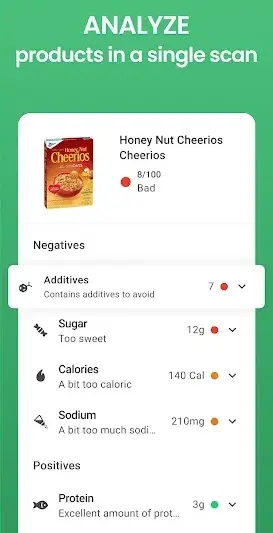
The app supports scanning both food items and cosmetics, allowing users to decode barcodes and receive real-time evaluations of ingredients. This intuitive functionality aims to demystify product labels that can often seem overwhelming. With a robust database that evaluates thousands of products, Yuka provides detailed information about what's inside each item, including its potential benefits and risks.
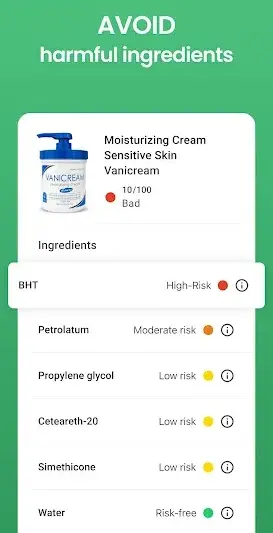
This tool not only helps in identifying harmful additives but also promotes discussions around sustainable consumption and healthy living. Users gain insights into their dietary habits and personal care routines, fostering awareness regarding the importance of ingredient integrity. By integrating such comprehensive data into everyday shopping experiences, Yuka empowers users to take charge of their health.
Regular updates ensure that users have access to the latest information about their favorite products, reflecting the continuous evolution in food science and cosmetic safety standards. Moreover, with an impressive rating of 4.7, Yuka stands out as a reliable choice among health applications available today.
Who Is Yuka – Food & Cosmetic Scanner For?
Yuka is ideal for individuals passionate about maintaining a healthy lifestyle through informed choices regarding food and cosmetics. It caters specifically to those who are conscious about what goes into their bodies as well as what they apply on their skin. Whether you're a parent scrutinizing ingredient lists on behalf of your family or someone looking to embark on a wellness journey, Yuka offers indispensable guidance.
Real-World Use Cases
- A family trying to improve dietary habits by choosing less processed foods based on clear ingredient information scanned via Yuka.
- A beauty enthusiast assessing cosmetic products for harmful chemicals while shopping at local stores.
- A fitness educator recommending healthier alternatives during meal planning sessions with clients using Yuka’s informative evaluations.
- A friend group sharing insights about healthy shopping decisions whilst accessing Yuka together at supermarkets.
Features
- User-friendly barcode scanning for quick evaluations.
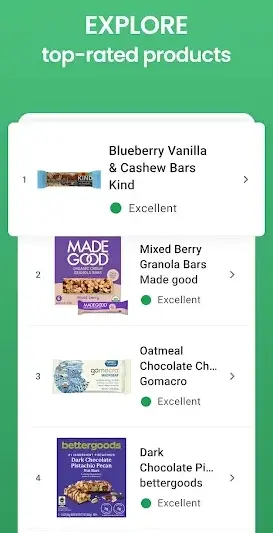
- Extensive database covering both food items and cosmetics.
- Clear breakdowns of ingredient lists highlighting risks and benefits.
- Personalized recommendations based on user preferences.
- Regular updates with new product information.
- Support for different languages for ease of use.
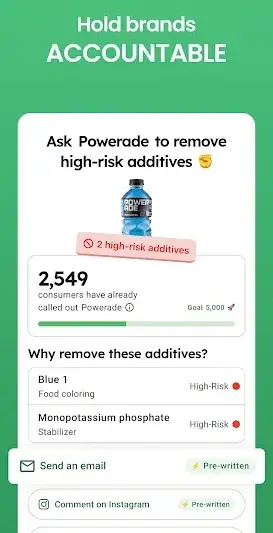
- Community features that allow sharing insights with peers.
- An educational section guiding users on making healthier choices.
Performance & Battery
Yuka's performance remains consistent across various devices thanks to its universal architecture support. Users may experience differences depending on individual hardware capabilities; however, general feedback indicates smooth operation without notable lag when scanning products or navigating menus.
Privacy & Permissions
As there are no explicit permission requirements listed for Yuka, it appears focused on providing essential functionality without intrusive data requests. Users should maintain safe practices by ensuring downloads are sourced from reputable platforms, thus minimizing potential security risks associated with third-party APK installations.
What’s New
The latest update from Yuka reinforces its commitment to staying current with evolving health trends. While specific details were not disclosed, improvements likely encompass enhanced product scans along with updates to its expansive database that ensures reliability in evaluations. Users can expect an overall smoother experience thanks to ongoing maintenance efforts.
How to Install
- Ensure your Android device has sufficient storage space for the app download.
- Visit the official website or trusted APK repository to download the latest version securely.
- Before installation, navigate to your device settings and enable ‘Install from Unknown Sources’ if needed.
- Locate the downloaded APK file using your file manager or notification bar.
- Select the APK file and follow on-screen instructions to complete installation.
- If an installation failure occurs, check device compatibility in terms of architecture or Android version required. Adjust accordingly before attempting reinstall.
- Should you encounter crashes upon launching, try clearing cache/data from settings or restarting your device before re-launching the app.
Pros
- Intuitive interface that facilitates easy navigation.
- Comprehensive evaluation metrics for products.
- Strong community engagement features.
- Continuous updates enhance user experience.
- Seamless integration of thousands of items in its database.
Cons
- Initial setup requires enabling unknown sources which may deter some users.
- Limited visibility into privacy permissions could cause apprehension.
- Occasional discrepancies found in product data after updates.
Download Yuka – Food & Cosmetic Scanner APK
Download Yuka – Food & Cosmetic Scanner vLatest APK
Free · Safe · Verified APK download
Frequently Asked Questions
What should I do if my scan fails?
Ensure that the camera lens is clean and aligned properly over the barcode.
Does this app require internet access?
Yes, it needs internet access to fetch product data.
Can I use Yuka with limited storage?
While it's best used with ample storage space available, light usage may still be accommodated.
What if my device architecture doesn’t match?
Check compatibility requirements before attempting installation; look for alternatives if mismatched.
'The app keeps crashing; what can I do?'
Try restarting your device or clearing the app’s cache through settings.
How do I reinstall Yuka without complications?
Uninstall any previous versions completely before downloading a fresh APK.
Is there an age restriction for using this app?
There is no formal age restriction; however parental guidance is recommended for younger users.
Final Thoughts
In a world filled with processed foods and complex cosmetic ingredients, Yuka – Food & Cosmetic Scanner emerges as a trustworthy ally in promoting health consciousness. By leveraging technology efficiently while providing vital insights into product safety, this app proves invaluable for anyone committed to living well-balanced lifestyles.
Related Apps
More apps coming soon.
Disclaimer
This article is not affiliated with Yuka App or any related entities. Responsibility lies solely with users when downloading APK files—ensure secure sources are utilized.
All Versions of Yuka - Food & Cosmetic Scanner
Frequently Asked Questions
Yes. Yuka - Food & Cosmetic Scanner is scanned before publishing. Our pipeline verifies each file.
Download the APK, enable 'Install from Unknown Sources' in Settings > Security, then tap the file.
Latest version is Latest.
Requires Android 5.0+.
Yes, completely free.
APKs let you install apps not in your region, use specific versions, or install without Google Play.
Related News Articles


Yuka - Food & Cosmetic Scanner Alternative
Apps similar to Yuka - Food & Cosmetic Scanner that you may also like.


User Reviews
Compatibility Checker
Yuka - Food & Cosmetic Scanner requires Android 5.0+ or higher. Select your device version to check.
Write a Review