
DigiLocker APK
National eGovernance Division, Government of IndiaVaries with device · Free · Safe · Verified
Share This App
Scan to Download
Scan with Android camera
Screenshots
About DigiLocker
In an age where digital documentation is becoming the norm, securing and managing essential papers has never been more crucial. DigiLocker offers a streamlined solution to this need, transforming your mobile device into a secure digital wallet for all your important documents.
Related in Productivity: Perplexity – Ask Anything · DuckDuckGo, optional Duck.ai · Claude by Anthropic
| App Name | DigiLocker |
|---|---|
| Version | Latest |
| Developer | National eGovernance Division, Government of India |
| Package Name | com.digilocker.android |
| Category | Productivity |
| Size | Varies with device |
| Downloads | N/A |
| Rating | 3.9 |
| Android Version | Varies |
| Updated | Jul 13, 2026 |
Overview
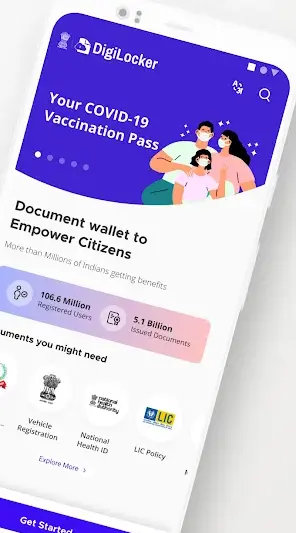
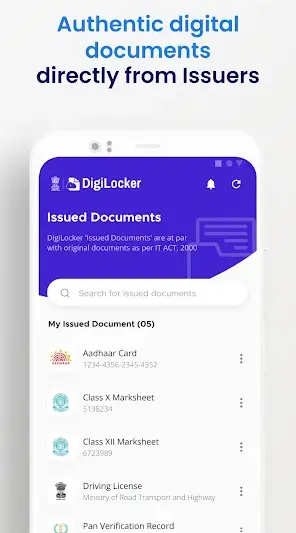
DigiLocker is a productivity app developed by the National eGovernance Division of the Government of India, designed to provide users with a simple yet effective way to store and manage their important documents digitally. With its user-friendly interface, DigiLocker aims to enhance accessibility while ensuring that valuable information remains secure at all times. The app offers universal architecture support, making it compatible across various devices and screen sizes, effectively catering to a wide range of users.
The design ethos of DigiLocker emphasizes clarity and usability. Users are greeted with a clean layout that allows for easy navigation—essential for first-time users who may feel overwhelmed by document management tasks. Onboarding is intuitive, minimizing friction during initial app setup, which is vital for users who are less tech-savvy or unfamiliar with digital platforms.
Accessibility of controls plays a crucial role within the app's user experience. Key functionalities such as uploading documents, accessing stored credentials, and sharing files are easily discoverable through well-placed buttons and icons. This design choice significantly lowers the learning curve associated with utilizing such technology in day-to-day life.
DigiLocker continuously evolves to meet user expectations and emerging needs. Regular updates not only improve performance but also expand functionality based on user feedback. As the world moves forward towards greater digitization of services and documentation processes, tools like DigiLocker stand at the forefront, facilitating easier access and management of important personal data.
Who Is DigiLocker For?
DigiLocker primarily targets individuals looking for a secure method to store their essential documents digitally. It is particularly beneficial for students needing access to academic records, professionals requiring quick verification of identity proofs, or citizens heavily engaged with government services. The application thrives on inclusivity, aiming to provide every demographic with easy engagement with electronic documentation.
Real-World Use Cases
- A student accessing their educational certificates while applying for higher studies online.
- A citizen proving their identity during an official process without carrying physical copies of identification documents.
- A working professional storing salary slips securely in one place rather than managing stacks of paper at home.
- A person sharing their driving license details quickly through secure links while renting a vehicle without physical documentation hassles.
Features
- Secure storage for various types of documents including government-issued IDs.
- User-friendly interface with straightforward navigation.
- Quick onboarding process tailored for first-time users.
- Universal compatibility across multiple Android devices.
- Options to upload documents directly from your device or capture images using the camera.
- Ability to share documents securely via generated links or within other apps.
- Multiple language support enhancing accessibility for diverse users.
- Real-time notifications about document processing status.
- Easily accessible FAQs providing assistance within the app.
- Enhanced security measures including data encryption and authentication processes.
Performance & Battery
Users report that DigiLocker's performance is consistently reliable across various devices. The application runs smoothly even when accessing multiple documents at once or uploading files directly from external sources like cameras or cloud storage services. Overall responsiveness ensures users can efficiently manage their essential paperwork without experiencing lag.
Privacy & Permissions
As a productivity tool aimed at document management, privacy remains paramount within DigiLocker's operational framework. While specific permissions were not listed in this instance, it's crucial that users maintain safe APK habits by downloading only from trusted sources like Google Play Store. Additionally, regularly reviewing permissions granted ensures personal information stays secure.
What’s New
While specific changelog details weren't provided in this update cycle, it’s evident that ongoing improvements focus on refining performance and enhancing user experience based on community feedback. Regular updates like these ensure that users benefit from timely fixes and new features that align with modern expectations for a productivity application.
How to Install
- Open the Google Play Store on your Android device.
- Search for ‘DigiLocker’ using the search bar at the top of the screen.
- Select the official DigiLocker app developed by the National eGovernance Division.
- Tap on the ‘Install’ button to download and install the app on your device.
- Once installed, find and open DigiLocker from your applications menu.
- Create an account or log in if you already have one to start using the service.
Pros
- Simple yet effective UI design enhancing user experience.
- Secure digital document storage safeguarding sensitive information.
- Universal compatibility allows usage across varied devices.
- Regular updates reflecting user feedback facilitate continuous improvement.
- Intuitive onboarding process reduces barriers for new users.
Cons
- Rating suggests some areas may still need refinement based on user experiences.
- Not all permission details are transparently listed in-app.
- May require internet connectivity for full functionality.
- Potentially limited appeal outside core use cases focusing primarily on documentation.
Download DigiLocker APK
Download DigiLocker vLatest APK
Free · Safe · Verified APK download
Frequently Asked Questions
What types of documents can be stored in DigiLocker?
Users can store various documents including government IDs, academic certificates, driving licenses, etc.
Is there any cost associated with using DigiLocker?
No, DigiLocker is completely free to use.
Can I upload documents from my computer?
Currently, uploads are possible primarily via mobile devices; desktop uploads are generally not supported.
How does DigiLocker ensure data security?
DigiLocker employs encryption and multiple authentication methods to safeguard user data.
Is internet access required to use DigiLocker?
Yes, an active internet connection is necessary for accessing stored documents.
Final Thoughts
DigiLocker remains a practical choice in the Productivity space. If you need the latest build (Latest) for Android, use the download section below and follow the installation guide.
Related Apps
More apps coming soon.
Disclaimer
AndroidKnight is not affiliated with National eGovernance Division, Government of India. All trademarks belong to their respective owners. Download and use APKs at your own risk and respect local laws and app licenses.
All Versions of DigiLocker
Frequently Asked Questions
Yes. DigiLocker is scanned before publishing. Our pipeline verifies each file.
Download the APK, enable 'Install from Unknown Sources' in Settings > Security, then tap the file.
Latest version is Latest.
Requires Android 5.0+.
Yes, completely free.
APKs let you install apps not in your region, use specific versions, or install without Google Play.
Related News Articles


DigiLocker Alternative
Apps similar to DigiLocker that you may also like.


User Reviews
Compatibility Checker
DigiLocker requires Android 5.0+ or higher. Select your device version to check.
Write a Review