Touch Lock Screen Touch Photo APK
CardsVaries with device · Free · Safe · Verified
Share This App
Scan to Download
Scan with Android camera
Screenshots
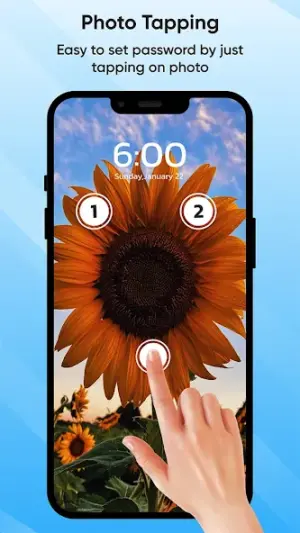
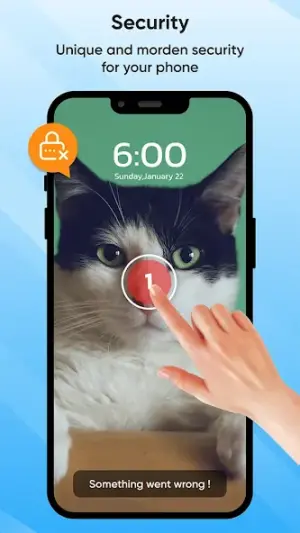
About Touch Lock Screen Touch Photo
In a world where every phone swipe and tap is precious, securing your device with an added layer of protection can be essential. Touch Lock Screen Touch Photo not only locks your screen but does so in a manner that enhances your personalization experience while keeping your data safe. This guide will help you navigate common installation troubles and provide insights into maximizing app performance.
Related in Personalization: Wallpapers · Zedge™ Wallpapers & Ringtones · Fonts Keyboard Themes & Emoji
| App Name | Touch Lock Screen Touch Photo |
|---|---|
| Version | Latest |
| Developer | Cards |
| Package Name | com.touch.lock.screen.password.security |
| Category | Personalization |
| Size | Varies with device |
| Downloads | N/A |
| Rating | 4.4 |
| Android Version | Varies |
| Updated | Mar 13, 2024 |
Overview
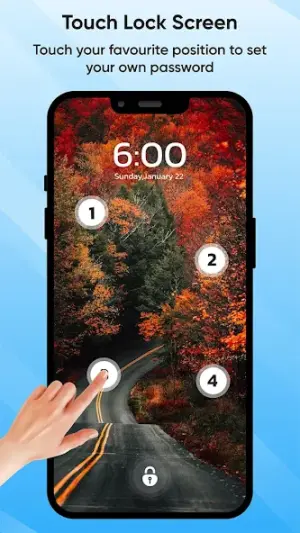
Touch Lock Screen Touch Photo by Cards is a dynamic personalization app designed for users who want to enhance the security of their mobile devices. With its simple yet effective password protection capabilities, the app allows you to lock your touch screen, preventing accidental touches while using apps or during calls. The app’s universal architecture ensures compatibility across various Android devices, making it accessible for a wide range of users.
Who Is Touch Lock Screen Touch Photo For?
This app is ideal for anyone looking to add an extra layer of security to their mobile device. Whether you're a parent wanting to restrict children's access to certain apps or a professional needing assurance against accidental taps during important calls or presentations, Touch Lock Screen offers practical solutions.
Real-World Use Cases
- A parent can prevent their child from accidentally making calls or altering settings while playing games on their phone.
- Professionals can lock their screens during meetings to avoid distractions from inadvertent touches.
- Users can ensure that sensitive information remains secure when sharing their device temporarily with friends or family members.
- You might wish to avoid accidental inputs while watching videos or reading e-books on a crowded bus or subway ride.
Features
- Simple password setup to secure your device.
- Prevent unintended touches during calls or when using apps.
- Universal architecture compatible with most Android devices.
- Free to download with no hidden fees.
- User-friendly interface that makes navigation seamless.
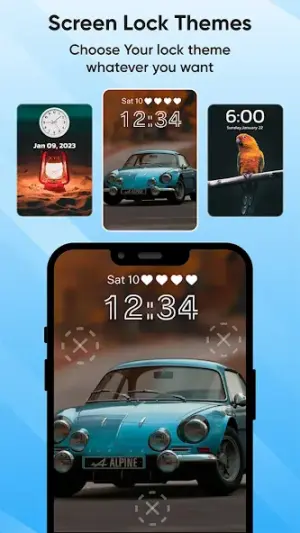
- Ability to customize the lock screen appearance.
- No annoying advertisements interrupting the user experience.
- Quick access options for emergency situations.
Performance & Battery
Touch Lock Screen performs seamlessly across varied Android devices due to its universal architecture. Users have generally reported smooth operation without significant lagging issues. However, performance may vary depending on background processes running on individual devices.
Privacy & Permissions
While specific permissions required by Touch Lock Screen are not listed, it is advisable always to be cautious about granting permissions that may infringe upon personal data privacy. Always review app permissions upon installation and ensure they align with expected functionality. For added safety, consider downloading APKs solely from trusted sources.
What’s New
The latest update, rolled out on March 13, 2024, brings improvements aimed at enhancing overall stability and user experience. Though specific changelog details were not provided, keeping the app updated ensures you benefit from the latest security features and optimizations tailored for modern devices.
How to Install
- Open the Google Play Store on your Android device.
- Search for ‘Touch Lock Screen Touch Photo’ by Cards.
- Tap ‘Install’ and wait for the application to download completely.
- If an error occurs, check available storage space; deleting unnecessary files may help.
- Ensure your device meets the minimum Android version requirements indicated in the store listing.
- If installation fails, try restarting your device before attempting again.
- If problems persist, uninstall any previously downloaded versions before re-installation.
Pros
- Easy-to-use interface
- Enhances device security
- Customizable locking features
- Free of intrusive advertisements
- Supports multiple screen architectures
Cons
- Limited detailed change logs upon updates
- Potential compatibility issues with older devices
- No option for biometric unlocking methods
- Lack of advanced customization options
Download Touch Lock Screen Touch Photo APK
Download Touch Lock Screen Touch Photo vLatest APK
Free · Safe · Verified APK download
Frequently Asked Questions
What do I do if I encounter an installation failure?
Check if there's enough storage space available on your device and ensure you're connected to a stable internet connection.
How do I unlock my screen if I forget my password?
'Reset' options may be available through the app's menu; otherwise, you'll need to uninstall and reinstall.
Can this app work on any Android version?
'Touch Lock Screen' supports various Android versions; please check compatibility before installation.
What should I do if my device crashes after installing?
'Try rebooting your phone; if issues persist, consider uninstalling the app and reinstalling it.
'Is there a way to contact support for further assistance?'
'Reach out via developer contact details found in the Play Store.'
Will this app use a lot of my phone's resources?
Generally, it operates efficiently without draining excessive battery power.
Final Thoughts
'Touch Lock Screen Touch Photo' effectively combines simplicity with utility in securing smartphone use. By following this troubleshooting-first guide and understanding potential pitfalls during installation and usage, you'll enhance both security and accessibility while enjoying what this personalization tool has to offer.
Related Apps
Disclaimer
'AndroidKnight' is not affiliated with 'Cards' nor endorses any claims within third-party APKs. We encourage safe downloading practices including verifying sources before installation.
All Versions of Touch Lock Screen Touch Photo
Frequently Asked Questions
Yes. Touch Lock Screen Touch Photo is scanned before publishing. Our pipeline verifies each file.
Download the APK, enable 'Install from Unknown Sources' in Settings > Security, then tap the file.
Latest version is Latest.
Requires Android 5.0+.
Yes, completely free.
APKs let you install apps not in your region, use specific versions, or install without Google Play.
Related News Articles


More from Cards

Touch Lock Screen Touch Photo Alternative
Apps similar to Touch Lock Screen Touch Photo that you may also like.


User Reviews
Compatibility Checker
Touch Lock Screen Touch Photo requires Android 5.0+ or higher. Select your device version to check.
Write a Review