VLC for Android APK
VideolabsVaries with device · Free · Safe · Verified
Share This App
Scan to Download
Scan with Android camera
Screenshots
About VLC for Android
In an age where streaming dominates our entertainment choices, having a reliable video player is essential. VLC for Android stands out not just as a tool, but as a cultural icon in the world of media playback. With its open-source roots and dedicated community, this app resonates with those who value customization and versatility in their viewing experiences.
Related in Video Players: Screen Recorder – AX Recorder · YouTube Create · 3D VR Player
| App Name | VLC for Android |
|---|---|
| Version | Latest |
| Developer | Videolabs |
| Package Name | org.videolan.vlc |
| Category | Video Players |
| Size | Varies with device |
| Downloads | N/A |
| Rating | 4 |
| Android Version | Varies |
| Updated | May 11, 2026 |
Overview
VLC for Android, developed by Videolabs, is more than just another video player; it’s a robust multimedia powerhouse that supports various audio and video formats without the need for proprietary codecs. This universality makes it particularly attractive to users who may be frustrated by the limitations of standard media players pre-installed on their devices. The latest version of VLC enhances its already impressive feature set while maintaining its commitment to being user-friendly and fast.
What makes VLC truly remarkable is its open-source nature—it invites collaboration and innovation from developers worldwide. It empowers users with control over their media experience while ensuring continuous improvement through community feedback. As mobile content consumption continues to rise, VLC's presence as one of the top free video players positions it perfectly within current trends in digital media, catering specifically to users seeking flexibility and performance.
Its longstanding reputation, coupled with a solid rating of 4 stars on app stores, illustrates user satisfaction and trust. People gravitate toward apps that provide real value—VLC does this seamlessly without costing anything upfront. Additionally, its ability to adapt across different device architectures ensures that it can serve anyone from casual viewers to serious media enthusiasts successfully.
The inclusion of advanced features, such as support for various subtitle files and network streaming capabilities, highlights its relevance not only within individual households but also in larger social contexts—think family movie nights or even sharing sessions with friends via screen mirroring. Today’s audience craves customization; VLC delivers on that front better than most competitors.
Who Is VLC for Android For?
VLC for Android is ideal for anyone looking for a comprehensive solution to play various multimedia formats without restrictions. Its user-friendly design caters both to tech-savvy individuals eager for customization options and casual viewers simply wanting reliable playback functionality.
Real-World Use Cases
- You’re commuting and want offline access to your favorite downloaded videos without worrying about compatibility issues.
- Your friend requests a group movie night; you can easily stream a film directly from your device without any hitches.
- You enjoy watching foreign films with subtitles; VLC’s subtitle support allows you effortlessly integrate them into your viewing experience.
- You have an extensive music library stored locally; create custom playlists within VLC that suit different moods or occasions!
Features
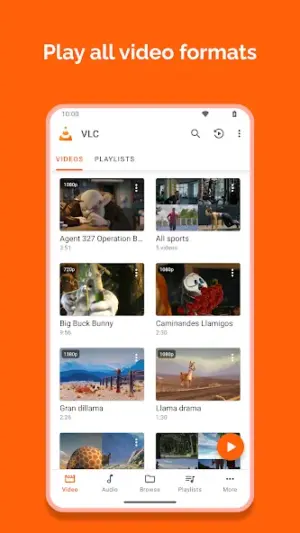
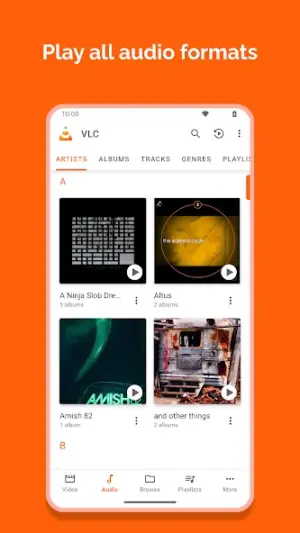
- Supports multiple audio and video formats, including MKV, FLAC, MP4, and more.
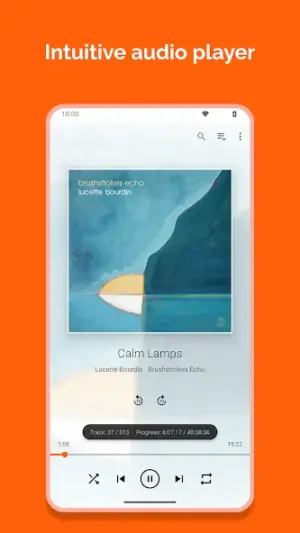
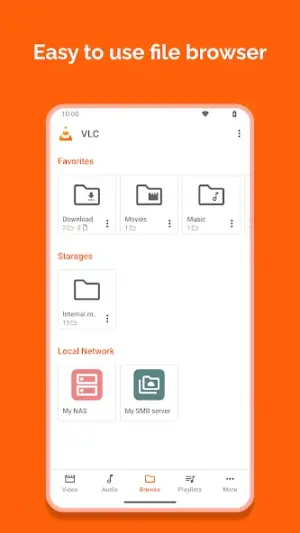
- User-friendly interface designed for seamless navigation.
- Network streaming capabilities allow access to online content easily.
- Customizable playlists cater to diverse listening preferences.
- Option to adjust playback speed for greater control over viewing experiences.
- Subtitle support enhances the accessibility of foreign films.
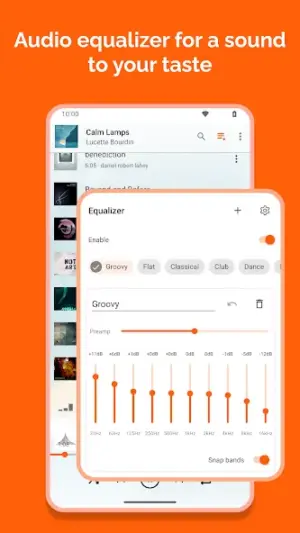
- A wide range of equalizer presets boosts audio quality tailored to your taste.
- No ads or hidden fees—an open-source model devoted to user experience.
Performance & Battery
Users report smooth performance across devices when using VLC for Android—its optimizations ensure quick loading times and minimal buffering during playback. Whether you're streaming content online or navigating through local files, VLC strives to deliver consistent quality regardless of file size or type.
Privacy & Permissions
VLC requires standard permissions such as file access necessary for reading media files stored on your device. As always when using any APK, it's advised to download it from reputable sources like official platforms to safeguard against potential vulnerabilities.
What’s New
While specific notes on recent updates haven’t been provided extensively, the app regularly receives enhancements aimed at refining usability and expanding functionality. This ongoing development reflects VLC’s commitment to staying relevant in an ever-evolving digital landscape. Users can expect minor bug fixes alongside potential new features designed based on community feedback.
How to Install
- Open Google Play Store or visit the official website directly.
- Search for ‘VLC for Android.’
- Select the app from the list presented.
- Tap ‘Install’ to download the application onto your device.
- Once installed, launch VLC from your home screen or app drawer.
Pros
- Supports an extensive range of multimedia formats.
- No ads; completely free without hidden costs.
- Regular updates help maintain optimal performance.
- User-friendly interface that appeals to all demographics.
- Robust network streaming capabilities enable easy access to online content.
Cons
- Some users might find advanced features overwhelming initially.
- Occasional stability issues reported on older devices.
- Lacks certain premium features offered by paid competitors.
Download VLC for Android APK
Download VLC for Android vLatest APK
Free · Safe · Verified APK download
Frequently Asked Questions
Is VLC really free?
Yes! VLC is entirely free without any hidden charges.
Can I use VLC without internet?
Absolutely! You can play downloaded files offline.
Does it support subtitles?
Yes! You can easily load subtitles alongside your videos.
What formats does VLC support?
VLC supports numerous formats including MP4, AVI, MKV, FLAC among others.
Is it available on all devices?
Yes! VLC is compatible with various Android devices regardless of architecture.
How often does VLC receive updates?
Updates are released regularly based on user feedback and new feature introductions.
Final Thoughts
In conclusion, amidst the sea of media players available today, VLC for Android remains culturally significant due to its commitment towards inclusivity in media playback solutions. Its blend of functionality and user empowerment makes it not only relevant today but positioned well into the future as audience needs continue evolving.
Related Apps
More apps coming soon.
Disclaimer
This article is not affiliated with Videolabs or any influencers associated with their products. All responsibilities regarding APK downloads should be managed through official sources.
App Permissions Explained
VLC for Android requests 2 permissions. Auto-fetched from the Play Store.
All Versions of VLC for Android
Frequently Asked Questions
Yes. VLC for Android is scanned before publishing. Our pipeline verifies each file.
Download the APK, enable 'Install from Unknown Sources' in Settings > Security, then tap the file.
Latest version is Latest.
Requires Android 5.0+.
Yes, completely free.
APKs let you install apps not in your region, use specific versions, or install without Google Play.
Related News Articles


VLC for Android Alternative
Apps similar to VLC for Android that you may also like.


User Reviews
Compatibility Checker
VLC for Android requires Android 5.0+ or higher. Select your device version to check.
Write a Review