
Microsoft Outlook APK
Microsoft CorporationVaries with device · Free · Safe · Verified
Share This App
Scan to Download
Scan with Android camera
Screenshots
About Microsoft Outlook
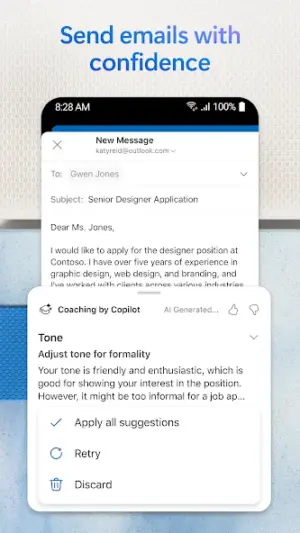
In an age where email communication is a cornerstone of productivity, Microsoft Outlook shines as a versatile tool designed to consolidate emails, calendars, and contacts all in one application. This well-established platform caters to users seeking efficiency in managing multiple accounts while providing an intuitive interface that bridges functionality and design.
Related in Productivity: Okta Verify · HP Print Service Plugin · Yandex Disk – Cloud Storage
| App Name | Microsoft Outlook |
|---|---|
| Version | Latest |
| Developer | Microsoft Corporation |
| Package Name | com.microsoft.office.outlook |
| Category | Productivity |
| Size | Varies with device |
| Downloads | N/A |
| Rating | 4.3 |
| Android Version | Varies |
| Updated | Jul 29, 2026 |
Overview
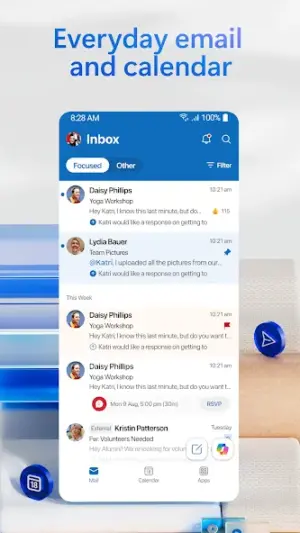
Microsoft Outlook's UI is characterized by its clean and organized layout, allowing users to navigate seamlessly through their email inboxes and schedules. The primary navigation bar remains prominently positioned, ensuring swift access to essential sections including Mail, Calendar, and Contacts. Such clarity in arrangement significantly reduces the learning curve for new users while enhancing efficiency for seasoned users.
The onboarding process is commendable; it offers streamlined setup instructions tailored for existing Microsoft account holders as well as newcomers. Users are greeted with helpful prompts and tooltips that effectively guide them through the features without overwhelming them with information.
Everyday usability stands out thanks to thoughtful design cues such as customizable folders and sorting options. Users can quickly adapt their workspace based on personal or professional needs—be it toggling between work and personal accounts or filtering specific messages for focused reading.
Accessibility takes precedence with adjustable font sizes and contrast settings that cater to various user preferences. The app’s universal architecture ensures it performs well across different Android devices, maintaining a consistent experience whether on a smartphone or tablet.
Moreover, feedback mechanisms like notifications help keep users informed about new messages or upcoming calendar events without disrupting their workflow, adding another layer of sophistication to its overall UX.
Who Is Microsoft Outlook For?
Microsoft Outlook is designed for anyone who requires efficient management of their communications and scheduling tasks—from busy professionals juggling various clients to students organizing school-related appointments. Its user-friendly interface also makes it approachable for those less tech-savvy who still require a robust solution for daily productivity needs.
Real-World Use Cases
- A project manager coordinating multiple team members can use shared calendars directly within Outlook to track project deadlines seamlessly.
- A small business owner might benefit from integrating client emails into one consolidated inbox while utilizing calendar invites for meetings.
- A college student can manage academic schedules alongside personal commitments using customizable reminders within the calendar feature.
- A frequent traveler relies on synchronized email management across devices while navigating scheduling changes on-the-go.
Features
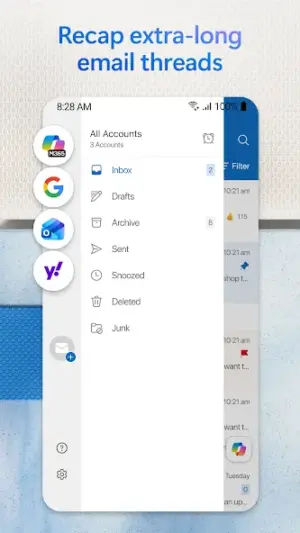
- Unified inbox for managing multiple email accounts effortlessly.
- Integrated Calendar view that helps schedule appointments with ease.
- Contact management tools that keep relevant profiles accessible at all times.
- Customizable folder organization provides a tailored experience.
- Push notifications alert users of new emails instantly.
- Search functionality that quickly filters through vast amounts of correspondence.
- Attachment previews enabling quick access to files without opening emails.
- The Focused Inbox feature prioritizes important messages, reducing clutter.
- Offline access allows for uninterrupted productivity regardless of connectivity.
- Easy syncing across all devices ensures the latest updates are always available.
Performance & Battery
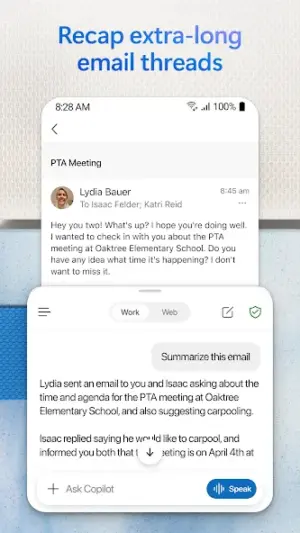
Microsoft Outlook demonstrates reliable performance across various Android devices thanks to its universal architecture. Users generally report smooth interactions when switching between sections such as Mail and Calendar, with minimal lag even under heavy usage scenarios like large email attachments or long threads.
Privacy & Permissions
While specific permissions were not listed within this review framework, it's advisable to be mindful about granting access sensitive information when installing productivity applications. Users should regularly check app permissions via their device settings—ensuring proper safeguards around personal data are adhered to during installation.
What’s New
While specific details regarding recent updates were not provided, ongoing enhancements typically focus on improving user experience and refining performance stability. It is reasonable to expect optimizations tailored towards better integration with other Microsoft services including Teams and OneDrive alongside security improvements relevant in today's digital landscape.
How to Install
- Open the Google Play Store on your Android device.
- In the search bar, type ‘Microsoft Outlook’ to locate the app.
- Select Microsoft Outlook from the search results.
- Tap ‘Install’ and wait for the app to download and install automatically.
- Open the app from your home screen once installation is complete.
- If prompted, sign in using your Microsoft account credentials or create a new one if necessary.
Pros
- Intuitive interface facilitates easy navigation.
- Effective multi-account management simplifies workflows.
- Robust search functionality enhances efficiency.
- Integration with other Microsoft products boosts productivity.
- User-friendly onboarding process reduces initial complexity.
Cons
- Occasional sync issues reported by some users.
- Features may feel overwhelming due to extensive customization options.
- Could benefit from lighter color themes for better accessibility in bright conditions.
Download Microsoft Outlook APK
Download Microsoft Outlook vLatest APK
Free · Safe · Verified APK download
Frequently Asked Questions
Is Microsoft Outlook free?
Yes, Microsoft Outlook is available for free download on the Google Play Store.
Can I use Outlook offline?
Yes, you can access previously downloaded emails and calendar events without an internet connection.
Does it support multiple email accounts?
'Yes', Outlook allows you to integrate several email accounts from different providers into one unified interface.
Is my data secure with Microsoft Outlook?
'Yes', Microsoft has extensive measures in place aimed at protecting user data privacy.
'What features does Focused Inbox provide?'
'Focused Inbox' intelligently sorts important mails from others based on your interaction patterns.
'How do I customize my appearance settings?'
'You can adjust font sizes and themes via the Settings menu accessible within the app.'
'Can I create tasks using this app?'
'Yes', you can create tasks linked with your calendar events directly within Outlook.
Final Thoughts
'Overall', Microsoft Outlook stands out due to its blend of functionality and thoughtful design catering effectively to varying user needs across both professional environments and personal contexts. Its continuous updates further indicate commitment towards refining UX aspects making it a go-to choice among productivity applications.
Related Apps
Disclaimer
'AndroidKnight' is not affiliated with Microsoft Corporation nor endorses any specific features or claims associated with this application. Users are encouraged to practice safe APK habits during installation.
All Versions of Microsoft Outlook
Frequently Asked Questions
Yes. Microsoft Outlook is scanned before publishing. Our pipeline verifies each file.
Download the APK, enable 'Install from Unknown Sources' in Settings > Security, then tap the file.
Latest version is Latest.
Requires Android 5.0+.
Yes, completely free.
APKs let you install apps not in your region, use specific versions, or install without Google Play.
Related News Articles


More from Microsoft Corporation


Microsoft Outlook Alternative
Apps similar to Microsoft Outlook that you may also like.


User Reviews
Compatibility Checker
Microsoft Outlook requires Android 5.0+ or higher. Select your device version to check.
Write a Review